I was having Wibiya toolbar sleeping in the basement of my non active plugins, and today I was taking a look to the plugins trying to remove some of unused or unimportant ones, then I say let’s check what Wibiya developers was doing since I stopped using their toolbar, I am sure you will be amazed while reading this and try the toolbar!
So, let me tell you why I personally like it as a social networking tool that keeps me on my blog more often and allows me to do some useful networking tasks, then I will hear from you…
3 reasons why bloggers removed Wibiya toolbar
I remember almost all bloggers (including me) removed the plugin from their WordPress blogs, and I think the main three reasons is:
- Because it was kind of slowing the blogs
- The look and feel (some people just don’t like it to be on a blog)
- No body is actually using it (this is what the stats says!)
So basically, it disappear from almost blogs that I know after a few months, then no body that I know have talked about it even once again!
And, after I visit Wibiya site yesterday, and I read about the new features, I decided to give another chance, I think we don’t have to take a final decision without giving another chance, and this is what I have discovered, but don’t take my words as it’s final, the word have to be a share between all of us, and let’s give it a try and see if we like it or not, and let me tell you about the most interesting things about it, of course you can add what interest you!
It’s more Faster and Lighter
I remember that bloggers who used to install Wibiya had to remove it to speed up their blogs, and I have made a very fast search to see what people say about Wibiya, why bloggers hate Wibaiya, and why they removed it! I couldn’t find a good answer, no body talks about this, so I thought it’s a good thing to share with you the new toolbar platform,
I actually can touch the new toolbar performance, it’s much better than before, and also loading more faster, for me this much better performance than the old plugin.
More features and Applications
Wibiya developers has added a new awesome collection of applications to help you to manage your social networking busy life, and they enhanced the other old features. I am testing the performance of it and enjoying the wonderful look and feel! But that doesn’t mean I will keep it for ever, so if our blog readers and visitors doesn’t use it we will have to remove it, I mean what for I will have something no body is using it?!
1- Latest posts
I like the latest posts with thumbnails, looks so good, and probably I will be able to remove the sidebar posts, this will give me more space to breath on the blog.
2- Real-time stat
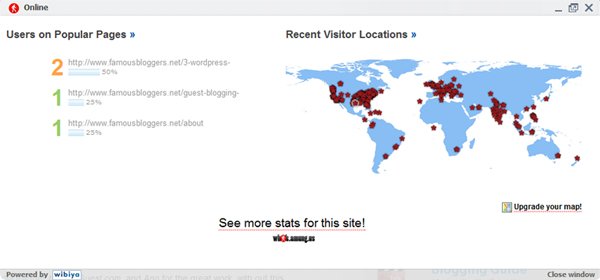
Another very cool thing is that I don’t have to add the script I was using on the footer before to indicate how many people on the blog, I like real-time stats, and I was suffering from scrolling all down the page to check it, now I have removed it and instead I will be checking who is visiting the site from the toolbar, and I also can get the stats on the page, I don’t have to jump to the Who’samung.us site unless I want to.
3- Twitter?
Of course, I am so active on twitter these days, and yeah!.. it’s cool feature, I can see the tweets of my favorite friends on the list I have created “Famous Bloggers on Twitter”, and also there an in option to see your tweets, and tweet… and more!
If you want to be listed on Famous Bloggers on Twitter list, follow us @FamousBloggers on twitter and engage!
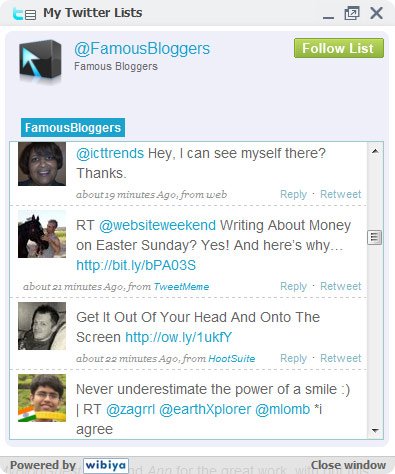
Yeah! Some funny and nice tweets above
4- Share buttons with nice effect
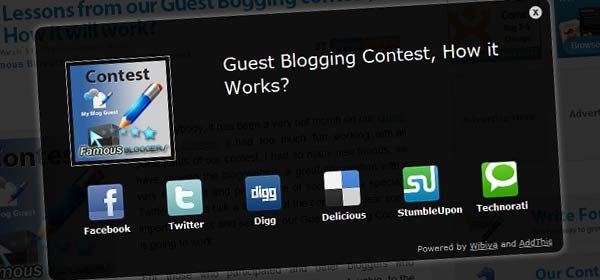
What a wonderful effect, I wanted that nice long time back but I don’t want to install more celebrity plugins than we already running on this blog, and now with only one plugin I can have lots of applications and features. Probably you notice that you can share the posts just by mouse over the thumbnail image of the post, then click on “Click Here To Share” and … do it!
And this is what you will get when you click on that share link…
5- Dashboard stats… Isn’t it Cool?!
Anyways, I won’t list all Wibiya’s new features here because my server won’t handle that
Also I didn’t mention the cool dashboard inside Wibiya which provide some useful information about your social networking and blog visitors and how they interact with the toolbar, so… it’s better if you check the dashboard from your account, and at the mean time just play a little with the toolbar and discover it by yourself, it’s down there
Tell me if you like, tell me if you don’t like it.. maybe I will remove it if you don’t like!


{ 59 comments… read them below or add one }
I’ve not been able to find how to install these toolbars until I found this post so thanks very much. It fits nicely with my site, and I hope it will boost social activity.
I’m impressed with the loading speed of all the tabs etc.
Durkin recently posted..U2 Officially Drop Out of Glastonbury Festival 2010
Hey Durkin, I visited your blog, and yes the toolbar looks awesome!
Thanks for your feedback
Thanks for having a look, and yeah it works well
this looks like an amazing plug-in and I would love to be updated as to how many people actually use the toolbar at the bottom now. And you are right that it does matter if it’s not quick because of the fact that Google is now measuring sites based on speed. I look forward to hearing how it works out for you and may be implementing it myself on my site.
.-= NEW from Brendan @ Online Marketing Consultant´s last blog ..Main Street Marketing Machines =-.
Nice post, Hesham. My story is similar to yours. Now Trafficke, my website, running on Wordpress, uses the new Wibiya toolbar platform as well, even though it is interfering with my live chat system. Good choice reactivating the plugin.
.-= NEW from Trafficke Website Optimization Consulting Firm´s last blog ..Choosing A WebHosting Company =-.
Good to hear that you are fine using the new Wibiya toolbar, as I said I am still testing it, and if my blog visitors don’t need it then that means I don’t need it
Thanks for the feedback, much appreciated!
I think the toolbar looks great on FamousBloggers. I would recommend adding the live chat widget. It’s clean, elegant, and easy to use. It even lets you broadcast video!
.-= NEW from Trafficke Website Optimization Consulting Firm´s last blog ..Choosing A WebHosting Company =-.
One thing makes me think twice before using the live chat is that I don’t have time for chatting with anyone
mmmm, let me think about it, maybe I will give it a try.. maybe others will like to chat together or leave me a message… let’s see
Even if you don’t have time for chatting, the live chat widget is really great for discussion between your readers. One idea I have is using the widget for a webinar.
.-= NEW from Trafficke Website Optimization Consulting Firm´s last blog ..Retweet Contest! =-.
I do not mind the Wibiya toolbar, but I really am not certain I want to add yet another plugin to my site. Possibly as I go through what I have, it might be nice. I will have to take it for a test run when I am comfortable. I still have quite a few design modifications and content moving to bring my site up to where I want.
.-= Nile Flores´s last blog ..Content Is King – Not Just A Fad =-.
That’s cool, I still like it.. but not 100% sure if I will keep it or not, I really want to remove some plugins from this blog, and this is why every week I work a little on it and try to enhance something in the design… I think it’s a continues process.. will never end!
i have really liked wibiya as this provides latest posts , twitter timeline as well as visitors stats but it loads very slow in blogspot platform . Already slow blogger wgets slower unlike wordpress which is like zap ! Nice customization , doesnt look like addon , integrades awesomely on your blog background
.-= Ajinkya´s last blog ..QwertyWEB gets Page Rank 4 =-.
Oh, I thought it will be faster on “Blogger”!
Yeah.. it’s integrating well on my blog, probably because the theme colors
Thank you so much for the feedback
Twitter: another_blogger
April 6, 2010 at 3:17 am
Already use it since I build my blog, I love the tool bar and exciting when I see someone online on my blog
Wibiya is great toolbar and its free!
.-= Latief@AnotherBlogger´s last blog ..Another Blogger Have Page Rank 3!! =-.
Yeah.. it’s very cool to see how many people is on your blog live
Thank you for the feed back Latief
Twitter: element321
April 5, 2010 at 5:07 pm
I just signed up and installed the plugin via the site and I cant get the tool bar to show up on the site. So I just deactivated it.
Probably you didn’t went to Appearance > Wibiya Configuration to enable or disable the Wibiya toolbar from your WordPress dashboard
Twitter: element321
April 5, 2010 at 5:52 pm
I bet thats it i will check
I am not sure buddy. I mean I am usually a fan of more simplistic web sites. I don’t usually like a lot of ads or some fancy scripts. So I am not sure. It’s totally up to you but I am not sure whether I would keep it.
.-= Julius Kuhn-Regnier´s last blog ..How to Become More Productive =-.
Thanks a lot for the feedback Julius
As I said, I am testing and trying it out, and at the end I will decided tweak it’s options or removed completely!
It don’t look bad at all, especially since it seems you can change the color to match your theme; this is important in a widget.
I definitely like the fact of replacing individual plugins all in one shot. This is one area I’m trying to clean on this new theme of mine. I have my new designer hard-coding some of the easier ones also.
.-= Dennis Edell @ Direct Sales Marketing´s last blog ..Comment Contest and Bonus Winners – March! =-.
It really looks great!
I wish I can remove more plugins as … plugin always hurt HTML & CSS validation!!
Nice anchor
I used the Wbya bar wehn it was in beta 6mnths ago.. I liked it.
But removed it because it wasn’t helping my site.
If you have a blog that you want a community on but not looking to make money with, then Wi bar is great
If you have a blog that you use to make money, the bar is a distracting and will leak alot of good traffic away from your blog.. never a good thing.
As far as how well it work, I never had any issues. worked great and loaded fast.. for the right blogger it is an AWESOME tool.
.-= John Paul@Make Money With A Blog´s last blog ..SEO Tips For Your Twitter and Facebook Page To Rank You Higher On Google =-.
Hey John,
Thanks for the excellent feedback, that was awesome! Actually I am not selling anything yet, and if it Affect traffic badly I will remove it for sure!
Hesham your welcome. It is a great tool for the right blogger.
Many features and it looks good. I like that you can post any message in the Notification box.. nice lil feature.
But for the blogger that wants to keep their traffic and be greedy, then this isn’t the tool for them lol Im greedy, I don’t mind sharing traffic with the right bloggers
Oh and Congrats on your PR jump… feels good right? lol
.-= John Paul@Make Money With A Blog´s last blog ..SEO Tips For Your Twitter and Facebook Page To Rank You Higher On Google =-.
lol! yeap.. that’s sounds logic!
oh! the PageRank was so funny lol! this blog stay they way it was… but the crazy thing was the jump on my new sites and blogs… it’s now the time for driving traffic to those sites!
But it doesn’t “leak traffic” to other sources. Everything on there is YOU anyway.
.-= Dennis Edell @ Direct Sales Marketing´s last blog ..Comment Contest and Bonus Winners – March! =-.
I understand that John talk about spotting your traffic and direct visitors to go to specific corners on your blog!
Trust me people will not use the facebook app and twitter app and flickr to stay in. They may clik it and they will go to facebook or twitter or even the flickr.
Traffic lost.
The rest is pretty good with keeping people in your blog.. I do like the chat, but to offer chat, you may lose comments.. so how do you chose.
If want to build community on your blog do it thru your comments, that best way to keep them coming back.
If you want to build fan page then do it on facebook, same with twitter build the communities there and drive the traffic back to your blog.
.-= John Paul Aguiar´s last blog ..SEO Tips For Your Twitter and Facebook Page To Rank You Higher On Google =-.
I stopped using our Facebook fan page since a while when we was having 300 fans!
The weired thing is that the page still attracting a few more people every week and doubled the number of fans to 600+, and some of them start to share their blogs and links…
I am not sure if I will keep using it if I am going to concentrate more on Twitter at them means time till I start our newsletter
Congrats on the PR jump on your other sites..
Yea I look at Wi bar like this.
You build a fan page a twitter page and a flickr account all to get in front of new people and drive them back to your blog.. right?
Then once they are on your blog, why woudl you want to offer them a BIG way to go back to your twitter page and fan page? lol
The blog is the be all end all for all your traffic once they are here JOB DONE! lol
Then you can get comments, share tips, make money etc…
It’s hard enough to get them to our blogs, so once you do, don’t push them away .. and after 3 mnths that what I was doing with the WiBar.
.-= John Paul@How To Make Money With A Blog´s last blog ..SEO Tips For Your Twitter and Facebook Page To Rank You Higher On Google =-.
Interesting tips John, you made this post awesome!
By the way, why don’t you get an avatar from gravatar.com?
I think people will like to see your nice avatar image
Hesham I’m glad I could help.. had some good experience with WiBar, so I thought I could help.
I do have a avatar with gravatar.com, I was wondering why it wasn’t showing up.
.-= John Paul@Make Money With A Blog´s last blog ..SEO Tips For Your Twitter and Facebook Page To Rank You Higher On Google =-.
Well… Maybe it’s not safe for our under age readers lol!
lol yea I wish I was that exciting lol
.-= John Paul@Make Money With A Blog´s last blog ..SEO Tips For Your Twitter and Facebook Page To Rank You Higher On Google =-.
I have Never heard of this before, I will give it a trial on my new blog.
Thanks for the great info.
.-= Onibalusi Bamidele´s last blog ..You have to read this =-.
No problem
I think i would one of the first few bloggers to review wibiya. I liked it a lot at first, but it was slowing my blog speed and hence putting off my readers.
After reading your post, i installed it again, but deleted it once i saw a lot of negative comments coming from my readers
.-= Gautam Hans @ Blog Godown´s last blog ..Additional SEO Tips to Gain More Organic Traffic =-.
I thought it’s a good time for you as you are running a content and need all the social media power for promotion!!!
I am going to keep it for some more time to be sure if I delete I will never come go back to it
If you receive lots of negative comments, just write a post like this one explaining what it’s all about.
Most negativity comes from ignorance; not knowing what something provides and not understanding it.
.-= Dennis Edell @ Direct Sales Marketing´s last blog ..Comment Contest and Bonus Winners – March! =-.
I agree!
I have checked Gautam ‘s blog and I sow the Toolbar when it was active, then it was removed, but I did’t see any negative comments!
Maybe a few guys contact him by email?!!
Twitter: BlazingMinds
April 5, 2010 at 6:36 am
I love the Wibiya toolbar, been using it for ages on Blazing Minds and as you say with the updated version it is much, much better than it used to be, I also noticed that it helps reduce the bounce rate of my blog
.-= Karen @ Blazing Minds´s last blog ..Why adding videos to your post for effect is GOOD =-.
Yeah! I remember the times almost all of us was using it!
By the way, I am trying to reduce my blog bounce rate as well… you have got the point
I have never heard of this plugin! It seems like this plugin does almost everything. I could probably replace 5 plugins with Wibiya, I need to look into this! Thanks for the update on it.
.-= Patrick Toerner @Young Entrepreneur´s last blog ..Single Greatest Tip For Success Online =-.
This is a good point, probably replacing plugins with the new Wibiya can increase your blog speed!
You can give it a try Patrick then decided!
Twitter: jkohlbach
April 5, 2010 at 2:09 am
I kind of like it, I’m starting to see it pop up every now and again on sites.
Looks to me like they’re taking a leaf out of the meebo website bar (mashable use that one).
Have the stats on interaction with the toolbar improved since you’ve installed it?
.-= Josh Kohlbach´s last blog ..StumbleUpon: My Stumble Your Own Stuff Experiment =-.
Hey Josh,
I can see some nice stats about almost everything, I got more twitter follower, 5 RSS subscribers, a few guys shared content through the social network and bookmark sites, etc., so.. I am actually started to like it more…
One thing I would like to tell… I am imagining if I didn’t publish about it! probably I will not get same results! just a thought.
Twitter: jkohlbach
April 5, 2010 at 2:48 am
Haha, that’s always a risk of talking about it I guess. You just never know how much that skews the stats!
I’ve been conducting a few experiments in secret because of this very fact!
Anyway, very nice post, I’ll be looking into a few of these website bars. My site could use the boost in interactivity.
.-= Josh Kohlbach´s last blog ..StumbleUpon: My Stumble Your Own Stuff Experiment =-.
Indeed
Anyways, the good thing.. Wibiya more faster and the performance is acceptable!
Thanks for stepping by
Twitter: dragonblogger
April 4, 2010 at 4:41 pm
The toolbar doesn’t look too bad and it actually helps with the link to facebook fanpage and twitter. I didn’t really notice any pageload performance issues either. I might consider it for my own blog, but in general I haven’t been a fan of toolbars previously.
.-= Dragon Blogger´s last blog ..Dragon Blogger Review of Surrogates =-.
Actually no one like to load his blog with tones of stuff unless it’s useful, so in the mean time I will e checking the respond and the use of the toolbar, or then I will remove it!
Thanks for the feedback Justin , I appreciate your visit!
Twitter: HotBlogTips
April 4, 2010 at 3:52 pm
I prefer a cleaner design and it seems to be a trend among other bloggers too but I have to admit the new Wibiya toolbar sounds like a nice option. I’ll look into it.
.-= Brian D. Hawkins@List Of My Blogging Friends´s last blog ..Are You A Blogging Friend To The Extreme Ezine? Get On The List! =-.
You can reduce the amount of applications, just run the ones you think will work for you, and I think guys like us like to try the new stuff.. then we can make up our minds..
Thanks Brian for the feedback!
The app that shows the stats around the world is really cool. Also I really like the Twitter app. Funny thing is I never saw, heard of, or used Wibiya before but I do like what I see. Good stuff!
.-= Gerald Weber´s last blog ..Blog Commenting Faux Pas, Red Flags, and Best Practices =-.
It looks cool on your blog Gerald
I am just thinking to remove the “Click here to share” from the thumbnails images, it could annoy someone … but I will leave it for a while to see what my friends say about it!
You have now convinced me that I should revisit this. I used it on my Blogger blog, when a I changed over to WordPress…I wasn’t feeling it because I didn’t see any benefit of using it when I was using Blogger.
Thanks for opening my eyes to the awesome features!
.-= Evelyn @ Healthy Living´s last blog ..Control The Fork Health Show =-.
Hey Evelyn,
Glad you like it, it looks pretty cool actually.. and hopefully this will increase the use of social networking on our blogs
Twitter: websiteweekend
April 4, 2010 at 12:11 pm
I remember when this toolbar was really active, then, as you say, it went away.
Then, I never talked to anyone personally that was using it, so I’ll have to check it out now.
Happy Easter!
.-= Dave Doolin´s last blog ..Writing About Money on Easter Sunday? Yes! And here’s why… =-.
Hey Dave,
Yeah.. I think everybody removed it after a while, I think this also happened before people realize social media power!
I am going to give it a try here as well
Happy Easter
{ 5 trackbacks }