Check out ThesisAwesome.com and get $20 OFF Product Skin Thesis Skins
How To Use Twimbow To Effectively Engage Your Blog Readers

How To Use Twimbow To Effectively Engage Your Blog Readers

by on November 9, 2011 · 23 comments

The most valuable asset of your blog are your readers, no doubt about it. Having a faithful group of readers is essential in order to make you a well respected and influential blogger. It’s not enough, of course, but it plays a fundamental role. The more you can engage your readership, the more your readers can start to perceive you as way more than a blogger, but rather an online friend they can trust.

In order to achieve this goal more effectively, social media comes into help. When I started blogging, back in 2005, the only way to engage your blog readers was through the comment section of your blog. Everything happened there and it was an easier task since you needed to focus on one “place” only. Now your blog post can be shared to different social networks and the conversation around your blog post can take place  far from your blog.

Twitter is, in my opinion, the place where your blog posts can hit more potential readers in a very little amount of time and can be shared with thousands of people at the speed of light. Keeping track of what’s going on around your posts is a strategical task you must pay attention to and using the right tools is very important.
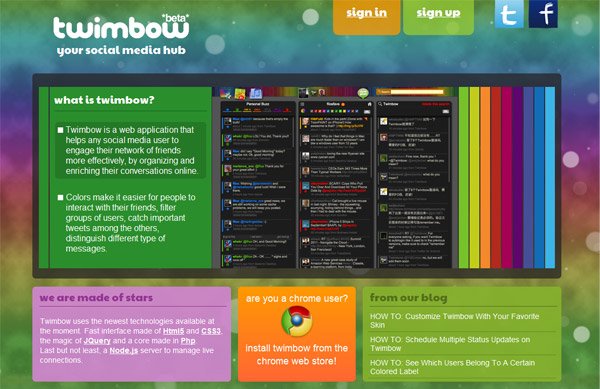
Twimbow

Today I want to share with you how I am using Twimbow to keep track of the Twitter conversations around my blog posts and quickly engage more people who can, potentially, become new, faithful and (why not) enthusiastic readers of my blog.

Twimbow Monitor

Twimbow lets you add keywords and tags to the monitor, a dashboard where you can keep track of what’s going on about stuff you care the most. What are the most important keywords you should add to the monitor?

  • your blog’s name
  • your blog’s URL
  • the headline of any of your blog posts
After you added the above items to the monitor, when new occurrences will be available, you will get a visual and audio notification. This way, you can quickly see who is sharing your blog post and, if you want, you can start a conversation with them (try to do your best to make it relevant for the reader). Asking for a feedback or an opinion about a certain part of your post lets you make sure that the user is not simply sharing your post but he/she actually reads it.

Labelling

Who did share your blog posts? Who is retweeting them?

On Twimbow, you can create a new colored Gmail-like label specifically for your blog readers. When you see new users sharing your posts or discussing  it with other users, make sure to assign a label to them. This way, you will be able to engage them in the future and make sure they come across your latest blog post, in case they missed it. Moreover, if you use Twimbow as your main social media dashboard, you can quickly spot them (thanks to colors) among the other users you are following.

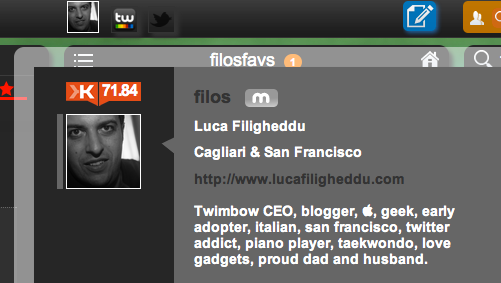
Bonus tip: try to figure out which of the users above are the most influential (for example, you can do that through the Twimbow’s Profile Browser, that shows users’ Klout scores) and use a different label for them.

Ask for a retweet

I did this a lot of times. When you see there are certain users who are particularly influential and  shared your content in the past (for example, those labelled as in the last paragaph above), send them a DM and ask for a retweet of your blog post. If you engaged them in the past properly, I can assure you they will be willing to share your posts again (upon request) and again.

Bonus: Keyword Search / Niche Blogs

Do you blog about cars? Make sure to insert all the relevant keywords around cars in the Twimbow Monitor. It’s not easy, since you risk coming across tweets that are not relevant for you, but you can start with a few attempts and try to fine tune them over time.

In addition, if you know other blogs in your niche, make sure to add their urls to the monitor as well. This could be a great way to “intercept” their readers and start a conversation with them in order to make them aware of your blog and, hopefully, turn them into new readers.
Twimbow

Check out → Twimbow

If you have more tips on engaging your blog readers, please let me know. I am also willing to discover more tools that could be useful in order to achieve this goal, so please feel free to leave your recommendations in the blog section. Feel free to engage me on Twitter, too, I am @filos ;-)

Article by Luca Filigheddu

Twimbow CEO, blogger, geek, early adopter, italian, san francisco, twitter addict, piano player, taekwondo, love gadgets, proud dad and husband. Ping me on Twitter anytime.

Write for us a guest post

{ 23 comments… read them below or add one }

rahul
Twitter:
January 24, 2012 at 4:00 am

Twimbow is a great twitter app to increase your engagement on twitter by labeling your twitter follower, awesome concept job well done by Luca.
Thanks
rahul recently posted..Email Marketing: So Easy Your Dog Can Do It!My Profile

Reply

Sheila January 10, 2012 at 7:52 pm

That’s surprising because it looks really helpful, as I’ve never seen a suite that seems so intelligently built for engaging readers through Twitter.Thanks very much for sharing..

Reply

samrat kafle from Blogging Talks December 7, 2011 at 12:50 pm

Hmm i also have heard lots of benefits of Twimbow i need to use it again thanks for the real info about Twimbow
samrat kafle recently posted..Twitter tools & strategy that really worksMy Profile

Reply

Kal November 15, 2011 at 2:44 am

This is definitely something new for me and for sure I am going to try it now. Just a guess, but I think it will work very well for every active blogger.

Reply

Jane from iOS Twitter features
Twitter:
November 13, 2011 at 8:50 am

Tracking and keeping record of the people who share a particular blog on twitter, for that matter any social network site, is very necessary to the growth of it. Twimbow seems to reduce this burden and helps to engage the blog readers effectively. Useful post.
Jane recently posted..Extra Plugin For Targeted Ad Placements [Free GiveAway]My Profile

Reply

Steve
Twitter:
November 10, 2011 at 3:10 pm

I have been using Tweetmeme for a while and I like that service. But I must say this looks pretty interesting. I love the color coding. I think that can really be helpful for finding just the right posts.
Steve recently posted..Build My Rank Review – THE Best Way to Get Backlinks?My Profile

Reply

keith November 10, 2011 at 12:03 pm

Thanks for the introduction to Twimbow, I had never heard of it. Although i’ve been running a blog for a year and have a decent amount of twitter followers, I don’t have a lot of comments or discussion after my posts. The niche is a bit dry to speak of but I didn’t expect it to be this dry. Maybe Twimbow can help.

Reply

Dipendra
Twitter:
November 10, 2011 at 8:37 am

When I first started blogging, I ignored the fact that I need a twitter account and I repented. Now I know value of twitter followers of my blog, so I would not ignore twimbow this time.
Dipendra recently posted..GiveAway: Huge Dofollow Blog list with High Page Rank and Instant CommentingMy Profile

Reply

Jeanie from Facebook Templates November 10, 2011 at 7:42 am

To be honest, I’m not a Twitter fan. Actually I have an account on it, but Ii can’t say that it can bring me many benefits and privileges. it seems to me that Facebook and LinkedIn can be more helpful for me
Jeanie recently posted..Free TV Channel Video Facebook TemplateMy Profile

Reply

kay November 10, 2011 at 7:17 am

That’s surprising because it looks really helpful, as I’ve never seen a suite that seems so intelligently built for engaging readers through Twitter..Looking forward more post!

Reply

Sunny November 10, 2011 at 6:29 am

Thanks for sharing Twimbow monitor , I have registered there and attached my twitter account with it too. Nice n colourful website , I really Liked it.

Reply

Devesh from Marketing Tips
Twitter:
November 10, 2011 at 12:22 am

Hey Luca,

Never heard about the Twimbow, before. Gonna try it, very soon.

Thanks for sharing ;) .
Devesh recently posted..Why Social Media Can Ruin a Company ReputationMy Profile

Reply

doug_eike
Twitter:
November 9, 2011 at 10:58 pm

Does anyone really read Twitter? I know I don’t. When I started blogging, I grew my Twitter contacts and tweeted a lot with the mistaken notion that it would attract visitors to my blog. I put a lot of work into it, and my effort generated nearly nothing in terms of additional traffic. My feeling is that Twitter posting has become so automated, and the site has become so saturated with impersonal posts, that its effectiveness has been watered down to the point of making it nearly worthless as a tool for growing a blog or website. Twimbow sounds great, but unless someone reads Twitter, there’s not much point. At any rate, your article is interesting, and I thank you for the tip.
doug_eike recently posted..The Words On The MountainMy Profile

Reply

Luca Filigheddu November 10, 2011 at 4:09 am

Honestly, I don’t think you are using Twitter in the proper way. You should invest time in building your network, taking into account that conversion rates on Twitter are very high. It is definitely worth it!

Reply

David Walker from Make Money Online November 9, 2011 at 3:29 pm

Wow, I’ve never even heard of Twimbow… at all! That’s surprising because it looks really helpful, as I’ve never seen a suite that seems so intelligently built for engaging readers through Twitter. Labels and tags is much easier than using Google Alerts that you’d have to set up for every single post. Very good post, checking out Twimbow now :) ~David Walker
David Walker recently posted..Why I Thought About You All WeekendMy Profile

Reply

bbrian017
Twitter:
November 9, 2011 at 1:35 pm

Hi Luca, personally I think anything that can help us get more done with less time is a great idea. I’m always trying to get so much done in one day for blog engage but sometimes it’s just impossible. Having the ability to focus my energy into one program would be ideal for getting the most out of ones day. I love the idea of tracking specific keywords with regards to our blog; it seems like an amazing way to keep updated on what’s most important to you.
bbrian017 recently posted..#engaged @blogengage is our new trend for #blogengageMy Profile

Reply

Luca Filigheddu November 10, 2011 at 4:08 am

thanks, looking forward to your feedback!

Reply

Josh November 9, 2011 at 11:17 am

I use marketmesuite for a lot of the same tasks but don’t like having to open a separate program on my desktop. I’ll check it out, thanks. :)
Josh recently posted..The Definitive Guide to Developing Your Social Media Strategy – Part 2: Building a Powerhouse SMM StrategyMy Profile

Reply

luca filigheddu November 18, 2011 at 11:16 am

Wonderful, looking forward to your comments :-)
luca filigheddu recently posted..How To Create A Strong Internet PasswordMy Profile

Reply

Tushar Agarwal
Twitter:
November 9, 2011 at 9:55 am

heard of this for the first time, looks a very colorful and lovely product to us, will get my hands on this very soon
Tushar Agarwal recently posted..6 Point Check List to Check If You Can Become a BloggerMy Profile

Reply

Luca Filigheddu November 9, 2011 at 10:19 am

wonderful, looking forward to it. Feel free to drop me a tweet anytime.

Reply

Ryan Biddulph
Twitter:
November 9, 2011 at 9:34 am

Totally new to Twimbow Luca, thanks for sharing with us :)

RB
Ryan Biddulph recently posted..How You Can Prosper as a Cash Gifting SponsorMy Profile

Reply

Luca Filigheddu November 9, 2011 at 10:19 am

great, spread the word then :-)

Reply

Leave a Comment

  Twitter (ID only. No links or "@" symbols)

CommentLuv badge

This blog uses premium CommentLuv which allows you to put your keywords with your name if you have had 3 approved comments. Use your real name and then @ your keywords (maximum of 3)
Web Analytics