How To Blog and Start a Business

Free Skin and Boxes for the Love of Thesis 2.0

Thesis 2.0 Boxes and Skins

Many great WordPress sites has been built on it -and of course some ugly sites too- But still Thesis Theme is one of my top framework for WordPress. After a second look to Thesis version 2.0 that was released last week, I am sharing a few thoughts that will probably got your interest. Plus, I will tell you about the top features that I love in it.

I wrote my review of Thesis 2.0 on the same day it was launched, it took me the whole night to go through its features and prepare my review, I gave it a good rating, but didn’t rate it as “excellent” because of some minor bugs and lack of documentation.

Two days latter, I could actually design a new Skin for Thesis 2.0, even though… no documentation was found, absolutely 0% documentation was released that time!

And guess what?

I actually didn’t code anything in that Skin! Not even a single line of code, thanks to the Skin Builder, Thesis did all the coding by itself!

I realized now that I should shift my Thesis 2.0 rating to excellent! Why?

Simply, because it’s a revolutionary theme framework for WordPress.

Free Boxes for Thesis 2.0

Boxes, probably are the most thing that makes Thesis Theme different than other WordPress themes in the market. Boxes is something similar to plugins or modules, it’s where you should place PHP code so you can do miracles!

The whole thing started when I was practicing and designing a new Skin, and I needed to add a few functions, so I didn’t include them in the Skin files (I mean why should I?) The Boxes gives way more flexibility because it allows you to display your output anywhere using the Skin Editor with a simple drag and drop.  Easy Beasy!

So, I made the stuff you are about to get now in almost no time – in less than a week! So, I am giving these Boxes and Skin to check them out, test them out, and - you you would like- use them on your site.

Author Info Box
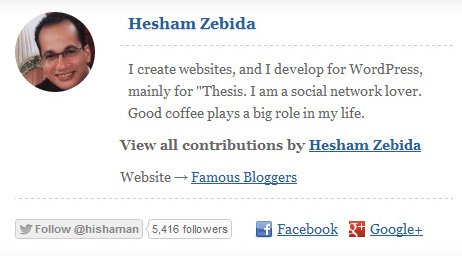
Author Info Box for Thesis 2.0

Add a new box to Thesis 2.0, display an Author Info box at the end of every single post, or use the visual editor to display in containers. This box display author name, author image from Gravatar.com based on the email he/she have registered with to your WordPress site, Twitter follow me button, Facebook profile link Google+ profile link, and it also adds new custom fields to the user profile.

Check out the Author Info Box →

Sliding Opti-in Form Box
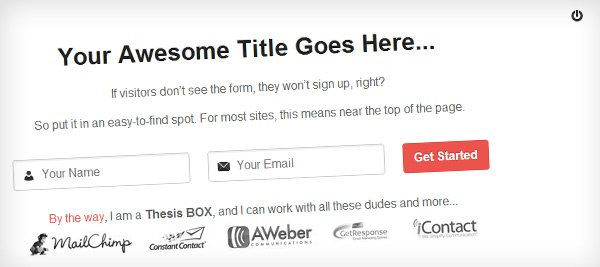
Sliding Opt-in Form Box for Thesis 2.0

A very simple but powerful opt-in form that will catch every one who visits your site, easy to use and customize, and it works with any HTML form code, this means it works with any email autoresponder service. Here is  a demo site where you can a live example.

Check out the Sliding Opti-in Form Box →

Parallax Content Slider Box

Parallax Content Slider Box for Thesis 2.0

A simple parallax content slider with different animations for each slider element and a background parallax effect.

This Thesis Box was made upon the design of Manoella Ilic (you can see the simple JQuery and CSS version here) And it was written upon the code of the Category Posts Slider Box by Matt Hodder.

Check out the Prallax Content Slider Box →

Legendary, a Free Skin for Thesis 2.0

A simple skin that was built for the joy of Thesis 2.0, I call it Legendary because it was the first skin to be released for the new version of Thesis Theme. Here is a link to its Demo.
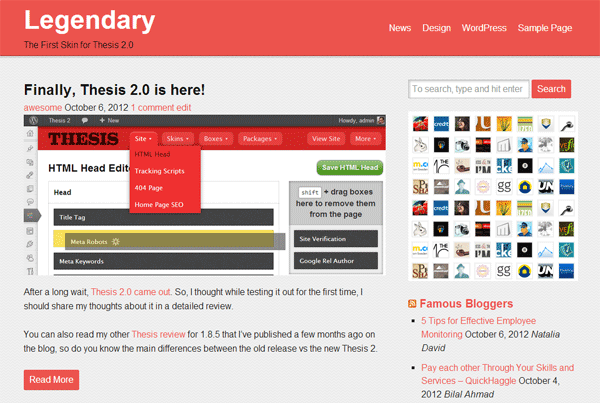
Legendary Skin for Thesis 2.0

Check out the Awesome Skins and Boxes for Thesis →

Have you started playing with Thesis 2.0?

Have you made cool and free stuff that you can share with us?

Share your experience and impression so far!

Don’t have Thesis yet? Get it Now!

I create websites, and I develop Thesis Skins. I am a social network lover. I am also the night creature who works hard to keep this project up. Owner and founder of the Famous Blog.

Website → Personal Blog

GET FREE EMAIL UPDATES

Get our latest articles delivered to your email inbox, plus download our FREE 15 minutes later marketing guide.

We respect your privacy!

{ 48 comments… add one }

  • Chris April 4, 2013 at 3:44 am

    I have a blog on Thesis 1.8.4 and really love it. Just to try out something new, I started a new blog on Woo’s Canvas Theme. But I really can’ t wait to start my next blog on Thesis 2.0!

    Reply edit
  • Scott January 11, 2013 at 12:16 am

    Great skin Hesham! I just had a question about the Optin Sliding Box. Where exactly would I enter my Aweber information in the ” Optin Form HTML” template box and exactly what info from Aweber is needed to send people to my list? Is it just the list name that is needed? Any info would be greatly appreciated.
    Thanks

    Reply edit
    • Hesham Zebida January 12, 2013 at 4:43 pm

      Hi Scott, It’s all in the Box options, you just need to head to the BlogSkin Editor, find the Optin Slider Box, and click on the gear image to show options.

      You need to add the form HTML code provided to you by Aweber, maybe it will need a little cleaning to display right (for example, remove any divs and classes from the HTML code).

      Reply edit
    • Fillipo March 15, 2013 at 2:11 pm

      I also have the same doubt. How to use the code from Aweber or Benchmark Email, I tried everything, but the form loses its original format. Can you detail it a little bit more?

      Regards,

      Fillipo

      Reply edit
      • Hesham Zebida March 15, 2013 at 3:29 pm

        Hi Fillipo,

        To clear up the HTML code you’ve got from your autoresponder, make sure it has no divs, classes, or line breaks..etc. Keep only the form open/close and input fields.

        P.S. also you can inspect the code of the demo site, see how it looks like as it.

        I hope this helps.

        Reply edit
  • sid January 8, 2013 at 11:38 pm

    Hi hesham, but I can’t see my posts after activating the skin. Is there anything to do after activation?

    Reply edit
  • Kendy Nguyen January 6, 2013 at 1:03 am

    Hesham! I couldn’t find where to download the Parallax Content Slider Box. Any ideas?
    Thanks.

    Reply edit
  • Jasijou December 31, 2012 at 11:20 am

    I’m having an issue with the Parallex Slider with the title not wrapping in the slider. How do I fix that? Can I set it to use the Thesis title? Also for the Opt-in box what service do you recommend if If I just want to use the box to have readers subscribe to my box? I don’t know how to customize it to feed to my Feedburner or if that is even possible.

    Reply edit
    • Hesham Zebida December 31, 2012 at 4:02 pm

      The slider is designed to work in full page width or at least take the full width of content. Rather than that, you need some CSS skills to customize it to fit your needs.

      You can use any email service with the Slider Optin Box. Yes, you can use FeedBurner, it’s not bad idea to test it out.

      Reply edit
  • saad naeem December 27, 2012 at 12:51 am

    hey hisham does these skins work only in your skins or i can put them on kolakube thesis 2.0 skins as well?

    would be great if i can use these.
    saad naeem recently posted..Basic Methods To Improve Google Author RankMy Profile

    Reply edit
  • Jasijb December 21, 2012 at 4:01 pm

    Hey so I downloaded the slider box and I can’t figure out how to customize the slider. Anyway to change the background?

    Reply edit
  • Anand November 28, 2012 at 5:28 am

    I tried to download and install legendary skin in thesis 2.0.2 but i get error that skin.php is missing can u tell me how to fix it….Thanx

    Reply edit
  • mrhoai November 25, 2012 at 7:07 am

    The skin is so great, thank Hesham hope I will use it in the future.

    Reply edit
  • Thach Pham November 4, 2012 at 2:23 pm

    Great collection for DIYThemes customers.
    I installed Legendary child theme on my Thesis 2 and it worked very well. It gives me more inspiration to customize Thesis 2 (color, header, footer, .. ect ..).
    But I don’t understand why Thesis 2 no documentation? This is a huge error when launching Thesis 2, the customers is very hard to use and customize it.

    Reply edit
  • Karen Daniels October 29, 2012 at 10:36 pm

    I wanted to try out the legendary skin – thanks for doing it – but it can’t install – says can’t find php file?

    Reply edit
  • Puneet Sahalot October 25, 2012 at 4:44 am

    Thanks for sharing this nice stuff.
    Your Author Info Box was a real help for me when building a 2.0 Skin. I have pre-packaged it with my Skin and customized the look and feel as per my requirements.
    And not to mention, a due credit note has been included :)
    Puneet Sahalot recently posted..Thesis Eleven40 : A responsive Thesis 2.0 skinMy Profile

    Reply edit
  • Rick Rottman October 21, 2012 at 7:30 am

    If Thesis 2 is so excellent, why aren’t you running it here on Famous Bloggers? Looks like you’re still running Thesis 1.85, the version without the bugs and with all the great documentation. It should be pretty easy to make the switch considering that it’s so excellent and whatnot, especially since you don’t have to write any code to make it happen.

    Reply edit
    • Hesham Zebida October 21, 2012 at 10:26 am

      First of all, I am still testing Thesis 2.0, and I recommend that everyone test it first on a test site before making a decision to move.

      The second thing is, at this point I prefer to invest my time building and designing Skins for ThesisAwesome.com, I have no time to implement this on FamousBloggers.net, at least not yet.

      Another thing is, FamousBloggers.net has a very advanced setup, so it’s not that easy to move all the code it already has to work with any another Theme (not only Thesis). But I will do the move once I get a chance.

      I hope this makes sense.

      Reply edit
  • Dave October 20, 2012 at 6:03 pm

    C’mon Hesham, not one single line of code to produce that skin?
    There’s a ton of additional css in there.

    What rating you choose to give it is your own opinion, but misleading people into thinking that your skin is something they could also achieve without knowing or using any css is just really poor.

    And the fact they may well use your affiliate link to purchase Thesis 2.0 because of what you have told them is wrong.

    Reply edit
    • Hesham Zebida October 20, 2012 at 8:17 pm

      Dave, when my pro Skin comes out, I will proof to you and everybody that they don’t need to code anything to run their blogs.

      FYI. CSS is not really coding, most people misunderstand that.

      I don’t understand why this is hard for some people to get! What makes a Skin a Skin is that you install it, and it gives your site the layout, design and maybe some extra features, so the idea here is “You don’t have to code anything by yourself” unless you want, so if you want then go learn how to code.

      Another thing to pay attention to, is I don’t sell a few lines of code, I sell mostly my support and time, this is what members of my site gets, and that’s why they don’t need to code, because simply I help them out!

      Reply edit
      • Dave October 21, 2012 at 4:37 am

        So for the benefit of those who do not understand what coding ‘really’ is, what’s your definition of coding? You say in your intro you developed this skin without writing one single line of ‘code’. What code are you referring to?

        If I understand correctly, what you are ‘now’ saying is that I don’t have to write any code because I can use a skin which you have already designed and written the code for. If that’s the case you need to make that clear, because that’s not what’s implied in your article.

        Reply edit
        • Hesham Zebida October 21, 2012 at 10:44 am

          Ok, let me try to explain again.

          Thesis 2.0 comes with two Skins, the Classic Skins, and a Blank Skin (that basically gives you a white page) that you can use them to build your own.

          The fact that Thesis 2.0 has a Free Skin included (The Classic Skin) makes it easy to run a blog, because once you install it you are ready to go.

          Now, The theme has an excellent drag and drop “Skin Editor”, all what you have to do is drag elements and drop them where you want them to show on your site. Thesis then will write the code for you (so you don’t have to write it by your own).

          Also, all the CSS elements can be implemented/edited via a visual editor, the CSS editor, which simply has forms for almost everything you need, all what you have to do is to choose which element you want to change, then choose how you want to style it. Again, Thesis will write the CSS code for you and even save it in a file, your blog will then server its CSS styles from that file.

          That’s exactly what I did when I designed the Legendary Skin, I dragged elements to build the layout of every page, then I set padding, margins, colors, background colors…etc. for every element without having to write those styles by myself. And, when I am done, Thesis exported a few files that has all the code. So, I decided to give it as a Free Skin for everyone to play with and see how it was made!

          I hope this explains what Thesis 2.0 is about in a better way.

          Reply edit
          • Dave October 22, 2012 at 6:56 am

            Hmm, that’s interesting.

            So what you’re saying is, all the ‘Additional CSS’ which is included in your skin was ‘dragged’ into the ‘additional css’ box and Thesis wrote the code? You didn’t have to enter anything for stuff like transitions, you just dragged it into additional css?

            If I use the visual editor do I need to have an understanding of what classes and selectors are?

            In its current form would you recommend people transfer their current site to 2.0?

            In it’s current form would you recommend 2.0 to everyone, irrespective of ability?

            In your reply to Rick you pointed out that you were still testing 2.0, if that’s the case is it not premature to be giving it a 5 star rating if you haven’t thoroughly tested it?

            Reply edit
  • Craig Grella October 17, 2012 at 9:32 pm

    cool boxes, thanks. I’ve created a few boxes and it’s a cool process. the only thing I can’t figure out yet is how to create my own packages. Any idea on that one?
    Craig Grella recently posted..Thesis 2.0 Box for the Revolution SliderMy Profile

    Reply edit
  • rahul October 12, 2012 at 9:01 am

    You are developer so making skins and boxes is easy for you. But to be honest i am disappointed with the Thesis 2.0. In sales letter they told it is drag and drop theme but in reality a newbie and a person who lack knowledge technical area are not able to use it freely and make changes in theme according to his/her needs.

    Can you bring your opinion about the drag and drop feature of the thesis 2.0 and how newbie can use this feature for their benefits.

    Rahul

    Reply edit
  • Peter October 12, 2012 at 12:25 am

    Hi Hesham,

    What a great review, thanks for all of your insight!

    As I was looking through, I didn’t see any information about thesis being responsive. Would you happen to know if it is?

    Reply edit
    • Hesham Zebida October 12, 2012 at 12:59 am

      Thesis itself isn’t responsive, what I know is they will release a free starter responsive Skin in its package.

      Reply edit
      • Peter October 12, 2012 at 12:42 pm

        Thanks Hesham for the quick reply. I’d like to ask for your advice on something since you’re such an expert web developer.

        I need to build a website, that is medium size (between 500 – 1000 pages) with an ecommerce store. I know that I want to use the WooCommerce plugin for sure and that I need the website to be responsive. Which one of these options would you recommend using to build my site?

        1) Thesis 2.0
        2) Genesis framework
        3) Woothemes Canvas 5
        4) Is there anything better than these options?

        Thanks so much for your time, your community here really benefits a lot from your expertise :-)

        Reply edit
  • Aditya October 11, 2012 at 4:02 am

    Hi Hesham,
    Thesis is surely a great theme i guess.Have read reviews about it on other blogs too.And they all are positive ones.Haven’t though yet if i will use it or not.

    Reply edit
  • Ben Troy October 10, 2012 at 8:21 am

    I wish these great plugin can be used for previous thesic framework

    Reply edit
    • Hesham Zebida October 10, 2012 at 1:41 pm

      Hi Ben, sorry that is not possible as it was made for Thesis 2.

      But I am working on some for Thesis 1.x that could bring in some cool features, getting ready to launch it in the coming days!

      Reply edit
  • Abhik October 10, 2012 at 2:15 am

    Man, you are indeed Awesome :)
    I loved the sliding optin form box. Going to check the other boxes too.
    Abhik recently posted..To Social Media Or Not : The Pros And Cons Of Social Media To BusinessesMy Profile

    Reply edit
  • Jim October 10, 2012 at 1:20 am

    Thanks Hesham, as we say in New Zealand, “you’re a legend!”

    Reply edit
  • Jim October 10, 2012 at 12:57 am

    Great work Hesham! Only, I couldn’t find where to download the opt-in box. Any ideas?

    Thanks again,
    Jim

    Reply edit

Leave a Comment

CommentLuv badge
This blog uses premium CommentLuv which allows you to put your keywords with your name if you have had 3 approved comments. Use your real name and then @ your keywords (maximum of 3)