After a long wait, Thesis 2.0 came out. So, I thought while testing it out for the first time, I should share my thoughts about it in a detailed review. You can also read my other Thesis review for 1.8.5 that I’ve published a few months ago on the blog, so do you know the main differences between the old release vs the new Thesis 2.
FYI, you are reading the first Thesis 2.0 review on the web, I’ve checked and found a couple of reviews that has been written before the theme was released, I don’t know how, funny though! People are trying to sell you what they don’t know about! So, I decided to make this review very detailed, so expect a long read.
To start with this review, I decided to install Thesis 2 on a fresh WordPress installation, so then I can test it out and have some fun before getting into the bottom of it. I keep reminding myself that I have to upgrade all my thesis skins to work with the latest version of Thesis to support my happy clients.
So, that’s my goal now. However, I may not upgrade anything, I maybe decide to go with another approach!
For example keep developing the old version of the skins for Thesis 1.x, and develop new skins for Thesis 2, especially that DiyThemes team decided to keep developing both versions, so if they function differently, why bother?
That’s what I will discover now!
How to install Thesis 2.0
The installation process is pretty simple, just like any other WordPress theme. Yes, for the first time, you can install Thesis within the WordPress Themes uploader, then activate it. No FTP is required, neither the annoying file permissions change that is a must in Thesis 1.8.5, pretty cool.
However, I note that Thesis 2.0 show a blank page when you try to preview the theme before activating it. So, basically you can’t use the Live Preview to look before you leap! So, let’s go a head and activate Thesis 2.0
Here is what you get… Boom!
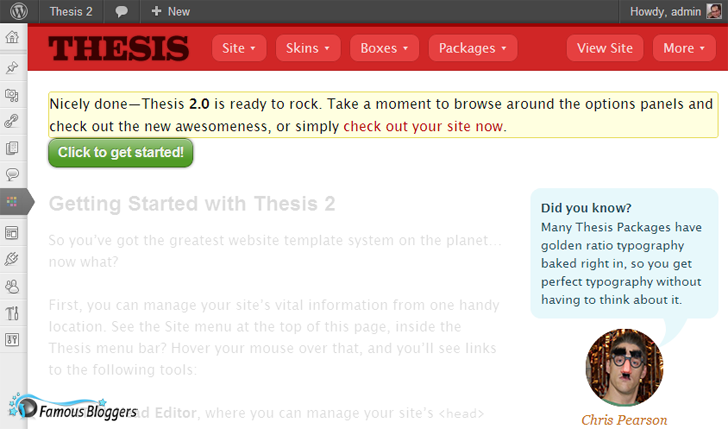
You will get a new website inside your dashboard
this is cool though, and I can see there is a new menu on the top with a few tabs, which make me think of a bunch of features. Also, I noticed that all sidebar admin menu items under Thesis has gone.
The only thing I don’t like is the “Click to get started!” button is not aligned from the top, and the notifications has no padding, small things, but didn’t expect them!
Anyways, let’s hit the “Click to get started!” button so we can read how to get started with Thesis 2 …
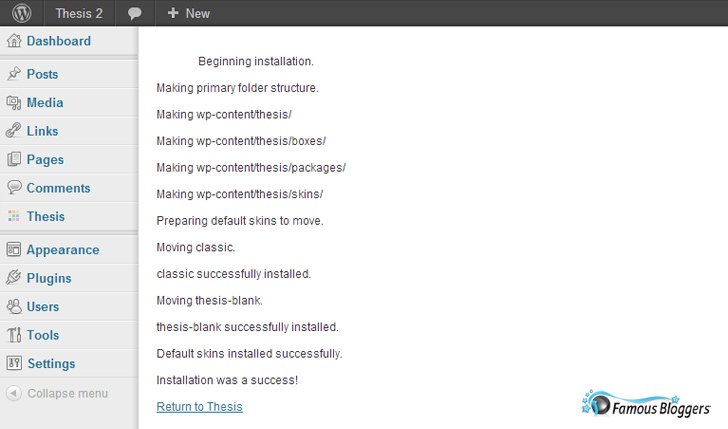
You will be taken to a new screen that show the progress of installation, that was super fast, and looks like the installation was a successful.
Now, let’s do the next step which obviously clicking on the “Return to Thesis” link, so let’s return to Thesis…
Once you click on that link, you will be taken back to the main Thesis dashboard, but now you can actually read the instructions on how to get started with the theme. Basically that page has all the basic that will help you get started with the theme, so make sure to go through it to the end.
Thesis Tips by Chris and Missieur
After a few clicks on the admin page, you will realize that Chris and Missieur are giving you some cool tips, introducing new Thesis functions, and even share some history lessons about Thesis. Actually, you will discover that Missieur knows a lot more than Chris!
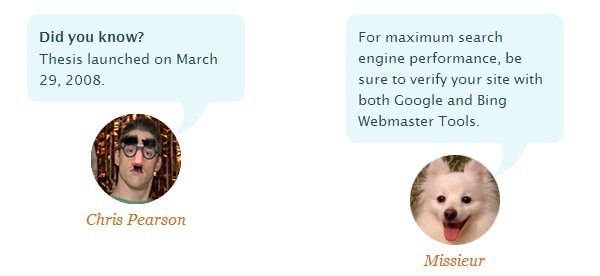
I’ve never seen this before in any other theme options page, good to see you guys
Site Options →
Now… Let’s go through Thesis 2.0 settings starting from the Site options:
Thesis HTML Head
The Thesis HTML Head tab has everything related to the Head area of your site, it’s really cool, especially that you can drag and drop every single element to simply change its order. Also, you can make a shift + drag boxes to remove them from the page.
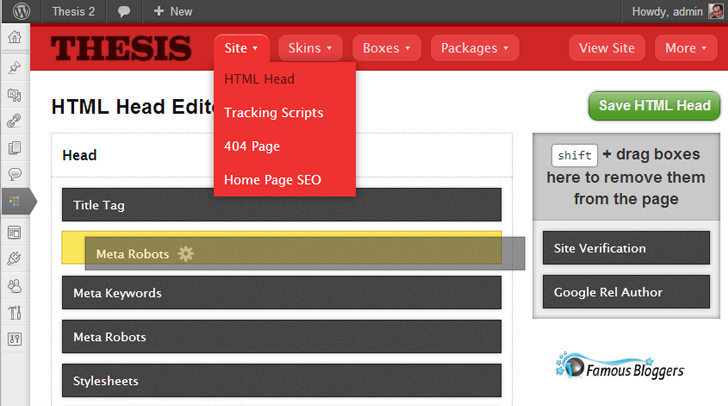
Here… I am wondering what’s the big deal about ordering the Head elements?! I really don’t know!
On the right side, you can verify your site in Google and Bing, plus get your Google authorship ready by adding a rel=”author” tag, this tag will show on every page of your site, it’s simply as entering your Google+ ID Number. But, what about multi-authors blogs? If you run a multi-author blog, then you can enter each author’s Google+ ID Number on their user profile page. Pretty neat and handy!
Thesis Tracking Scripts
This is the second item in the Site menu, it takes you to a page with a simple form to enter tracking codes to your site. You can enter your Google Analytics tracking ID and the theme will do the rest, and also you can add other tracking scripts.
Thesis 404 Page
Yet another new feature that allows you to use a custom 404 page. This can be done by simple create a new page (normal WordPress page), and add the custom message that you would like to show, then choose it in the 404 options. Very easy and straight forward, probably the best way to create a custom 404 for WordPress.
Home Page SEO
The last item in the Site menu is Home Page SEO options, it’s where you should put together an awesome home page title, description, and your main keywords.
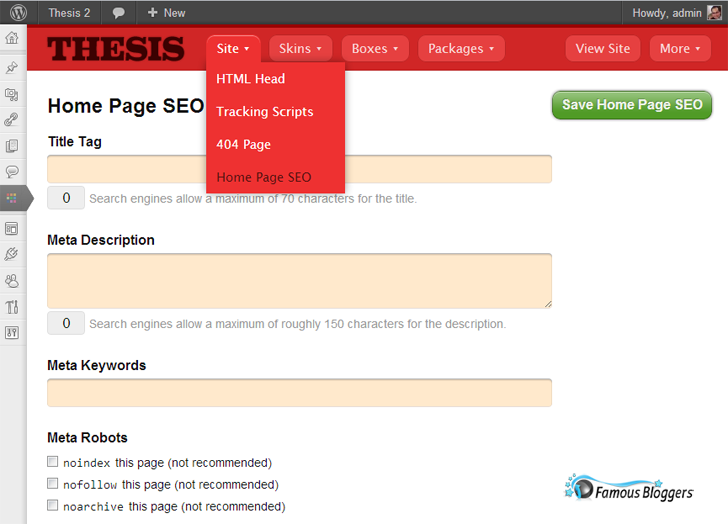
Here… Make sure not to touch the Meta Robots options unless you know what you are doing, as the options page says it’s “not recommended”, I just can’t think of a reason why someone would set no-index to his/her home page, well… of course unless they want to create a retarded website!
I recommend you read this very detailed article about using Thesis SEO Options and Settings.
Thesis Skins →
Thesis 2.0 allows you to install more than one Skin at the same time, on same site, and switch between them, however it doesn’t look like you can actually run more than one Skin at the same time.
Select Skin : (Two Skins included)
Thesis 2.0 comes with two Skins, the Classic Skin (the usual Skin that we use on 1.8.5), and another Thesis Blank Skin (basically an empty page) so you can start designing your own blog the way you want it to be from scratch.
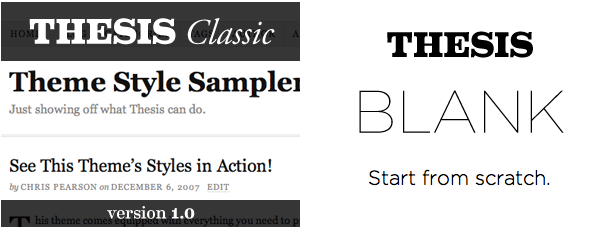
The cool thing here is you can preview a skin in the development mode as an administrator, and you can edit the Preview Skin, but your site visitors will continue to see the current Skin that is active on the site. This indeed gives a high level of flexibility while customizing your site.
Thesis Skin Editor
This probably the fanciest piece of code in Thesis 2.0, this may look weird and uncomfortable to some people at the first look, but I assure you, it will be your best friend in a few hours. I am talking here about drag and drop template builder that will save you a ton of valuable time, and gives you the guts to edit your pages’ layout anytime.
Do you remember Thesis Open Hook plugin?
The interesting thing here is Thesis Skin Editor killed Thesis Open Hook plugin with its drag and drop, easy to customize, Skin editor.
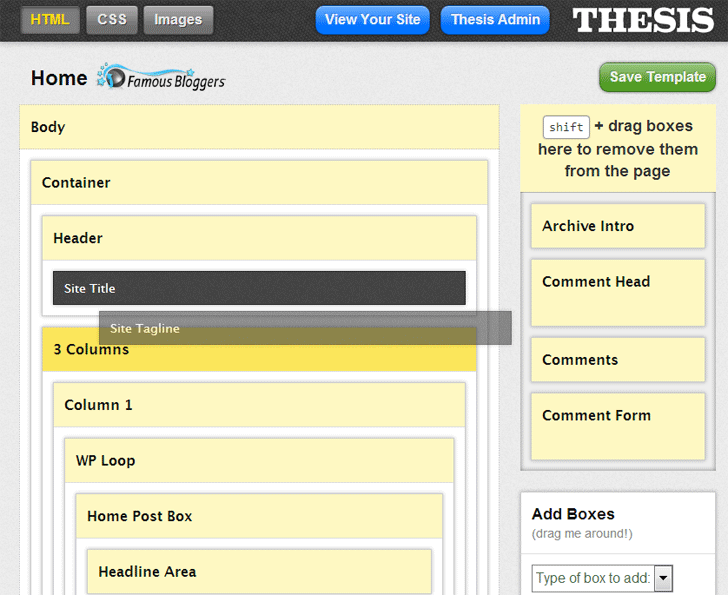
Remember when we used to add a lot of code snippets to the custom_functions.php file?
In Thesis 2.0, you will probably forget about almost everything you used to do with Thesis 1. Most of it can be done now with only a few clicks or drags/drops!
Now, there is a new HTML editor, a new CSS editor and a new images uploader that will help you forget about the old school of customizing a WordPress blog.
Thesis Boxes & Packages →
This is another story, and probably another level of development has been reached!
Imagine that you now can upload little snippets of code or CSS styles and add them to the flow of Thesis without having to use FTP client again in your life!

You can think of Thesis Boxes as WordPress plugins (this is only an example), and you can say that Thesis Packages are CSS styles that you can load directly via a traditional uploader, then once you have them running, you will have more functionality on the site.
The question now is, how to make boxes and packages?
Another cool thing about Boxes and Packages is that once Thesis developers and designers catch the idea, you will see tons of them produced in no time!
New Custom Meta Boxes →
Yes, a punch of changes has been made to the Thesis custom meta boxes, I really love these modification because it will reduce your jumping and scrolling, how? Everything set of options that was grouped in one meta box, it has been divided into separate meta boxes, so you can simply get rid of those that you don’t need to use by simply hiding them within the WordPress Screen Options, and keep your post editor page clean as possible.
For example, Thesis SEO options has been separated. The most important part for SEO now is Title Tag and Meta Description, search engines grab and display search results based on these two fields, Google no longer give weight to Meta Keywords like before, so you can go ahead and hide the Meta Keyword within the Screen Options. And, do the same thing with every single meta box that has a feature you don’t use or need.
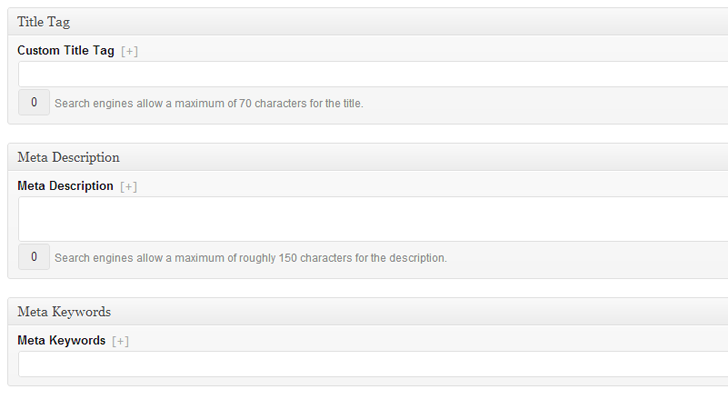
An upload image button has been added to the Thesis Post Image and Thesis Thumbnail meta boxes, this small addition means a lot to me since I use Post Image on every single post I publish, and I got tired scrolling up and down the page, now.. no more scrolling, do the job in one place! These are the features I like because it increase the user experience.

And, guess what? You can create custom templates, then use them on any page or post:
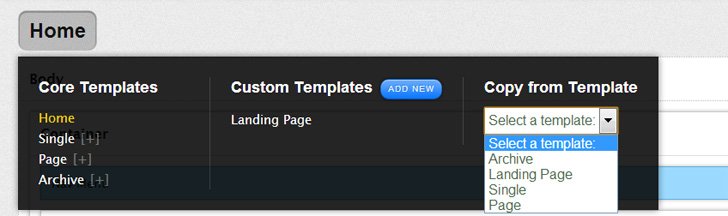
For example, there is a custom template to create a landing page that comes with the theme, once you create more custom templates, it will show in the drop down menu under Thesis Skin Custom Templates meta box, so you can create several templates and choose from:

So good so far!
My Thoughts →
Alright, now that we’ve made a great tour, I’ve walked you though the main Thesis 2.0 features, and showed you how it ended as a totally different product than its older version, it became so clear that version 2.0 is different in almost everything -except the old hooks which I knew it has not been changed- anyways I’ve talked about a few things that I like about Thesis 2.0 in my review above, so here is my thoughts and personal opinion about other Thesis 2.0 stuff:
No documentation, no tutorials
When 2.0 was released, I didn’t find any documentation at all, so it maybe confusing, but that’s OK, there is one page with basic information to get you started, which I think is useful for those who are already familiar with the theme. But, if you are new to Thesis, then I have the feeling that you will be lost! So, I hope that my Thesis 2.0 review gives you a sense of what to expect, and explains to you how easy it is to install the theme and use it.
Too many notices when debug mode is enabled
I can’t stand that, both the back-end and front-end are full of notices, I can easily say that this isn’t a developer friendly release!
Drag and Drop doesn’t always mean easy to use!
The drag and drop in Thesis looks cool, but it’s not so clear. I know it’s not an easy job to build a template builder, I’ve seen many that really sucks. And, I was expecting this to be more easier to use. Anyways, I won’t judge it in my review, I will just let you tell me what you think about it if you had a chance to try it.
What I think is, most of developers expect people to love and start using their themes or plugins once they install it, they -mistakenly- think it “really” takes a few minutes to build a page with drag and drop type of interface! But this isn’t always the case. In real life, no matter how easy it is to use, you will find many people struggle!
No boxes, no packages
And, no one knows what exactly they are, or when we will get them!
Upgrade from 1.8.5 to 2.0
If you are thinking about it, then don’t!
I don’t understand this “Thesis Legacy Helper” plugin, this is the plugin that DIYThemes provided for those who want to upgrade from 1.8.5 to 2.0, the plugin description says:
What’s the difference between Thesis 2.0 and older versions? Pretty much everything. This plugin is for people upgrading from older versions to Thesis 2.0. Logged in users will see the new Thesis skin, Thesis Classic, while your normal site visitors continue to see your previous version.
Huh?… I really don’t understand what’s the purpose of this plugin, and I can’t recognize this as an “upgrade”!!
If you want to use Thesis 2.0, then use it only on a new site, or learn how to WAIT!
I see that DIYThemes team rushed this release to satisfy their members, but it’s hard to call it a complete release, at least not for me. I expect a new update pretty soon to fix the minor issues, plus documentation, tutorials, boxes, packages…. etc.
P.S. I didn’t expect to give it a low rating, especially that I’ve already done that with my 1.8.5 review! But I just can’t give it more than that today! I think the theme is good and has many creative ideas, but the launch wasn’t anything from what I expected, and there is no material to work with. I will be updating the review latter on when something new comes up.
What about you?
Have you got a chance to check it out?
How is your experience so far with Thesis 2.0?


Alfan May 21, 2013 at 1:54 am
Hi Hesham,
Thanks for review of Thesis. I have been thinking to get the theme, but now it seems not too suitable. What theme with similar functionality would you suggest?
Hesham Zebida May 21, 2013 at 11:16 am
Alfan, there is no theme like Thesis!
Wait for Thesis 2.1, it should be released soon, and it’s really good.
Alfan May 21, 2013 at 3:10 pm
Thanks, Hesham. Look forward to that. Hopefully it’s not too far off.
Chris April 8, 2013 at 8:33 pm
It is already April 2013, four months plus since the release of 2.0, and still very little in the way of how-to tutorials that explain basic functionality in a way non-techie types can follow. No explanation of what a “class” is, for instance, or any clue as to why we are instructed to “give it a name.” I think I have an idea of what they are trying to accomplish with the drag-and-drop interface and I like it. Only it doesn’t work *every* time; I put in a new text box for my home page template and it doesn’t show up on my site. I remove it and it shows up on a post page…wtf?
For the money, you’d think they’d be full of advice and help, instead, the tutorials use techie-savvy language as if to alienate their customers (they say it is for inexperienced designers, but it is really for developers, still).
I’m going to flog away at this theme (only trying to use with new sites) until I’ve got it, but why is it so hard? Dang!
Hesham Zebida April 8, 2013 at 9:58 pm
Hi Chris, thanks for stopping by!
Since the release of Thesis 2.0, and a punch of talented developers are testing it heavily (including myself), in a few days 2.1 will be released with tons of enhancements based on the experience we’ve contributed. I can tell that Thesis 2 is getting much better and more flexible than any other theme in the market.
Speaking of tutorials (at this point) it doesn’t make sense to publish them or even write them because it would be waste of time and effort, so instead of doing that, I think the DIYThemes team is waiting for the final 2.1 release to start kicking.
Trust me, I am like you.. I don’t feel that good about what’s going with Thesis, this explains my low overall rating. But, I am expecting amazing things to happen in a few weeks.
Chris April 9, 2013 at 5:57 pm
That is good news, Hesham! Of course, the new 2.1 will be free to customers, and I’m hoping they will have taken the mystery out of functionality with a good, down-to-earth level, step-by-step for at least the basics and some comprehensive tutorials for the advanced tweaks and customizations. That would be a much needed and appreciated breath of fresh air. Can’t wait (but I guess I’ll have to!)
Cheers, Chris
Mercedes March 20, 2013 at 1:19 pm
Excellent review and especially helpful. I’m just looking for a theme that meets my expectations of functionality, and I’m analyzing some. This is going to help me and clear my doubts. Thanks for sharing. Greetings.
Sire March 12, 2013 at 8:07 am
I only found out about Thesis V2 yesterday. I updated the one blog that uses it and even after activating it I got a white screen. Checked the forums and found I wasn’t the only one. Went back to the old version. Never did like Thesis, but I thought I would give them another go with this new update. I should have known better.
Hesham Zebida March 12, 2013 at 2:42 pm
Sorry to hear that Sire.
There is no upgrade between Thesis 1 and 2, they are totally different themes, and it requires some work to get your site up on Thesis 2 while keeping the same look and functioning!
Sire March 13, 2013 at 6:38 am
Luckily for that otherwise it would have been a lot harder to get the blog back up on the old theme. I don’t understand why they made the new theme so different that you have to work at getting your blog to look the way it did before the update.
Sam Jablanski February 13, 2013 at 12:31 am
Thanks for your honest review. I was thinking about purchasing Thesis and read your review on the 1.85 version and was disappointed to hear the Yoast SEO plugin conflicts with Thesis current SEO settings. Did they add some feature in the 2.0 version where the SEO settings can be disabled? If not, I probably won’t use Thesis.
Hesham Zebida February 13, 2013 at 2:37 pm
Hi Sam,
It’s still the same in Thesis 2.0, and just for your information… I never needed to use Yoast SEO plugin on any Thesis site, even here on FamousBloggers.net, Thesis Theme’s SEO features is quite enough in my opinion.
Vivek January 8, 2013 at 9:35 pm
Author or lets say its developer says its drag and drop theme framework. But I think its nothing like that. First thing is that, the whole layout is too confusing to me and secondly their is almost no tutorial on thesis 2.0. The true drag and drop theme is Pageline and they are truly the most easiest theme for any blogger, webmaster or internet marketer.
Deborah Anderson December 23, 2012 at 4:40 pm
Good advice, to install Thesis 2.0 on a new site, rather than upgrading. The first thought I had was, “where are my hooks?” I am a coder, so I go straight for that spot. I don’t feel that I am in need of the “easy way” but respect that non-coders and non-developers appreciate that. Also, I am all for trying new things (I’m weird, I admit it), so I dug in on two sites. At first, all I wanted to do is go back to 1.x with familiar nomenclature, instead of things like boxes and packages. But, I am starting to see the sun come up over the mountain and see some value. It appears that I may be seeing what Chris was promising.. It is a way to still use my coding (albeit, logging in and writing my code the old fashioned way), but using that code in a drag (don’t forget that shift!) and drop method. Considering I develop a lot of sites “in a weekend,” this will make it quicker, and yet allow for non-cookie-cutter looking sites.
-Deborah
Deborah Anderson recently posted..Learning How To Use PPC Effectively with John Rampton #SocialCafe 12/26 3p EST
Lisa November 29, 2012 at 4:55 pm
Thank you for this review. I have been using the previous version which I thought was a piece of cake. Now I’m lost. I encouraged a friend to download Thesis because I thought it was so easy and now I think for a non-developer it’s not so useful. I have to study and study to figure this thing out – and with limited tutorials and the whole “skin” thing, I’m frustrated. Why did they do this? And once you’ve purchased 2.0, can you download the previous version? I set up a website for a friend who has NO worpress experience, let alone working with Thesis and now I feel bad for having her download this version.
Plus, now I have to work a lot harder to help her.
Lisa recently posted..Imagine Your Own Business!
Hesham Zebida November 30, 2012 at 5:37 am
Lisa, really sorry to hear that, what they actually did is releasing a “new theme”, so it’s not considered an upgrade for the previous version of Thesis.
Yes, you still can download the older version within your account, and they will keep supporting it, so basically you can switch back to it.
I would recommend you look up some Skins, you may find something that fits your friend’s blog, I have a couple of Skins and a few cool Boxes over at ThesisAwesome.com that you can check out.
Muhammad December 15, 2012 at 4:56 am
Hi all, i also like to share my feeling related to thesis 2.0.3, i got a project, i thought that it would be easy for me to develop projects on thesis, because i have developed so many projects on thesis 1.x, but when i installed thesis 2.0, i just shocked, the new theme sucks, Please if some one like to use thesis then go for a old version new version really sucks. As this article writer says no documentation, nothing at all, no hooks and filters working and also sometime the default template classic v1.0 not works. So if any of the diythemes member reading this article, please man create something which is similar to what you have developed before. I just have to say that thesis 2.0 have nothing to do with thesis 1.x versions. and it really sucks. I am a developer even i got problems with development, so how can i say that it would be easy for someone to develop with no experience… i must say you diythemes members, you really have no idea what you developed in this case (version 2.0).
No means to harm anyone, i just want to share my feeling, i just get frustrated from this theme.
Robb S November 28, 2012 at 10:26 am
Some very good insights. However…
“I just can’t think of a reason why someone would set no-index to his/her home page, well… of course unless they want to create a retarded website!”
…or the site is still in development and having search engines indexing things that will likely be changed, added to, or removed would be a problem.
The “long read” we are asked to prepare for could have been a bit shorter if you didn’t spend the first 250 words explaining why you wrote the post. A sentence would have sufficed, beyond that for me it got frustrating and frivalous – as did a tutorial about how to install in what is billed as a ‘review’.
Hesham Zebida November 30, 2012 at 5:49 am
mmm… Not sure if you actually get what I am talking about!
You have an option in WordPress to tell search engines Not to index your site so you won’t have a problem with that while developing a site. So, you won’t need to set your site’s home page to no-index, or at least I never needed that before! (that’s only my personal opinion and experience).
Since the time of writing this review till today, it still non sense to set no-index for home page even if you are in development mode!
Well… Not everyone knows what is Thesis, so not everyone have your experience, that’s why I came up with a long introduction! Well… maybe I was in a good mode
Sorry it came out little long for you.
DRG November 22, 2012 at 7:59 am
Thesis, the best theme ever seen
Thanks for the share.
Vishnudath November 18, 2012 at 7:43 am
How to move all my Meta Values (titles, descriptions) form thesis 1.8x to thesis 2.0 ?
Hesham Zebida November 30, 2012 at 5:56 am
You don’t have to move anything, it should move by itself once you install Thesis 2. (of course this in case you have thesis 1.8.5 installed before on your blog).
P.S. Please, get support from DIYThemes.com support forum, this is not a place to ask such questions.
Pete Diamond November 2, 2012 at 5:10 pm
Thanks for the review. As I write this comment it has been 1 full month since the release. I decided to wait a month before trying 2.0 again. I’m not messing with my 1.8 based sites; I’m building an experimental 2.0 site from scratch. I’m a marketer and an end user who wants to build my own stuff and from my point of view Thesis was misrepresented from the get go on how easy it was for a non-techie. I’ve been using it for a couple of years so I’ve gotten better but it has cost me a lot in lost productivity. I know I could have hired someone to do it but that’s not my style so I realize much of this was self-inflicted.
As for 2.0 I’m not sure how the launch could have been done more poorly, Chris may have damaged his product and reputation for some time to come even though I believe 2.0 will eventually evolve into a decent platform. When I say decent I mean as far as wide scope usability. It may have great capabilities as it is right now however if the documentation and support aren’t there then it’s not useable for someone needing guidance. It might be great to have your own jet and free fuel but if you don’t know how to fly it, it will only cause you frustration.
What I believe would help would be more effort towards useability vs capability in the short term to sooth the frustration of those who can’t get a basic site up. I’m trying to build a site and it seems that there have been upgrades since the first tutorials were made so they are obsolete in areas. Handling it in a forum is an inefficient and time consuming method. A time out on the development and and a few days of making simple, easy to follow tutorials on how to build a basic 2 column static main page, blog page and the usual about, contact etc from scratch would help a large segment of their clientele, especially new customers.
I think I’m going to like 2.0, however I’m a patient person and I like figure stuff out but I certainly wouldn’t mind it if 2.0 had been released in a better fashion and I was figuring out nuances instead of just trying to get something up.
There’s an old saying that rings true here. “You never get a second chance to make a good first impression.”
Asif October 25, 2012 at 10:56 pm
Thesis 2 is pretty good for the people with some CSS knowledge but general people wouldn’t have a clue. I dont think not many people will be willing to use thesis 2 any more.
Hey Hesham, are your skins are Thesis 2 compatible yet?
Cheers
Asif recently posted..Sell License keys or Serial Numbers with WP Bizcart Shopping Cart Plugin
Hesham Zebida November 30, 2012 at 5:59 am
Once Thesis 2 gets its share of development, it will be ideal for everyone!
Compatible is irrelevant, as I said in my review, Thesis 2 is a completely different theme, so it requires its own Skins (Skins that are made especially for Thesis version 2).
I got a couple of Skin though, one free and the other one I call it the BlogSkin 2 which has the main BlogSkin functionality.
jeni October 23, 2012 at 12:56 am
Hello Sham,
I watched the video tutorial from BYOB site, first it was very impressive, but when I was the one to create my own customized template, it seemed to break my head. It took me whole day to create a header. I could say, the old version of thesis was just fine for me where you will just check in the design options. My impression is that, the tutorial is not satisfactory , lack of documentations, and seems a lot of bugs. I hope sooner, this difficulty of mine will just go away.
JasiJou October 22, 2012 at 1:05 pm
Aww…well this is kind of disappointing. I used Thesis 1.8 on an old blog and loved it. I’m a novice at best when it comes to the technical stuff. But the plugin was great. Then my site was compromised and I decided to give iThemes a try (big mistake) I HATE their drag and drop set up as it is totally confusing. So I was ready to jump back to Thesis, but I can’t do this drag and drop thing all over again and it not be well thought out. Hopefully theiy’ll update the fixes soon.
Jatin Singhroha October 21, 2012 at 4:11 am
I did love Thesis , but i use Genesis Framework on my blogs , Thesis Awesome provide awesome themes for Thesis . Thanks a lot .
Jean-Luc Benazet October 13, 2012 at 3:23 pm
I waited for Thesis 2.0 until it was announced it would come out on October 1st. I installed it pretty much straight away when it became available, and despite NO guidance from the developer attempted to install it anyway. And what a huge disappointment!
My old site had gone completely, only replaced by a blank page with a box with an Edit button in the lower left corner. That’s it! I played with it for 4 days, tried everything, and was still left in limbo! So much so that I even stopped using Thesis 1.x as I was gutted with the developers, and change theme altogether! Not going back!
Hesham Zebida October 14, 2012 at 11:28 pm
Hi Jean_Luc,
I understand your point when you said “NO guidance”, but what I don’t understand is how come you’ve installed a new version of theme of your live site?!
Man, you need to test things before you actually use them, even if everyone tells you something else, you got to test it by yourself.
Also, FYI. you can switch back to Thesis 1.x anytime after trying Thesis 2.0, you won’t lose any of your data or design..etc.
Pritam Nagrale October 13, 2012 at 8:11 am
I am just trying to learn thesis 2.0 by testing on other demo blog but not able to understand this fully. As you are suggesting not to upgrade from 1.85 to 2.0, I am thinking to upgrade in next few days until I am comfortable with this.
Hesham Zebida October 14, 2012 at 11:30 pm
Good to know you are safe! However.. Just to clear things, there is no upgrade bridge between Thesis 1.8.5 and Thesis 2.0, deal with Thesis 2.0 as you are dealing with a new Theme.
webbie October 11, 2012 at 1:16 am
Thanks for the review! Does anybody know if its possible at this point to purchase Thesis 1.8.5 from somewhere? I’d like to own both, 1.8.5 and 2.0 as well.
Hesham Zebida October 11, 2012 at 10:09 am
You are not actually purchasing version 2.0 or version 1.8.5, you are just purchasing Thesis Theme!
You will be able to download both versions within your account though.