Check out ThesisAwesome.com and get $20 OFF Product Skin Thesis Skins
Thesis 1.7 is Installed and Running on Famous Bloggers

Thesis 1.7 is Installed and Running on Famous Bloggers

by on March 31, 2010 · 44 comments

I didn’t expect that Thesis 1.7 final version is going to be ready so fast, I didn’t have enough time to play with the beta version, but anyways I have done some work depending on Thesis 1.7 and I was waiting for the right moment, when the final version released, and here it is, arrived already, and installed.. it’s ready!

I know that so many people won’t buy thesis theme probably for two major reasons, the first reason is Thesis price which is $87.00 , and the second because most of bloggers that I have talked with about Thesis have that believe that Thesis Theme is so ugly, and they got bored from seeing it everywhere on the Blogosphere, so many bloggers are using it already, and all their blogs almost looks the same!

So, some bloggers don’t need to pay money for getting a boring theme that has the same look of so many blogs, and I agree with that, actually lots of Thesis blogs look exactly the same and it’s even getting more ugly when someone tries to play with it, specially if he/she have no idea about web design and CSS, and the worst thing when someone add advertisements to Thesis powered blog, this absolutely will look so ugly for their blog visitors.

And this is why I think we should look to Thesis Theme as a framework for web designers!

Are we using a different theme on FamousBloggers?

famous_bloggers_logo

Nope! But probably you have noticed that FamousBloggers.net theme has a new custom style, it’s actually the same Thesis WordPress Theme we are using, but I have done some changes to it’s custom style and added a few custom functions and graphics, so now our Thesis sidebar looks better than before, to make it look more beautiful and work more effectively to serve our blogging goals, I even made some changes to our blog logo design, now it looks more comfortable and with a bigger font size, and has a very nice mouse over effect that I like to play with it all day :)

I have received a few emails and comments from my friends bloggers asking me if I have changes the theme, but I told them that it’s the same Thesis theme we are using, but I have played a little with it, and I am feeling so good because they like it, and almost all feedbacks was great.

Famous Bloggers upgraded to Thesis 1.7

The good and exciting new is we already upgraded to Thesis 1.7 and it’s awesome! And I have done it in almost less than 1 minute, can you believe that?!

Thesis 1.7 features
thesis_1.7_options

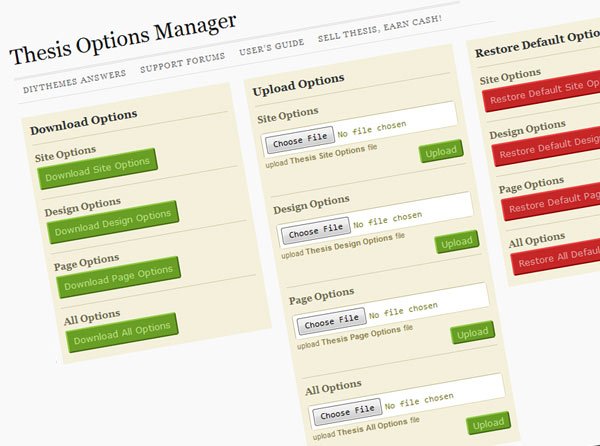
I am not going to discuss or talk about all Thesis new features, because you can visit Thesis site and know read it, and there is some bloggers wrote about it already, but I will mention only what is really interesting for me as a web designer and developer, the main important feature for me is the download/upload options, I have tested this by myself on a fresh WordPress installation, and it works great, so now Thesis 1.7 developers will be able to transfer options between blogs in seconds (minutes) Pretty cool… right?

Thesis Theme Revolution

Ah! no.. no, not yet, I have interesting news for Thesis Theme users, but on the right time, you know me… I always have surprises, and you will like my coming surprise :)

Ahhhh! I would tell you if the day was 48 hours! or if we don’t ever need to sleep! but what to do, I have to get some rest to continue working tomorrow, if I finish the work I will share every thought with you, and you are going to love it!

If you have upgraded, then share your thoughts, if you didn’t upgrade yet, do it, because I say so :)

Thesis_468x60

Article by Hesham Zebida

I create websites, and I develop Thesis Skins. I am a social network lover. I am also the night creature who works hard to keep this project up. Owner and founder of FamousBloggers.net.

Write for us a guest post

{ 42 comments… read them below or add one }

Vijay October 29, 2010 at 10:38 am

I am not able to see the comment notification in my blog “Notify me of followup comments via e-mail”. Can you please give me a solution?

Reply

Hesham October 29, 2010 at 11:03 am

This needs a plugin, it’s called “Subscribe To Comments“!

Enjoy!

Reply

Vijay October 29, 2010 at 10:40 pm

Other than the plugin, there is any code to place it and make it work ?
Vijay recently posted..MaxBlogPress Ping Optimizer WordPress PluginMy Profile

Reply

d3so June 29, 2010 at 3:14 am

I had no idea comment threads were already integrated into wordpress. Thanks for the help!
d3so recently posted..iPhone 4: Thoughts and ConcernsMy Profile

Reply

Hesham June 29, 2010 at 3:35 am

Great.. Enjoy!

Reply

Colleen June 15, 2010 at 11:16 am

Hesham,
Curious what plugin you are using for your comments. I just installed the plugin WP Thread Comment and cannot seem to get it to work with Thesis 1.7
Colleen recently posted..West Richland Washington 2010 Hogs & Dogs EventMy Profile

Reply

Hesham June 29, 2010 at 3:34 am

Sorry for the late reply, plz deactivate & remove the plugin because it will not work with Thesis, and enable the thread comments in WordPress settings > Discussion

Reply

Colleen July 1, 2010 at 8:33 am

Thanks Hesham. I did that and now have thread comments working using WP’s resource.
Colleen recently posted..104 South Idaho Street- Kennewick WA 99336My Profile

Reply

Rachel June 4, 2010 at 11:36 pm

Has anyone figured out the threading on Thesis 1.7? I have checked the box under Discussions and enabled thread comments but it does not thread my comments. I am annoyed. Solution?

Reply

Hesham June 4, 2010 at 11:52 pm

mmm.. this is kind of weird, are you installing any other plugins that deals with comments?!

Alss it could be your cashe plugin, so be sure to clear your cashe!

Reply

Rachel June 5, 2010 at 12:43 am

Thanks for all of your help!!!!!!!!! The Comment Reply Notification plugin worked!! Now I have threads and replies to commenters via email!!

Reply

Hesham June 5, 2010 at 12:46 am

no problem, enjoy your blogging.. and have a great weekend Rachel

Reply

Pubudu Kodikara April 3, 2010 at 9:51 am

Glad to see that Thesis is updated! And to tell the truth… bro, your blog is getting nicer everyday! :D I like you theme! :D
.-= Pubudu Kodikara´s last blog ..3 Cheers! Our Page Rank Has Been Updated! =-.

Reply

Gautam Hans from Blog Godown April 2, 2010 at 8:55 am

I would agree on the point that thesis would be good for web designers, because they have a sense which enables to create a good design like yours :)
.-= Gautam Hans @ Blog Godown´s last blog ..How to Connect With Your Social Media Followers and Fans =-.

Reply

Suzanne Franco April 1, 2010 at 9:39 am

Hi Hesham ~ Your blog looks awesome! Love it … I am a bit hesitant to upgrade right now because I have so many projects going on that I don’t have the time or patience to deal with what might go wrong … but here soon. ;)
.-= Suzanne Franco´s last blog ..Blogging Idol Secrets Revealed =-.

Reply

Hesham April 1, 2010 at 10:19 am

Thank you Suzanne for stepping by and for your kind words!

I completely agree with you, I know about your biz and it’s so important not to have problems with your blog, specially that there is no extremely need to upgrade!

Thank you a gain, this is wise decision

Reply

Suzanne Franco April 1, 2010 at 11:11 am

OK … might be a silly question … but like the other reader asked … for that image did you just do a screenshot and then … rotate it? It really stands out like that! ;)
.-= Suzanne Franco´s last blog ..Blogging Idol Secrets Revealed =-.

Reply

Hesham April 1, 2010 at 11:53 am

Oh! yeah… no plugins… it’s simply Photoshop ;)

Reply

Kristen April 1, 2010 at 5:28 am

I have just upgraded to 1.7 and have spent half the night fixing things I didn’t realize would go away when I upgraded. I can’t seem to find a tutorial…but my custom twitter field went away as well when I upgraded. Is there any possible way you could tell me how to get it back? I’ve grown quite frustrated!! Thank you so much!!
.-= Kristen´s last blog ..10 positive things shaving your head will teach you =-.

Reply

Hesham April 1, 2010 at 10:26 am

You mean the Twitter field in comment form?

If this is what what you lost, then wait a little bit, I will post a new post today to tell you how to do it, as this will help lots of people!

Thanks Kristen.. I love questions, specially if it will help me to generate great post ;)

Reply

Hesham April 1, 2010 at 12:27 pm

Hey

I have put an answer to you in this post: Twitter Id field in Thesis 1.7, I hope this is helpful!

Reply

Josiah from Tumblr Themes March 31, 2010 at 8:06 pm

Hearing lots about this update. FamousBlogger.net looks beautiful. I know for a fact that there are some WP designers out there that are working on thesis themes.

Q: How do you do your screenshot of the features with the slanted effect? Photoshop or is there a firefox addon, ect.
.-= Josiah@Tumblr Themes´s last blog ..Flourish =-.

Reply

Hesham March 31, 2010 at 8:37 pm

Hello Josiah, Thank you so much for your complement about FamousBloggers.net

Yeah, I use mostly Photoshop!

And by the way, nice collection of themes you have there! I am on my way to start my first design blog and join the design world, so with me good luck ;)

Reply

Ana Goncalves March 31, 2010 at 5:02 pm

I just heard about the update today through my inbox too, and it all sounds and feels wonderful by the looks of things. I usually wait a while before I update, as I’m not eager to follow the masses in doing something straight away. I’m quite patient when it comes to that, also leaves plenty of time for me to get involved in the design aspect of it when I’m ready to do so.

Your blog is looking exceedingly fresh! :)
.-= Ana Goncalves´s last blog ..Power of connect communication =-.

Reply

Hesham March 31, 2010 at 8:41 pm

Good way of thinking Ana, more safe!

but for someone like me who likes to play a lot, I can not handle myself and wait ;) specially when this help me on my work.. you know!

Ah! this is the best description for FamousBloggers.net theme I ever heard :)

Reply

Chadrack from Home Business Marketing
Twitter:
March 31, 2010 at 12:46 pm

Noticed the problem with the WP Tread Comment plugin when I tried to reply to comments on my guest post. Even now loading any of the page has continued to trigger a warning about a script that is slowing down things. Think you just have to take a proper look.
.-= Chadrack@Home Business Marketing´s last blog ..My First Guest Post Gone Live at FamousBloggers.net =-.

Reply

Hesham March 31, 2010 at 1:09 pm

Thank you fr the feedback, so much appreciate it, I have returned everything the same it was before, are using Firefox or IE?

Reply

SmashinGeeks March 31, 2010 at 11:22 am

Looking Nice One, will update soon,,

Reply

Harsh Agrawal from Blogging Tips March 31, 2010 at 8:04 am

I installed Thesis on my new blog and not on live site..I like the new features in Thesis 1.7 so far.. Gottta upgrade atleast 4-5 sites of mine.. :)
.-= Harsh Agrawal @Blogging Tips´s last blog ..19 Best and Free Thesis Skins For Your Thesis Wordpress Theme =-.

Reply

Hesham March 31, 2010 at 11:49 am

Hey Harsh, I am using Thesis 1.7 actually on another blog of mine, and it works great, and it’s inspiring me to expand my design work, the thing is the operation here failed because of the “WP Thread Comments” plugin, all “replies” to comment disappeared when activated Thesis 1.7 ..

So, I will have to visit the support forum or contact the plugin author about this, hope someone can provide fast solution!

Reply

Harsh Agrawal March 31, 2010 at 1:56 pm

Wondering why are you using this plugin? When Wordpress has default feature. Check under your Discussion settings. Look for 4 options which says enable threaded comment.
If I’m on the wrong pitch do let me know…. :)
.-= Harsh Agrawal´s last blog ..Secretinnerlife: Personal Blog by Submom Migrated to Wordpress =-.

Reply

Ana Goncalves March 31, 2010 at 5:09 pm

This is what I have also enabled on my blog! The feature is under WP Settings> Discussion > Other comment settings > Enable threaded (nested) comments. (to tick) No WP plugin needed.
.-= Ana Goncalves´s last blog ..Power of connect communication =-.

Reply

Hesham March 31, 2010 at 8:53 pm

I am using it because it send emails when anyone add a reply to any comment! it send a customizable email like the ones you receive when I reply to you now, which keeps the conversation!

I think WP doesn’t do that with out a plugin!

Reply

Heather April 13, 2010 at 8:36 am

I have the same problem with WP Thread comment and 1.7- I use it to automatically email readers there’s a reply without them having to check the box…any suggestions to do this in 1.7?!
.-= NEW from Heather @ Side of Sneakers´s last blog ..All in the Family =-.

Reply

Ileane from Blogging
Twitter:
March 31, 2010 at 5:03 am

I hear nothing but good stuff about Thesis and I bet many users need to know about this upgrade. My daughter is using it on her blog, so I have to stay on top if this Thesis stuff. Thanks for sharing all the details. btw – I do see the comment reply so maybe you fixed it since Andrew’s comment.

Cheers!
.-= Ileane@Blogging´s last blog ..WordPress.com is Still The Bomb! =-.

Reply

Hesham March 31, 2010 at 5:23 am

I think she can use it safely :) I was just having this problem with the reply to comments because I am using the “WP Thread Comment” plugin… read the other comments below and you will know what happened :)

I will see what I can do about this latter as I will get some rest now!, good night dear.

Reply

Dave Doolin
Twitter:
March 31, 2010 at 3:30 am

This is actually very good timing for me, as I have 5 sites I’m going to need to upgrade.

I’m dreading it, but no time like the present to knock it out.
.-= Dave Doolin´s last blog ..5 Simple Steps to be an Authority Blogger (you can do this) =-.

Reply

Hesham March 31, 2010 at 5:20 am

It’s very good Dave, but I just return back to 1.6 because I can not view the WP Thread Comments through the plugin, so I think it’s going to be safe for those who don’t run the “WP Thread Comment” plugin!

Actually I have tried it on a fresh installation and everything seems to be working, and I using wordpress own threaded comments system with no plugins!

By the way, you will lose the options if you return back, but the good thing is I remember them :)

Reply

Andrew from Blogging Guide
Twitter:
March 31, 2010 at 3:25 am

Hesham,

I purchased Thesis a while ago and have never got around to using it!
One day I will.

I noticed that the ‘reply’ comments are no longer showing on your blog posts – due to the upgrade?

Thanks.

Andrew
.-= Andrew @ Blogging Guide´s last blog ..Feedback – When did you last ask for it? =-.

Reply

Hesham March 31, 2010 at 3:37 am

I am replying from the admin dashboard, it seem that the threaded comments plugin has some problems with the theme, All replays disappeared, it’s going to be a long night :)

Reply

Hesham March 31, 2010 at 5:17 am

The WP Thread Comment plugin is not working with 1.7 because they changed the comment code completely, and it’s moved to another file, so I finally return back to 1.6 till the plugin has an upgrade or I find another solution!

So, be careful!

Reply

Ana Goncalves March 31, 2010 at 5:23 pm

Hesham,

You don’t need a WP Threaded plugin, as threaded comments are already an integral part of Wordpress.

All you need to do to get threaded comments is go to:

WP Settings> Discussion > Other comment settings > Enable threaded (nested) comments. (to tick) Than you select the depth of the threaded comments you’d like, and presto!

Hope that helps, and no plugin ever needed!
.-= Ana Goncalves´s last blog ..Power of connect communication =-.

Reply

Leave a Comment

  Twitter (ID only. No links or "@" symbols)

CommentLuv badge

This blog uses premium CommentLuv which allows you to put your keywords with your name if you have had 3 approved comments. Use your real name and then @ your keywords (maximum of 3)

{ 2 trackbacks }