Some bloggers think and feel that Thesis Theme is kind of ugly and they would like to have a custom theme with a unique style, and this is what we was trying to do here on FamousBloggers blog, and we have succeeded so far to style and change the ugly face of Thesis theme and turned to something else probably most of you will NOT notice it’s Thesis Theme anymore, Don’t you think so?
So.. In this tutorial I am going to show you how to make a sidebar buttons for Thesis Theme, so it’s not a navigation buttons but you can use it the way you like and you think it will work for you. We will use images, CSS and some HTML code to past simply to your side bar text widget, although it’s not for WordPress blogs only, it’s not also for Thesis Theme only, but if you are using any other blogging platform and it’s not of the thesis examples, or you have a static website, and you know where to add the HTML code to display the buttons on your sidebar then this tutorial will work for you just fine. You can see them working on our FamousBloggers blog sidebar.
What you will need?
Basically you will need some HTML and CSS knowledge to customize the code the way to fit your blog, and also some graphic buttons to use them on your blog sidebar, and because I don’t know how you sidebar looks like and what is the specific width, height and color theme you prefer to have for your buttons, so I will not include ready made buttons for you, but I will give you the original PSD file that I am using to create FamousBloggers blog sidebar buttons as a gift, for free, so you can start working using it to create your custom web page buttons, and I will also tell you from where to get free set of icons to include them to your buttons if you would like to make look more professional, and this means you will need to have some little skills with:
So you can get benefit of this tutorial.
From where I get my icon sets?
Almost all icons and images I use on my designs are from the icon finder search iconfinder.com, I remember this website one year back when it was hard to find what you really need on it, but now it has more awesome icons sets that I use for designing logo and buttons in both ICO and PNG formats, you will love it.
Download PSD file and Sample Buttons
First of all download our PSD file and our image samples, the PSD file has the basic layers to create the buttons with a gray background, it will allow you easily to change the buttons colors and/or gradient colors for the mouse over effect by playing with it’s style, and of course change the size of buttons. You can also choose the icons that match your need from the icon finder iconfinder.com website and just replace them with the ones on the PSD file. Now you will be able to easily generate your own buttons.

Also you will need a sprite.png transparent image to replace it with the text of your links, and this is why we included the folder of our sidebar_buttons for you to check it out so you can get the full picture of what we did exactly to create these sidebar buttons.
Download the Sidebar buttons PSD + Sidebar sample buttons Folder
CSS style your sidebar buttons
Copy and past this code to your custom.css file and don’t forget to change the (URL_TO_BUTTON_IMAGE) to point to the right path where your button images are saved on your hosting server, and of course upload your custom.css file back to your server after editing it, this code is a style for two buttons, you can add more buttons and style them as well using the same way.
/*---------------------------------*/ /* Sidebar buttons BOX */ /*---------------------------------*/ .sb-buttons ul li a {background:url("URL_TO_BUTTON_IMAGE/sprite.png") no-repeat scroll 0 0 transparent; display:block; text-indent:-9999px; width:300px;} li.sb_write a:link, li.sb_write a:visited {display: block; width: 300px; height: 70px; background: url('URL_TO_BUTTON_IMAGE') no-repeat scroll 0px 0px; outline: none;} li.sb_write a:hover {display: block; width: 300px; height: 70px; background: url('URL_TO_BUTTON_IMAGE') no-repeat scroll 0px 0px; outline: none;} li.sb_mmo a:link, li.sb_mmo a:visited {display: block; width: 300px; height: 70px; background: url('URL_TO_BUTTON_IMAGE') no-repeat scroll 0px 0px; outline: none;} li.sb_mmo a:hover {display: block; width: 300px; height: 70px; background: url('URL_TO_BUTTON_IMAGE') no-repeat scroll 0px 0px; outline: none;} /*------------ End of Sidebar buttons BOX ---------------------*/
HTML Code
After you generate your files upload them to a folder in your host server, so you can call them to view them where you want using this code, just make sure to change the (Page_Link) to the URL you want. This code is going to add two buttons and of course you add more, but don’t forget to create a separate style for each one in your custom.css file the same way we did above.
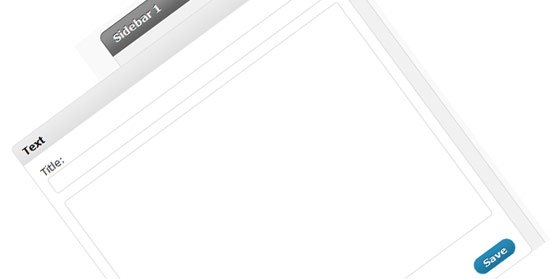
To show the buttons on your sidebar you will need to add a text widget by going to Appearance > Widgets > and simply add a test widget to your sidebar where you want the buttons to show and past the HTML code into it and save it.
<div> <div class="sb-buttons"> <ul> <li class="sb_write"><a href="Page_Link">Write for us</a></li> <li class="sb_mmo"><a href="Page_Link">Beginners guide for make money online</a></li> </ul> </div> </div>
Conclusion
There are some simple ways to customize your WordPress blog theme. Working with Thesis Theme is a lot of fun and it will teach you so many things while working with it, it’s the theme that can teach me by involving me on it’s code and style. You can get amazing icons and PNG files for your design from the icon finder search at iconfinder.com, and the awesome thing is it’s for FREE.
Credits:
I have got this idea from ProBlogDesign.com blog. I like the design of this blog.




{ 70 comments… read them below or add one }
Hi, great recommendations. I appreciate it a lot. I am still learning more about thesis. I am still on the stage of familiarizing the codes.Thesis is fantastic, it is something more than a conventional theme. thanks for sharing.
Hello mate,
Really love your simple and neat explanation.. I have one question, How to create navigation bars like yours (Optimize Press,elegantthems, etc..) when hover it will turn from grey to colorful..
Thanks Jebat,
Sorry, this navigation images were created especially for the blog, and I don’t really have time to explain how to create one!
Hesham,
Just as a side note in reference to adding wigets to the sidebar of a Wordpress based blog…
I installed the HAL HTML Plugin and it lets you add HTML code to it. After you install the plugin, you can drag and drop it to your side bar in as many places as you want.
A definite “must-have” for Wordpressers…:)
Mark
Thanks Mark
Nice tutorial. Part of the reason I stayed away from Thesis is because unlike ordinary wordpress themes, it is so hard to customize. I don’t know why they haven’t made it easier.
teatree recently posted..SEO Idol Contest
Very longer, but, helpful tips. After I changed theme, I wasn’t able to show the social Icons in my blog. Now, I will try each steps, then lets see what happens.
Thanks
Musthafa Ullal
TekNoise
Hi, Can you help me…. how if we want add twitter button in sidebar like WP Genius Theme from solostream.com (but my theme is white) in genius theme is gray
Thank You,
I am not sure I understand you right, I hope I could help!
thanks for the tutorial, helped me with my theme, i have customized it all by my self with out any knowledge lol, the social icons have been getting on my nerves..Also that icon highlighter under your second menu is amazing, the one with all your affiliate links integrated, godaddy, popup domination etc.. how did you do that?
Gene Wolff recently posted..Internet Marketing SEO For Selling Niche Products Online
Thanks!
I would love to to explain how to create the affiliate icon bar I am having here on FamousBloggers, but writing such tutorial will need some time, I hope there will be a chance soon!
did you guys use a plugin or how did you create the 125 ad blocks side by side like that on your sidebar. I tried using billboard plug by ithemes but it only lines them up one under another..
Gene Wolff recently posted..Internet Marketing SEO For Selling Niche Products Online
Hello! I spent 2 hours doing my custom images, all are good but “If I visit one of my pages, It messed up! How can I fix it:
“It only shows the right thing on posts not on pages”
Eij Casanova recently posted..Best WordPress Plugins you need
It looks find to me! I really don’t understand what exactly you need to fix!
Actually I like the thesis theme, is clean and simple. What I don’t like about it is that is hard to edit and modify, just like any other WP theme…I don’t know why but the files are different than the usual WP files.
Maria
Maria Pavel recently posted..How To Become A Certified Nursing Assistant
Great stuff. The thesis theme is a great premium theme. You can customize it very easily. For a blogger that doesn’t know much about coding, this is important.
Fazal Mayar recently posted..Proven Steps To Guest Post On Top Blogs
another great tutorial Hesham, thx….
Nice tutorial!! You know after reading it we decided to use it on our blog
and I am so happy that it really worked fine and looking great!!
Thank you very much!!
suraj recently posted..30 FREE Photoshop PSD files
Hi Hesham,
another excellent tutorial of yours! I’m preparing to start creating such sidebar buttons:) They add so much to the look of the blog or website.
Thanks for the iconfinder – that’s a great resource of icons.
And Thesis is my top theme, I bought developer license straight from the beginning:)
Justyna recently posted..RSS Feed Generator and Submission Plugin Review
Twitter: another_blogger
October 23, 2010 at 9:59 am
Cool Hesham, I wish I’m a thesis owner

Latief recently posted..Google Send Me A Gift!
Great tutorial. I am working on putting together a sidebar and this has helped me a lot. I am almost ready to input it.
John recently posted..Falling out of love with Foursquare
Twitter: shariffdotorg
September 19, 2010 at 2:38 am
Hi Hesham,
Even I am going to use NoFollow Free plugin in blog to for all comments to give the link back credit.
Is there any specific setting for nofollow in thesis. Please do let me know.
Thanks
Imran
Imran recently posted..Contact Importer Addon Feature For FaceBook Fan Page
hi Hesham
i have an problem about view my comments
visitors can add commments but only visitor’s name is show not his comment on my article
Rahul Dev recently posted..Facebook Testing “Subscribe To” Feature
Are you using comments related plugins, I have added a comment now, plz approve it because I need to see what’s happening!
No, i m not using any comment related plugin.
Rahul Dev recently posted..Ultra Thin iPhone5 With 4G
Weired! probably you should visit Thesis support forum! I really can not help with that because I never faced this problem before!
Did one of my blog and it took me about a hour to get it done, I’m new in designing. I had problems with the coding just now but all have been solved now.
sidder recently posted..Blucig Comes in 5 Different Flavors
Glad to hear that problem solved!
Thesis hasn’t been as user friendly as I hoped it would be. I haven’t checked out the new release yet though. Just checked out iconfinder, awesome sauce, lots of great icon sets.
Ian recently posted..Copywriting Scorecard Review
Have you tried Thesis 1.8? it’s more user friendly that the last version, although Thesis Themes needs a lot of work to create a unique look and feel!
I am making a tool bar using this method but can not figure out out to get rid of the spacing between the buttons. You can check my site at iloveelectrohouse.com to see what I mean. I would like the buttons flush against each other.
Also completely off topic when building a thesis blog where you want users to leave comments such as this how do you set it up similar to this forum so you do not have to have people set up a account and go into he wordpress admin?
To your custom.css file where it says:
li.sb_topelectrohouse a:link, li.sb_topelectrohouse a:visited
Add This:
margin-top:-8px;
Or
margin-top:-9px;
—-
Enable thread comments from Wordpress settings > discussion
I hope this help!
The margin worked great to get rid of the white space.
Do not really understand how to setup my comment section similar to this so the user does not ever enter the wordpress admin and also so its auto integrated with aweber.
If you can point me to a tutorial or info so I can figure that out I would have such a productive morning going.
thanks for the last tip and great site.
CC
You don’t need a tutorial to do this!
Plz check your discussion settings!
In your Wordpress dashboard, Goto Settings > Discussion
You should allow anyone to add a comment, enable threaded (nested) comments!
Yes I have done that but trying to figure out how you automatically have aweber built into the comment section so you collect the e-mails every-time someone leaves a comment. Also how you restyled the comment forum so it looks much better.
I do not want to get to off topic since this thread is about your wonderful nav system but love your comment system and would love to get mine looking better and integrated into aweber.
thanks for your time
CC
You really don’t have to collect emails when ever someone post a comment! you should them the option to subscribe or not to subscribe!
I am using a plugin called “Aweber”, plz read this post (I share some interesting information) An Exciting List Building Experiment!
P.S. Try to search the blog for more articles about Thesis!
I know I have used Aweber for years and have many lists on it. I noticed I got a optin from Aweber after leaving a comment on this blog that’s why I asked if you were doing something special to build the aweber login into the comment signup feature.
One last question related to this post. Where do I place the alt tag for alt text for the menu bar. I have the menubar up at iloveelectrohouse.com but when I insert the Alt tags where I would think they go it makes the graphic not show up. In this setup where would I insert the Alt= tag?
Alt tag is not necessary for the buttons!
Hey Hesham – great suggestions and thanks for the tips!
I was trying to add this to my site but using sprites. I created my sprites with psd and made them .png files. For each of my category links on my website, i have three “images” per .png file: a static image, a hover and an active.
I wrote this code but it’s all I have for one image and I know it’s missing a lot for the Custom file of Thesis and I don’t know what to add for the html in the text box
#category link#uncategorized a { background-position: 0 0; }
#category link#uncategorized a.active { background-position: 0 -125px; }
#category link#uncategorized a:hover { background-position: 0 -250px; }
Do you have any suggestions?
Sorry for the late reply, I visited your blog and it looks great!
It also seems to be working well, do you still have a problem?!
Hey Hesham – I was finally able to figure out the sprites and I’m happy it’s working! However the .active doesn’t apply to the current page as I thought it would ie if they click La Vie est Belle, La Vie est Belle will change to the .active image while you are on that page but it doesnt. I added a .current command but that’s not working. Once again I seem to be on to something but am missing what I need to make it work.
Any suggestions on how to make the .current command work?
Try something like:
.rollover-ex > li > ul li.current >a {}
Well, this is the most easy tutorial i found on web, because you providing all steps and stuffs right from your post no need to search anything. Thanks Hesham
Late reply, thank you so much for your time, glad you like it!
This is cool Hesham! I’ve just done one for my blog and it took me more than 1 hour to get it done, I’m noob in designing. I had problem with the coding just now but all have been solved now.
Thanks for the tutorial, thumbs up!
Regards,
Lee
.-= NEW from Lee Ka Hoong@Make Money Online´s last blog ..Sunday Killer Link Love Post #24 =-.
Excellent, I have checked it now.. looks great!
I maybe give another tutorial to enhance the performance of the buttons and make it load more faster, I would love to have one image instead of 8 images so we can use CSS to chance position of the background each time we display a button, this will enhance the image hover effect as well as speed load of th sidebar buttons! I just need to do it here on the blog first to test everything then I can write the tut and put it up!
Twitter: heydevesh
March 22, 2010 at 2:43 am
thanks for this post .
downloading ..:)
.-= Dev | Technshare´s last blog ..A Video Marketing Blueprint That Will Knock Your Socks Off =-.
Nice tips, however I am using Blogussion theme then it is a bit hard to implement it
.-= Tinh´s last blog ..Boost Google Adsense Revenue With Optimization Tips by Emails =-.
It has nothing to do with what Theme, skin or even site you are running, you can display these buttons on any WP blog because we are using the normal text widget! it just need some work to set the button size to fit your sidebar!
Love these buttons… Thanks for sharing!
One question, I am not familiar with .rar files and am not able to download/open your folder. I have my SM icons already, but I am trying to get specifics you mentioned above to install. Is there another place to get the file or a different typ of file?
Thanks much, Hesham!
Lee – A free utility download to open .rar files – http://www.jzip.com/
.-= Dennis Edell´s last blog ..$100 – 10 Winners – Comment Contest! ‘Till Months End… =-.
I think dressing up the sidebars in Thesis is the quickest way to make it look custom. I’m not too comfortable with CSS or HTML… so it will take me a while to get to these customizations,
But I’ll keep these notes for later, thanks
.-= Debbie@heartratemonitorwatch´s last blog ..Timex Women’s Ironman Pulse Calculator Watch =-.
Thanks for you visit!
Perhaps we can help i needed.
Good luck Debbie!
This will be useful on my current design, thanks.
Hi,
how you make the date, name and comments count appear in each commnet box and how you arrange in vertically??
hope you can guide me to do it..
im love your commnet box.
I am using “WP Thread Comment” plugin, this one is responsible for arraigning the comments and add reply, and also send an email when you got a reply like the email will be sent to you when I submit this comment!
I use “NoFollow Free” to remove the nofollow tag from comment author link after a few comments added by the same person, which gives his/her link the juice of PageRank of posts he/she comment on, and it add the number of comments as well.
hope this help.
Cool… thanks bro.. i’ll look at them right away! might be useful for my new theme
.-= Pubudu Kodikara´s last blog ..How To Turn Off Windows Indexing Service =-.
I like your new theme, it’s good for biz.
Hehe… thanks bro
.-= Pubudu Kodikara´s last blog ..How To Turn Off Windows Indexing Service =-.
I can use iconfinder on non-thesis, yes?
.-= Dennis Edell´s last blog ..Theme Construction Part 2 – What Should Go WITHIN The Blog? This Is The FUN Part! =-.
Yes! even with static website!
I love your buttons! I’ve been wanting to upgrade my sidebar for a long time now, and these will be perfect! Thanks for the tutorial.
.-= Kristi Hines´s last blog ..How to Promote Your Business, Blog or Website on Twitter =-.
Looking around on designs and CSS drives me crazy, this niche is very rich with ideas and creativity. I think I should post more often about web-design and fill the Design category with some nice and simple stuff, glad you like it.
this will be very usefull for me after some days
This means I have to keep this post published for a few days until you come back
.-= Hesham´s last blog ..Thesis 1.7 A New Generation of Website Optimization =-.
ha ha
whether i will come back or not this post will stick to this url untill this blog expires….
I will use this article after some days when i installed thesis themes to my blog..
currently im reading thesis book so that it will b usefull when installation
That is really handy. I have Thesis on one of my blogs, but I am looking at getting the developer license so I can have it on all my blogs.
Yeah! after working with Thesis for a few months I decided to get my developer license couple of weeks back! you know .. just in case
Twitter: michaelaulia
February 11, 2010 at 8:12 pm
Yeah I bought the developer license from day one. Permission to remove the Thesis attribution link footer was enough for me to buy it
.-= Michael Aulia´s last blog ..Windows 7 RC no more =-.
{ 8 trackbacks }