Home > SEO > Why Bloggers Need to Learn Search Analytics

Get Thesis Theme

Article by Ann Smarty

Ann Smarty is an experienced blogger, search geek and a social media enthusiast. If you are serious about blogging, be sure to join Ann's community of guest bloggers My Blog Guest: there you will find bloggers for your site as well as guest posting opportunities to promote yourself

Ann has written 5 awesome articles for us at FamousBloggers.net

Twitter: @seosmarty

Why Bloggers Need to Learn Search Analytics

by Ann Smarty on February 22, 2010 in  SEO
19 Comments

blog search analytics

Being a blogger, search analytics is something you will have to learn: people may come to your new posts from social media shares, links from your friends’ sites, etc. But it’s search traffic that will in the end will create a steady stream of targeted visits.

You may feel unwilling to actually “optimize” your pages for search traffic (even being a search marketer, I don’t care about the keywords when I blog because this somehow limits my creativity) but search analytics will give you way more than you may expect:

1. Have a constant stream of inspiration

You will be amazed at what people search to stumble at your site. This is like seeing what people ask relevant to your current blog content:

  • See search referrals that drove the least traffic (these are the ones that were about your post content but not exactly, so your post didn’t rank high enough and drove only a fraction of traffic. These are good for finding some “neighboring” topics for follow-ups on the existing content);
  • Focus on “long-tail” phrases: those that contain 3+ words. These are usually the most fun to research and the most revealing as well.
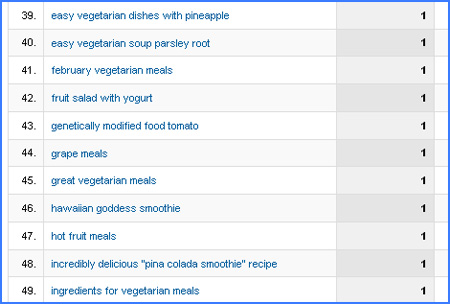
Search analytics for blogs

2. Pinpoint the posts that attract attention

Traffic analysis is a great way to find what most appeals to your reader:

  1. Identify pages which get most of the views and analyze how people got to them.
  2. Check those pages where people spent most time on. This is a great way to research what type of content is best to engage your readers.

Now, give them even more exposure:

  • You may want to check out some WordPress plugins that feature those most viewed posts;
  • Write more posts like those that attract attention and engage.
  • Link to the older posts from your newer ones. This will both boost your older post performance and give you another reason to write something fresh on the similar topic.
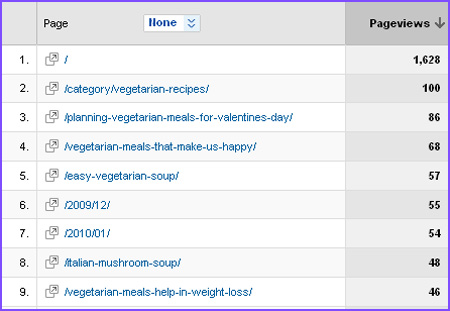
Blog search analytics

How do I do that?

Now that you are convinced that you need to know the basics of traffic analytics to better interact with your audience, the natural question to follow is how to actually do that. Well, there are quite a few very details and well-outlined bloggers’ guides to search analytics; below I am listing a couple of posts that really help (both are based on Google Analytics):

  • Blogger’s guide to Google Analytics: a very detailed, clearly written step-by-step tutorial targeted to bloggers.  Have it bookmarked and go through one section a day  (and you will learn it very soon!);
  • Google Analytics Plugin: you will need this one to easier install Google Analytics to Wordpress.

{ 13 comments… read them below or add one }

1 CJ @
(48 comments)
June 17, 2010 at 2:47 pm

I absolutely love Google Analytics, before using it, I was clueless and had no idea where my traffic was coming from or how much traffic I was getting. The bottom line is that not using Google Analytics is stupid Haha

CJ

CJ’s last blog ..Pay Per Click Kind of Sucks Or Kind of Rocks… What Do You Think?

Reply

2 ashok (69 comments) June 4, 2010 at 12:59 am

I will definitely apply your advice under “pinpoint:” I keep thinking “have to write more, have to write more,” and I tend to forget I have older posts that get good amounts of search traffic. Getting them more visibility and just even linking back to them once in a while can’t hurt, not at all.

Reply

3 Robyn from Sam's Web Guide - Web Tutorials & Tech News @
(4 comments)
March 10, 2010 at 5:27 pm

Good reminder Ann.

Another useful wordpress plugin that will easily display stats from the dashboard is Wordpress Stats and can be downloaded from the wordpress.org site here: http://wordpress.org/extend/plugins/stats/ – I tend to use this more often since it gives almost real time stats and is easily accessed through the dashboard.

Analyzing my traffic stats helps to keep me motivated to keep blogging, because here I can see my actual progress and potential reach.
Robyn@Sam’s Web Guide – Web Tutorials & Tech News´s last blog ..Top 30 Massive Earning Blogs – Its Time To Take Action My ComLuv Profile

Reply

4 Ricky @
(6 comments)
February 25, 2010 at 12:05 pm

Google analytics and keyword tools are best. I usually have a look at the best keyword for my blog in my analytics and try to target such keywords in next posts. It really helps to understand what people is looking in your blog.
Ricky ´s last blog ..Social Networking Website For Sports Lovers With Real Time Updates My ComLuv Profile

Reply

5 Dennis Edell @
(244 comments)
February 24, 2010 at 1:29 pm

This is a bad spot for me up to this point, I’ve rarely if ever checked any stats. i hope to get better at this, this year. :)
Dennis Edell´s last blog ..Do You Know The REAL Difference Between Bloggers and Internet Marketers? My ComLuv Profile

Reply

6 Dana from Blogging Update @
(57 comments)
February 24, 2010 at 10:30 am

Search engine analytics can make us to know the unknown part of our blog such as what exactly others think about our blog content, which article that really useful, and others.
Dana @ Blogging Update´s last blog ..6 Benefits of Guest Blogging My ComLuv Profile

Reply

7 Gordon @
(5 comments)
February 23, 2010 at 5:56 pm

Doing work without any kind of user feedback is much harder to succeed in. That’s why I say, never own a website or blog without Google Analytics. Google is the top internet search engine and it has a free analytics service, that’s a no-brainer.
Keep an eye on your stats and supply what the readers demand.
Gordon´s last blog ..Getting Rid Of Twitter DMs My ComLuv Profile

Reply

8 chandan from work at home jobs @
(28 comments)
February 23, 2010 at 3:06 pm

I have my great tool that is statcounter which give me all stats of my blog. I can evaluate all things through the statcounter stats like daily pageview, unique traffic, traffic source etc.
chandan@work at home jobs´s last blog ..Dofollow link building resource My ComLuv Profile

Reply

9 Michael Aulia @
(58 comments)
February 23, 2010 at 4:21 am

Nice writeup. I always check on my stats every morning but I’ve never actually tried to seek out those long keywords. Those long keywords mean something else and we can further use them to create better posts on our blog!
Michael Aulia´s last blog ..Why becoming a product reviewer is not as easy as you thought – Part 1 My ComLuv Profile

Reply

10 Rinaldi @
(1 comments)
February 23, 2010 at 3:42 am

Like this post! yeah I think all the things about blogging should and must be known by the bloggers to blogging activities running smoothly.
Rinaldi ´s last blog ..7 in 1 Business Success Wordpress Theme My ComLuv Profile

Reply

11 Shabnam Sultan @
(34 comments)
February 23, 2010 at 1:35 am

Traffic for bloggers is very important and long tail keywords brings decent traffic to your blog.
Shabnam Sultan´s last blog ..See Asteroid Vesta with your naked eyes My ComLuv Profile

Reply

12 DiTesco @
(170 comments)
February 22, 2010 at 9:37 pm

Thanks for the plugin, I have been searching for one and you have now made my life easier:) Analyzing your traffic is a very important aspect of blogging and the tips you have provided here in your post are top notch. Thumbs up
DiTesco´s last blog ..Microsoft’s (BING) Free SEO Toolkit Update My ComLuv Profile

Reply

13 Tom from Free Squeeze Pages @
(30 comments)
February 22, 2010 at 6:52 pm

I am slowly starting to get some decent longtail searches for my content. I am constantly checking now to see what people are searching for so I know what to target with future content.
Tom@Free Squeeze Pages´s last blog ..The Aweber Code….And Why You Need To Promote It! My ComLuv Profile

Reply

Leave a Comment

  Twitter (ID only. No links or "@" symbols)

CommentLuv Enabled

Our blog uses KeywordLuv. Enter "YourName @ YourKeywords" in the Name field to take advantage.

Sign up for our Newsletter

{ 6 trackbacks }