How To Blog and Start a Business

Add Rich Snippets to WordPress

Rich Snippets in WordPress

Search is changing more rapidly than ever. Probably you’ve heard about Google Rich Snippets, and how these snippets are designed to give users a sense of what a webpage may contain, and help them to discover websites that are more relevant to their searches, resulting in higher click-through rates.

Many SEOs and internet marketers implement rich snippets to their websites or clients’ websites, especially if they are selling a product online, runs their own e-store, or publishing product reviews.

Review information such as ratings and descriptions can help users to better identify pages with good content.

Finally, I’ve launched my new Pro version of Author hReview plugin today.

What this plugin dose

The Author hReview plugin adds Rich Snippets to WordPress.

It’s designed for authors or editorials reviews. It’s made for those who do product reviews, and wants to stand out in search results, increase their conversions, and web traffic in general, which leads to more sales.
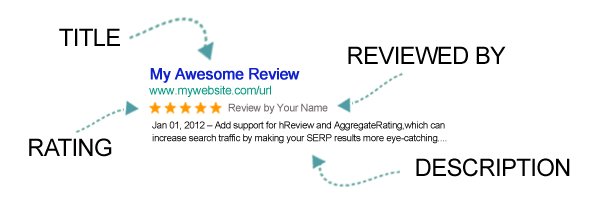
review google rich snippets

The most noticeable feature of the Author hReview plugin is the ease of use. This plugin make use of meta boxes which allows you to easily insert your review and rating information to your blog posts and pages.

So, basically you don’t have to go through any technical stuff, all what you have to do is to write your review, add additional information about the product in the custom meta box, and let the plugin take care of the rest!
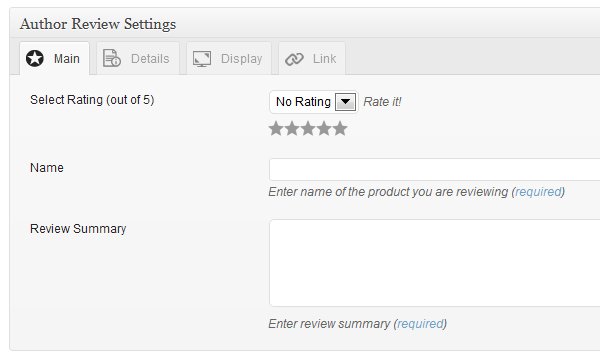
author review meta box

You can view more information on the plugin documentation page.

Now, let’s talk about the real cool stuff!

The Author hReview Launch

You can get this plugin for a special price during the launch time, there is a 50% discount of it’s original price.

You get 6 months of priority support and upgrades when you purchase the plugin.

You also get a free copy of the WP Customer Testimonials plugin as a bonus, this plugin will be sold for $45 right after the launch ends. Now, it’s your for FREE when you purchase the Author hReview plugin.

Here is what  the WP Customer Testimonials plugin dose:

This plugin adds a new Custom Post Type with support for rich snippets reviews and star rating to your WordPress site, which can increase search traffic and conversion! It has shortcodes to display a form on any page or post of your choice to allow your customers to send you testimonsials directly so you can publish them.
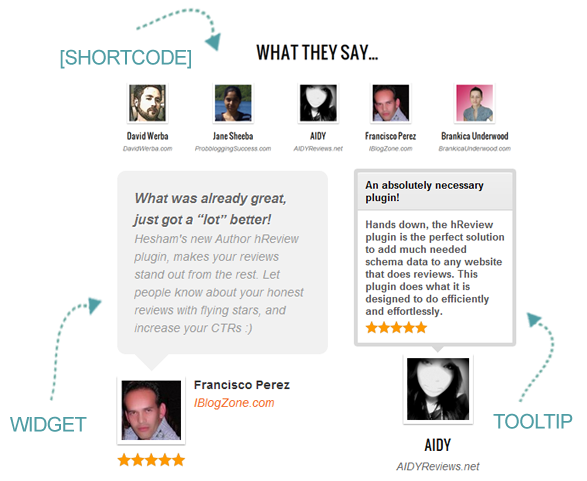
wordpress customer testimonials plugin

You can see a live example of how the WP customer testimonials plugin works at:

And, the best part is, it validate customer reviews in Google Rich Snippets test tool on the domain front page of your site, I’ve used my own site as an example to show you how it looks like:

rich snippets in search results

[box type="note"]The information I’ve used on rating is provided by the plugin page on the wordpress.org plugin directory, I’ve used this data because simply it’s real! You can check how the search results look like by searching for keyword “Author hReview” in Google.[/box]

If you sell a product of any type, you will really love this plugin!

[box type="spacer"]

50% OFF

Get Author hReview Plugin Now!

Plus a FREE Copy of WP Customer Testimonials plugin

[box type="spacer"]

Thoughts or Questions?

Feel free to ask in the comments and I will reply to you.

I create websites, and I develop Thesis Skins. I am a social network lover. I am also the night creature who works hard to keep this project up. Owner and founder of the Famous Blog.

Website → Personal Blog

GET FREE EMAIL UPDATES

Get our latest articles delivered to your email inbox, plus download our FREE 15 minutes later marketing guide.

We respect your privacy!

{ 22 comments… add one }

  • Prasenjit from Ad Blocking Internet February 1, 2013 at 9:37 pm

    Hi Hesham,

    The free version of the plugin does not have the option of fractional rating e.g 3.5 or 4.5 which would be an excellent feature to have. Any plans to include it into your plugin?

    Thanks.

    Reply edit
    • Hesham Zebida February 3, 2013 at 7:57 pm

      The half rating options is included in the pro version of the plugin, there is no plans to add it to the free version, consider the free version a light version of the plugin, I don’t think I will be adding any new feature to it.

      Reply edit
  • Nayan September 24, 2012 at 12:34 am

    Hi, does this plugin allow to integrate all snippets? like even author?

    Reply edit
  • Miguel Salcido July 5, 2012 at 5:17 pm

    But what if you already have authorship markup on your pages, will this override that or how will that work?

    I guess the best thing to do is use this on pages that make more sense over the authorship markup?
    Miguel Salcido recently posted..Producing Real Results in a Web of Virtual DistractionsMy Profile

    Reply edit
    • Hesham Zebida July 5, 2012 at 5:46 pm

      Hi Miguel ,

      The plugin doesn’t deal with authorship markup! It only adds rich snippets for reviews and ratings.

      Having both markups on the same page or post works with no issues though, we are doing it this way on famousbloggers.net

      Reply edit
      • Miguel Salcido July 5, 2012 at 6:12 pm

        Hesham, sorry for the confusion. I’m clear on what this plugin does but was curious as to what would happen if you had both authorship markup and reviews markup on the same page? Google doesn’t use a hybrid of both so how is it determined which to use.

        For instance this post gets your authorship markup and not the reviews markup.

        Also, have you seen any difference in CTR for authorship marked up pages vs review mark up pages in the SERPS. Wondering if one gets more click thru than the other?

        I suppose the authorship does since you get the picture in there. But I guess it depends on the query too.
        Miguel Salcido recently posted..Producing Real Results in a Web of Virtual DistractionsMy Profile

        Reply edit
        • Hesham Zebida July 5, 2012 at 6:22 pm

          This post has my authorship markup, but not the review or rating markup simply because it’s not a review :)

          Hit any of the review posts on the sidebar and check one of my reviews, you will see both working!

          P.S. Google didn’t explains it, but they made it clear that you can have more than one type of snippets on the same page. Actually the “review” and the “rating” are different types, so the rating is included in the review, then the author or the reviewer (in this case) the one who published the review, you can markup all these. I hope this makes it clear.

          - –

          For you other question, yes it happen that my CTR increase by at least 100% for some of my reviews, also I am pretty sure this help ranking the page higher, I am almost 100% sure of that from what I saw!

          However, still the SEO title and description is the most important part of getting a good rank in search results!

          Reply edit
  • Alan Tay from Security Blog July 2, 2012 at 11:24 pm

    Great plugin, Hesham!

    I would recommend this plugin to any affiliate marketers out there. Being able to visually rate a product gives your reader a clearer review on what you really think about the product.
    Alan Tay recently posted..Secure Your Diablo 3 Battle.net Account with AuthenticatorMy Profile

    Reply edit
  • Gera from Sweets Foods Blog July 2, 2012 at 2:31 pm

    Hi Hesham,

    I’ve been using the free lite version and is very good. Today, I updated it to a new free version.

    Questions:
    Is there an affiliate program of the pro version, public available? How it works and in which site handles that?
    Is the WP Customer for people who have registered in your site, or you can add some manually by yourself e.g. for a landing page or similar?

    Keep up the great work and the best for the launch :)

    Cheers,

    Gera
    Gera recently posted..S.M.I.L.E.: Word of Mouth Marketing for the 21st CenturyMy Profile

    Reply edit
    • Hesham Zebida July 2, 2012 at 6:21 pm

      Hey Gera,

      Glad to hear that the free version works fine for you buddy, and yes.. I rolled out some update with a few fixes yesterday.

      To answer your questions…

      1- Yes, there is an affiliate program of the pro version, however it’s close to only members who actually purchased the plugin license.

      2- The WP customer testimonials make use of custom post types, so basically you can add testimonials by yourself, also you can allow your customers to send you testimonials by a form. So, yes it works both ways!

      It’s perfect for a landing page, as it has a simple shortcode to display the testimonials on any post of page.

      I hope this answers your questions.

      Reply edit
  • James Johnston July 2, 2012 at 11:29 am

    Trust me guys this is a great plugin! I have been using the free version since release and had a lot of success. I also had the chance to test and use the pro version and I am impressed with ease of use and feature rich tools that are designed to help your reviews be more successful.
    James Johnston recently posted..Author hReview Goes ProMy Profile

    Reply edit
  • Jakes July 2, 2012 at 7:14 am

    Hi Hesham,
    It’s long time, I commented on one of your posts :-) . Nice article as usual. I have been using rich-snippets in ma e-mail signature. Earlier, I had been using wise-stamp for using rich signatures before Gmail itself introducing the rich-snippets provision . So, when I saw the title of article I was expecting such things. The plugin, you discussed here, seems good. But since, I have started writing reviews in my blogs, I don’t require it now. Still, am adding it to ma bookmark with the hope that I will need it in future ;-)
    Jakes recently posted..Impact of Portugal’s loss in Euro Cup on Social MediaMy Profile

    Reply edit
  • Mariella Lombardi July 2, 2012 at 4:45 am

    Hi Hesham, great article. It seems like this is a must-have plug-in, thank you for sharing this.

    Reply edit

Leave a Comment

CommentLuv badge
This blog uses premium CommentLuv which allows you to put your keywords with your name if you have had 3 approved comments. Use your real name and then @ your keywords (maximum of 3)