2012 was the year the password broke. I still remember how my GoDaddy account was hacked and I was about to lose my domain names for ever. With leaks and dumps become all too common, a string of characters can’t protect you anymore.
I personally started to use two factor authentication, and I highly recommend you start securing your online accounts today, make it hard for them.
Please enjoy this infographic: The future of the password :
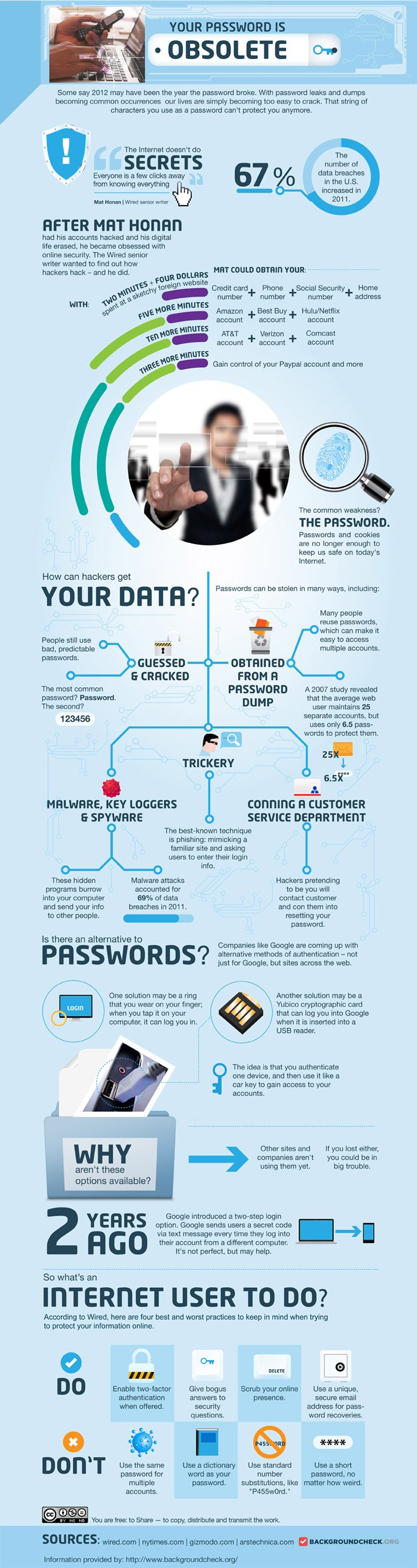
Infographic by BackgroundCheck.org : Your Password is Obsolete


Rahul Kashyap February 11, 2013 at 12:47 am
Really This is Informative and valuable post for every online reader and social network fans

Rahul Kashyap recently posted..Tyler Perry’s Temptation (2013)
Vivek February 10, 2013 at 11:13 am
Now I have to take step to ” protect ” my accounts.. Just check the real story here : http://www.wired.com/gadgetlab/2012/08/apple-amazon-mat-honan-hacking, its really amazing to read how hackers can assume your password and your username.
Sarah Park February 9, 2013 at 11:53 pm
Very detailed infographic. I stopped using the same password in all my accounts when my Facebook account was hacked two years ago. I don’t that to happen to my other accounts and to avoid further damage as well.
Jules Webb February 8, 2013 at 8:15 pm
Very nice infographic! I wish more applications provided 2 step verification. If anyone is looking for a stand alone secure password database check out KeePass, my personal fav.
RE: Using a unique secure email address for password recoveries.
What applications allow for this? I think email accounts are the only ones that give you an option of using more than one email address. I agree it’s a good idea, just not overly available.
Jules Webb recently posted..Keyword Research
Lola Stoney February 8, 2013 at 5:53 pm
Very informative. Hackers don’t rest or sleep, you only know about their activities if you have some security solutions in place which alerts you whenever anyone tries to hack into your site or information, and the type of activities they are engaged in.
My bank uses an amazing security key which provides a two factor authentication. No matter the level of tech involved, there will always be hackers and they will always find ways around it. The good news is we can always try to be a step ahead of them by following useful tips like the ones listed here.
Lola Stoney recently posted..Infographic: Google Plus Shortcut keys and Cheat Sheet for Newbies
Servando Silva February 8, 2013 at 3:47 pm
I started to use 2 factor authentication last year because having a blog or any website adds a lot of things to lose than simply an email account.
In fact, something I think it would be terrible o lose, would be your Facebook account or something similar, where you’re exposed with your personal details.
Seriously, guys, use better passwords now.
Servando Silva recently posted..7 important SEO Mistakes you can’t forget in 2013
Evan February 8, 2013 at 9:33 am
Great infographics! But not the greatest situation. I was wondering recently about such kind of opportunity to get the pass via phone and then log in. But I guess in 2 years someone will come up with some more convenient idea about password protection. Looking forward then) )
Easther February 8, 2013 at 9:03 am
Hey Hesham,
great! Post. Great handy tips you’ve got there on ow to protect your online information.
thanks for sharing it with us.
Easther recently posted..Chatwing Chat Widget – Definitely Blogger Friendly
Jacob Arvin February 7, 2013 at 9:53 pm
This is actually frightening. I use the same password for many of my accounts. Scratch that. I *used* to use the same password for many of my accounts, not anymore…