Check out ThesisAwesome.com and get $20 OFF Product Skin Thesis Skins
How to Tweet Blog RSS Feed via HootSuite

How to Tweet Blog RSS Feed via HootSuite

by on October 1, 2010 · 62 comments

I wrote something before about why I feed my Twitter with my list of Most Trusted Bloggers, it was my simple way to show appreciation to all my friends and fellow bloggers who have been working hard on their blogs to deliver quality content. I am using HootSuite to feed my multiple Twitter account with blog RSS feed, probably you know that you can simply manage multiple Twitter profiles via HootSuite.

My fellow bloggers asked me if I can publish some tutorial about how to tweet blog RSS Feed via HootSuite, it seems that a few people are messing the proper setup of maybe confused about it, so here you go guys, it’s very simple, and  oh! I remember now a very good and informative HootSuite for Blogging Guide at kikolani.com, it’s a must read in my opinion, so plz enjoy it!

How to feed blog RSS Feed to HootSuite?

1) Click on the Launch Button to open HootSuit menu
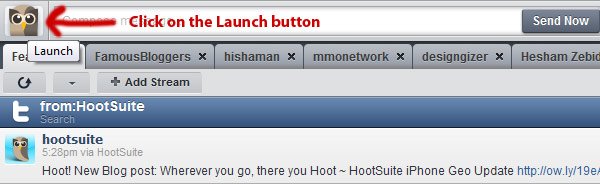
hootsuite launch button

2) Choose RSS/Atom from the drop down menu
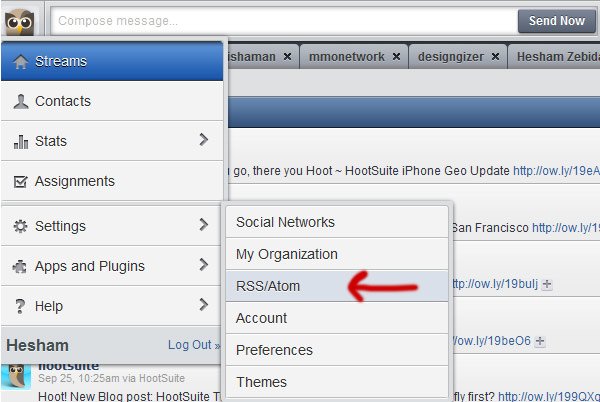
hootsuite rss atom menu

3) Add new Feed

The settings popup will open and then you will be able to add a new RSS feed, just click on the button!

hootsuite add new feed

4) Last Step: Add RSS/Atom Feed

The add RSS/Atom window will popup, now you can fill the fields as shown below, in this case I am using FamousBloggers Feed as an example:
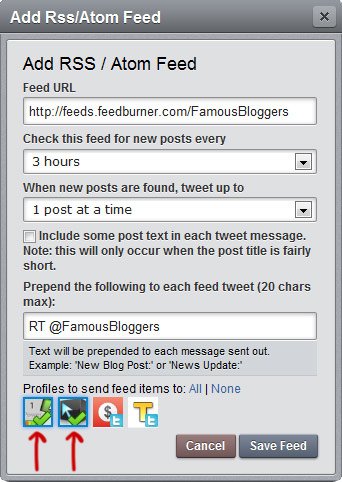
hootsuite rss atom

As you can see above:

  • I’ve used our blog RSS Feed
  • I’ve told HootSuite to check the feed every 3 hours for new blog RSS feed updates
  • Only one post to tweet each time
  • Un-tick the include some post text
  • I’ve added RT @FamousBloggers to the tweet
  • And, finally I pick two of my Twitter accounts to send the tweet

Now, hit save feed button, and.. you are done!

You can add as many blog feeds as you want, and tweet from different and multiple Twitter accounts.

But, Hey.. Don’t automate everything in your life, remember to be Human on Twitter!

Some additional explanation

I’ve told HootSuite to look into the feed every 3 hours, if there are any new blog posts, then HootSuite will tweet it immediately. But I also set my HootSuite settings NOT to tweet more than one post per 3 hours, this means if the blog is updated with 2 posts during the last 3 hours, then only one post will be tweeted.

Another important thing is to un-tick the check button where it says “include some post text in each tweet message”, this will give a room for your followers to re-tweet your tweets without messing a few words, also it’s not recommended you use the 140 characters, this is how the tweets will look more clean. I add “RT @FamousBloggers”, also here you can use whatever you like, maybe something more smarter! But in all cases I recommend adding Twitter ID of the blog you are tweeting from, by this way they will be informed as you mention their Twitter ID in the message.

Do you need some awesome Twitter Tips?

Alright, here is 10 useful picked posts for you:

  1. The ONLY Twitter Guide you will ever need to Actually Make Money by Tweeting
  2. How To Be Important on Twitter?
  3. How to Get Targeted Twitter Followers Fast
  4. FollowFriday Helper App makes it easy to recommend Twitter Followers
  5. How To Get More Twitter Followers
  6. To Schedule tweets or NOT to tweet?
  7. 6 Best Practices for Twitter Marketing
  8. 10 Killer and Effective Twitter Tips for Bloggers
  9. How to Tweet Like A SuperStar!
  10. Linkify Twitter usernames in Thesis Theme TwitterLink Comments

That’s all

Now you are able to share your trusted blogs that has quality content, let HootSuite do the job while you are working or relaxing, or even in a vacation!

Enjoy your tweets and share the love by tweeting this post if you think your followers will like it :)

Article by Hesham Zebida

I create websites, and I develop Thesis Skins. I am a social network lover. I am also the night creature who works hard to keep this project up. Owner and founder of FamousBloggers.net.

Write for us a guest post

{ 59 comments… read them below or add one }

Robert from Micro Niche Finder
Twitter:
February 3, 2012 at 5:32 pm

I never hear about HootSuite before, but this little application is relly great as it allows you to update all your twitter accounts with your blog RSS feeds from one place where everything is centralized

Reply

Mark July 16, 2011 at 3:37 pm

Little known secret about HOOTSUITE…the real time tarcking stats are gold for testing what types of email subject lines will get the clicks and which ones don’t…hint, hint.

That one was for free fellow FamousBloggers readers…;)

Mark
Mark recently posted..Huge List Of Classified Ads For Internet MarketersMy Profile

Reply

Rae March 29, 2011 at 5:26 am

Very informative post. hootsuite should be utilize fully and this post just make it clear.

Reply

Wayne John February 17, 2011 at 6:35 pm

I’ve just started checking out Hootsuite since my Twitter sabbatical. I’m going to go check this out now…thanks Hesham!
Wayne John recently posted..How to automate tweets with the Twitter APIMy Profile

Reply

Brad Harmon February 4, 2011 at 4:10 pm

Great tutorial, Hesham. I like the extra control that HootSuite offers you that many other ways of automating your posts to Twitter do. I also appreciate your reminder not to automate everything. There are times when Twitter seems only to be populated by bots and feeds. Thanks for teaching how to set this up in HootSuite.
Brad Harmon recently posted..How to Improve Your Twitter ProfileMy Profile

Reply

Steve October 14, 2010 at 9:31 pm

I user TwitterFeed for this kind of RSS to Twitter feature. I do like HootSuite for all other Twitter type functions. I used to use Buzzom for following and unfollowing and had to switch to JustUnfollow when Buzzom got cut off from the Twitter API.
Steve recently posted..Sex Offenders Registry IndianaMy Profile

Reply

Michele Welch October 6, 2010 at 10:39 am

Thanks for the awesome tutorial Hesham! I’ve used Tweetdeck up until now, but I keep on hearing more and more how great Hootsuite is.

I think it’s time I give it try. =) Ciao!
Michele Welch recently posted..Creating DoFollow And NoFollow Links On A WebsiteMy Profile

Reply

TJ McDowell
Twitter:
October 6, 2010 at 8:35 am

It seems to me like the purpose of a tweet is changing from the original use. When I first started looking at Twitter, people were using it to share the mini-details of their daily routines, but now it seems like it’s just another medium for communicating. Have you noticed this trend too?
TJ McDowell recently posted..Jpeg ReplacementMy Profile

Reply

Bob October 5, 2010 at 4:38 pm

Good article, Hesham. I have been using Hootsuite for about 2 months now, and I love it. Didn’t know about the RSS feeds, though. I love the fact that I can update Facebook, Twitter, and LinkedIn all in one spot, plus track all of them as well. Plus, I love the interface–much nicer than TweetDeck in my opinion.

Reply

Kavita October 5, 2010 at 9:18 am

Excellent informative article Hesham. Never heard about Hootsuite before. I am using twitterfeed to send my feed automatically to my twitter account. It will be interesting if using it increases my feed subscribers. Does it?
Kavita recently posted..Godaddy Coupons for October 2010My Profile

Reply

Kimi October 4, 2010 at 5:23 am

I have read very often in some blogs about hootsuite, will definitely try it if i got a chance.

Thanks for the complete image of hootsuite.

Ps. When i type famousbloggers.net in the browser, i land of this page: http://www.famousbloggers.net/wp-content/w3tc/pgcache/_index.html.gzip

Is this normal?
Kimi recently posted..Insert Breadcrumbs Code -Thesis TutorialMy Profile

Reply

Levi October 2, 2010 at 9:07 pm

Facebook actually uses Hootsuite on their twitter account, that’s when I first decided to try it out. I’m using the free version right now, its really a nice way to keep your social networking tools under “one hood”.
Levi recently posted..Free BoardMy Profile

Reply

ZK October 4, 2010 at 2:22 am

All big and serious bloggers are using Hootsuite … though few people want to show that they are different … but this one is the best one ( I am also planning to shift to it)
ZK recently posted..4 Reasons to Use VPS as a Hosting SolutionMy Profile

Reply

Richard October 2, 2010 at 10:37 am

Thanks for the info on Hootsuite. I’ve been using some plugins and twitterfeed to tweet my posts. But this looks like it may be more efficient.
Richard recently posted..Themes- Plugins- and Widgets Oh My!My Profile

Reply

Pankaj Gupta October 2, 2010 at 10:24 am

This is the complete tutorial for beginners . Great Post thanks for sharing.
Pankaj Gupta recently posted..How to Drive Lots of Traffic to Your Website From Twitter Series 2My Profile

Reply

Chadrack
Twitter:
October 2, 2010 at 9:19 am

Though I’m not really using hootsuite right now but I must say this is a great tutorial. It’s well laid out and right on the point. You do have the ability to make things simple!
Chadrack recently posted..Making Money Blogging And The Web Income Journal- Where Are We HeadedMy Profile

Reply

Lennart Heleander from Property Marbella October 2, 2010 at 6:46 am

Hi Hesham,
Thanks for the ref. to your list over your “Most Trusted Bloggers” I must have miss that article and its going to be interesting to read their blogs.

Reply

Trues October 2, 2010 at 6:03 am

A new bunch of information here for tweeter lovers.

How can I tweet multiple posts? Any suggestions from your side, Hesham?
Trues recently posted..MazaKaro Monthly Income Report September 2010My Profile

Reply

Michael October 2, 2010 at 4:35 am

Hi Hersham

I’ve just started using Hootsuite so this tutorial is very timely and very useful.

Thanks for sharing.

Michael

Reply

Jasmine October 1, 2010 at 11:27 pm

Great tutorial there, HootSuite looks great! But I still have not get my Twitter account yet. :)
Jasmine recently posted..StartLogic ReviewMy Profile

Reply

Hesham October 1, 2010 at 11:51 pm

mmm, that makes me think.. what’s good on this post for you ;)

Reply

benin
Twitter:
October 1, 2010 at 10:30 pm

As always Hesham, this post is very well thought out. leaving room for retweets is the type of detail that’s so easy to overlook. Thanks for pointing these tips out.
benin recently posted..Social MediaSalesMy Profile

Reply

Hesham October 1, 2010 at 11:31 pm

Hey Benin, yeah man.. leaving a room is a good thing especially you don’t know when someone will retweet your tweets! haha

Reply

ZK October 2, 2010 at 2:02 am

Giving space for RT is small but this one is the most important to get more exposure in the twitter world.

Now let me try this tutorial practically.
ZK recently posted..4 Reasons to Use VPS as a Hosting SolutionMy Profile

Reply

Khalid J Hosein October 1, 2010 at 9:09 pm

You learn something every day… I’ve been using Hootsuite for some time and had no idea you could do this. Now I get why some people love HS.

I’ve been using TwitterFeed to auto-tweet my blog’s posts to Twitter myself, and that’s after going through more than a few plugins for Wordpress. Twitterfeed has been much more reliable.
Khalid J Hosein recently posted..Neuros Control Tablet 1002 comes with Boxee remote controlMy Profile

Reply

Hesham October 1, 2010 at 11:34 pm

Khalid, I think people will love more when they know how to use HootSuite !

Even me.. I don’t know everything about HootSuite .. just a little!

P.S. thank you so much for the extra information!

Reply

Will October 1, 2010 at 2:28 pm

Hi Hesham,

Great of you to post about this – thanks very much. As you know I had problems getting this to work and your post has made me check everything again.

Well, the steps you list are easy to do and well explained – and, srangely enough, are exactly what I did first time round ! So why didn’t it work for me before?? The answer is ( as I found out after checking everything again) that I hadn’t granted HootSuite access to my twitter account ! Stupid of me really – but maybe worth adding a note about above in case anyone else overlooks this detail…

Ok, thanks again, it’s a great service – and one that I’d probably have missed out on without you being good enough to post on the topic.

Have a great weekend !

Cheers
Will
( stumbling & digging here right now before signing off for the night!)
Will recently posted..Noaspa News – 08092010My Profile

Reply

Hesham October 1, 2010 at 11:50 pm

Oh! alright :) now we know.. thanks for this Will, I will update post and add this very important note :)

Great weekend!

Reply

Kimberly Castleberry October 1, 2010 at 12:54 pm

Hesham, I’ve got a post just like this drafted that I’ve not been willing to publish. The reason being is not too long ago information about Hootsuit moving to a “freemium” (free + premium) offering was sent to their list and it was restricted to two feeds in their free package. When I added that to the support tickets I’ve had to open while they try to get this working consistently it just hasn’t been worth me talking about it yet. I love hootsuite to bits but just have had real issues keeping feeds publishing consistently. Even Harsh’s shoutmeloud feed they were telling me was not validating (false, it works fine), and would not publish consistently through their too.

Details here: http://hootsuite.com/plans
Thing is they made all this announcement and then its gotten quiet. I don’t know whether they will delay indefinitely or not.
Kimbelry
Kimberly Castleberry recently posted..Are These Two Facebook Profile Permissions Limiting Your Networking AbilityMy Profile

Reply

Hesham October 1, 2010 at 1:23 pm

mm.. Kim, I am actually tweeting Harsh’s posts through HootSuite (I should give him credit because he was the one who’ve told me about it) I had no problem with his feed as I am doing this for the last 2 months!

If you are having problems with validating a feed, it’s not a HootSuite mistake, it’s because some bloggers have their Feedurner not setup well!

This usually happen after immigrating to a new domain name, Feedurner for some reason doesn’t add “date and time” to the feed! this could be the big reason why it’s not validating! although it’s easy to solve this by playing a little with Feedurner setting to add dates info to the feed!

Reply

Kimberly Castleberry October 1, 2010 at 11:40 pm

I shifted all my feeds back over to http://dlv.it since I find it unlikely I’m going to pay for hootsuite’s premium access.

Perhaps you could do a post about getting the timestamps set up on feedburner feeds correctly that we could share. It’s not something I have experience with.
Kimberly Castleberry recently posted..How To: Change Your Twitter Name Without Losing FollowersMy Profile

Reply

Hesham October 1, 2010 at 11:47 pm

This is a good suggestion, I actually helped a friend once to set it on his feed, but I forgot how we did it :)

I will try to remember!

Reply

Mani Viswanathan October 2, 2010 at 5:21 am

As kim mentioned, a post on setting up Proper Timestamps on Feedburner would help many Bloggers. I myself need to research on the time-stamp feature. (though not facing any errors until now)

Reply

Steve
Twitter:
October 1, 2010 at 12:44 pm

Well done. A nice way to add an RSS feed and a very nice and clear instructions. Additionally a great links to all of the other wonderful related twitter articles. I missed a few along the way and they were some great reads to go back and check them out!

Thanks, you rock!
Steve recently posted..How I Learned about Marketing from a DragonMy Profile

Reply

Hesham October 1, 2010 at 1:15 pm

Hi Steve, glad to hear that :)

Probably explanation was clear because it’s really simple!

enjoy your weekend!

Reply

Justin Germino
Twitter:
October 1, 2010 at 10:41 am

This is a fantastic way to showcase other bloggers that you follow and promote all the time, but I tend to be selective on what articles I retweet and don’t send any RSS feed to a tweet except for my own. All others are manual. This does seem like a good option for users who don’t want to use the Google Feedburner Sociable feature for their own sites.
Justin Germino recently posted..Instant Messaging- Phone vs ComputerMy Profile

Reply

Moon Hussain October 1, 2010 at 12:54 pm

First–very, very handy Hesham. Great job with including step-by-step directions. But I am kind of like Justin: I need to read the post first to see if it’s interesting or worthy.
Moon Hussain recently posted..Why Missing Out On Networking Could Kill Your Blogging CareerMy Profile

Reply

Hesham October 1, 2010 at 1:25 pm

What to say? … Still there are blogs to trust without reading! (personal opinion)

Reply

Justin Germino
Twitter:
October 1, 2010 at 1:48 pm

This is true, but too many feeds I see are just people retweeting Mashable, Chris Brogan…etc by default. Chances are you already follow the big ones so having the smaller people just setup feeds for the giant bloggers is really just twitter whitenoise.

Now, its different when you feed in a smaller blogger or one who you haven’t discovered yet, then sometimes you can get some good info (but in many cases you may not want to promote every article unless you are die hard fan about everything/friend).
Justin Germino recently posted..Instant Messaging- Phone vs ComputerMy Profile

Reply

Hesham October 1, 2010 at 1:07 pm

Justin, I understand.. I do manually also when I think I can’t trust the blog enough, or it publish a lot of promotion articles, some other will not follow this idea for blogs that affiliating some products (for example) and they are aff it as well! so this consider promoting someone else’s aff!

For me, it doesn’t really make a big difference, this blog meant to support others, as in some how it’s a community blog, also I don’t use my personal Twitter ID to do it!

Reply

Justin Germino
Twitter:
October 1, 2010 at 1:49 pm

This is why I especially dont’ setup RSS feed for blogs that are made up of multi-author or guest bloggers, since you don’t always know if it is something you will promote to, especially with affiliate marketing posts.
Justin Germino recently posted..Instant Messaging- Phone vs ComputerMy Profile

Reply

Mark Walker October 1, 2010 at 10:32 am

Great post, I’ve used hootsuite for a year and obviously not used it to it’s potential. Thanks for taking the time to explain.
Mark Walker recently posted..A Realtor is Instrumental in Buying Edmonton Real EstateMy Profile

Reply

Hesham October 1, 2010 at 1:02 pm

Hi Mark, I think Hootsuite has more features than we really need
Thank you stopping by

Reply

element321
Twitter:
October 1, 2010 at 9:43 am

Great post Hesham,

Great little tutorial on how to add RSS feeds to Hootsuite. Its very easy to add the feeds and I like better than twitterfeed.
element321 recently posted..Best PhotoShop Tutorials Created in SeptemberMy Profile

Reply

Hesham October 1, 2010 at 1:00 pm

Cool then, now maybe you will be able to un-tick that check-box to stop appending text from the post in your tweets ;)

Reply

Ryan Biddulph October 1, 2010 at 8:40 am

Hi Hesham,

Thanks for sharing the Hootsuite RSS tutorial and the twitter resources. I like the screenshots.

My favorite piece of advice? Be human on twitter! Well said my friend.

Enjoy your weekend.

Ryan
Ryan Biddulph recently posted..A Hearty Thank You and Big Changes at RBs KeysMy Profile

Reply

Hesham October 1, 2010 at 12:59 pm

haha yes Ryan, we really don’t have to automate everything and then forget about each other!

Good weekend buddy

Reply

Ileane
Twitter:
October 1, 2010 at 5:04 am

Hey Hesham, fantastic tutorial for HootSuite. I know you have a trusted list of bloggers that you have added feeds for and I agree with your choices. Also I notice on your Tweets that you give credit to the person that created the post.

But I see some folks have added Mashable or TechCrunch to their Twitter streams without mentioning that is where the tweet is coming from (I think they are using Twitterfeed). Is there a tip that can avoid this? Or is that controlled by the original author of the post somehow?

Thank you for showing details of how to do this.
Ileane recently posted..How to Install CommentLuv on BloggerMy Profile

Reply

Hesham October 1, 2010 at 12:58 pm

Having Mashable or TechCrunch is not something I recommend! I always look to support the upcoming bloggers!

The author of the post has nothing to do with it, some of them will not even know that their posts has been tweeted in some cases!

The one who control the Twitter Id is responsible for this, he didn’t add the @ Twitter_ID to his/her tweet! and this is not good thing in my opinion!

This can be done by Hootsuite the “Perpend the following to each feed tweet” field!

Reply

Kevin Douglas
Twitter:
October 1, 2010 at 4:56 am

Great post, Hesham. I believe this is one of those posts, like just about all of the posts here at FB, that is a great value to readers. I use HootSuite for my trusted bloggers, as well. It’s the best way to get great content out to the people who follow you.

Thanks, my friend.
Kevin Douglas recently posted..The Bloggers You Should Follow seriesMy Profile

Reply

Hesham October 1, 2010 at 12:52 pm

Hey Kevin,

I can also add it will benefit by two ways, the first is you are tweeting interested stuff which attract more people to follow you, and this happen with me, I got an average of 20 followers/day , and the other thing is you actually helping on promoting content from those trusted blogs, this will help on building a good relationship fast!

Reply

Gloson October 1, 2010 at 4:51 am

Hi Hesham! Great step-by-step post! I’ve never thought of adding RSS feeds to Hootsuite before, but now Famous Bloggers is the first blog in my Hootsuite RSS list! :)
Gloson recently posted..It’s Not Really What You Say- but How You Say ItMy Profile

Reply

Hesham October 1, 2010 at 12:46 pm

Cool ;)

It’s pretty easy way to share the love!

Reply

Patricia
Twitter:
October 1, 2010 at 3:32 am

Yet again you give clear concise instructions Hesham. When I first set up my blog I had someone who knew what they were doing set mine up. Will bookmark this page so if I want to add anything I’ll know what to do. thanks.
BTW can I ask a question here. When you RT old posts, is it okay to comment and ask questions on those posts or no?. I know some bloggers don’t like comments on old posts. If it is new information for me I often have a question to ask.
Patricia Perth Australia
Patricia recently posted..Growing Lavenders-Your Favourite Gardening ToolMy Profile

Reply

Hesham October 1, 2010 at 12:45 pm

Hi Patricia,

The reason some bloggers don’t like comments on old posts is they get a lot of spam, spammer usually hit the older posts to keep a way from eyes, and also because some of these older posts are ranked higher!

If comments are open this means you are allowed to comment or ask a question. The problem is in many cases bloggers will not respond to you! we try to rely to every single comment especially when help is needed!

So, feel free!

Reply

Patricia
Twitter:
October 1, 2010 at 7:59 pm

Thanks Hesham. Just didn’t want to be labelled spammer as learning heaps from you and other experienced bloggers.
Patricia Perth Australia
Patricia recently posted..Lavender Products- Why Choose Organic LavenderMy Profile

Reply

Rose April 11, 2011 at 2:37 am

Hi Hesham,
I have read this awesome post from you last year but didn’t add comment or asked any question because I thought I will not need it but in present time, I have to manager several social media account, I do need some tools.

I am TweetDeck fan, also using Socialoomph free version, thinking to go pro because of their fantastic features such as schedule new update and queue reservoir. I never try HootSuite; do they also have these features? Reason I ask because HootSuite price a lot cheaper than Socialoomph. :) Thank you.
Rose recently posted..Fernando Botero’s Paintings – The Perfect Art Pieces for Every HomeMy Profile

Reply

Hesham April 11, 2011 at 3:07 am

Hi Rose,

Scheduling is one of the first features that you can use HootSuite to do, and you should do that with the free account!

There are amazing other features has been added recently, and HootSuite guys are working all the time to add more, for example the amazing stats and reports that allows your to track your social profiles and accounts performance and more!

Check it out!

Reply

Rose April 11, 2011 at 3:27 am

Hi Hesham,
Too late. I can’t wait for your answer. I am on the process to pay them now. :)
Rose recently posted..Fernando Botero’s Paintings – The Perfect Art Pieces for Every HomeMy Profile

Reply

Leave a Comment

  Twitter (ID only. No links or "@" symbols)

CommentLuv badge

This blog uses premium CommentLuv which allows you to put your keywords with your name if you have had 3 approved comments. Use your real name and then @ your keywords (maximum of 3)

{ 3 trackbacks }

Web Analytics