Check out ThesisAwesome.com and get $20 OFF Product Skin Thesis Skins
Design Tutorials That Will KickStart Your WordPress Site

Design Tutorials That Will KickStart Your WordPress Site

by on September 1, 2010 · 64 comments

Everyone who has been blogging for any amount of time has heard the phrase “Content is King!” So if content is so important and I agree it is very impoartant, what is second most important thing about a website? There are many opinions on what is most important or what the second most important part of a website is.

For me its simple, its design. You can have great content, but if you have a boring website or a poorly designed website I am not staying around long enough to read the content.

Most people will agree with me on this, design is important, the design of website not only needs functionality, but it also needs to be pleasing to the eye. A site that is pleasing to the eye we will have a good design, and not be a boring black and white site without images.

One of the easiest ways to have a well designed website is to use is a self hosted WordPress site. WordPress can be configured as a blogging website or just a static paged website. The best part is, there are literally thousands of free, subscription based, and premium themes available to WordPress users. What this means to the WordPress users is, the site owner does not need to know web design. All they need is a little training on how use WordPress and a ability to pick out a theme that works in the site owner’s niche.

I am big believer that subscription based and paid premium themes are the best choices for site owners.  When choosing a theme, you not only have to look for a good design, but you need you need to know the site was coded properly and can easily be customized to individualize the theme. With free themes, you have to be careful, some of the free themes, will not have validated code and if you validate the code it will fail. Also a lot of themes require you leave a back link to their site and if you try to remove it, it breaks your site. So if you choose a free theme, read the reviews, read the fine print (Terms of Service) and only download from the WordPress Themes Directory.

Once you choose the theme that works best for you, then its time to make it your own. What I mean by this, is to modify the code and change the look of it. You can add static images, floating social bookmarking buttons, add logos and backgrounds or anything you can think of. If it can be coded, then it most likely can be done. But in order to do this, you need to know basic web development skills. You will need to know PHP, CSS, and a little jQuery. Don’t get worried, you don’t need to be web Dev Guru! There are so many online tutorials out there, you can teach yourself the basics of coding and the more you work on your site, the better you will become with web design and coding.

To get you started, I wanted to give you a list of my favorite WordPress customization tutorials found on DesignGizer.

NOTE: Before jumping into any of these tutorials, ALWAYS BACKUP your website!

Make sure you have a good database plugin that is active and backs up daily if not multiple times a day. Second, when working on any PHP, HTML, or CSS file, make sure to back those up. You can go into your admin dashboard >>> Editor>>> choose File to be edited. Once you have that file up, right click >>> Select ALL >>> Copy. Once the code is copied to your clipboard, then open up a new note pad or word document and past the code into a file and save it to something you know and keep it. If you can make a mistake you can always copy it back to the file on your admin panel.

Design Tutorials For WordPress

Now for the list! Most of the tutorials range from beginner to advanced.

1- Add a side bar widget to showcase your feedburner subscriber stats

abstract orange rss

The first tutorial I wanted to share with you is how to add a side bar widget to showcase your feedburner subscriber stats. The article goes into detail how to perform this and as a bonus, the author shows how we can add the graphical feedburner stats to the end of the post. I looked over the tutorial and it was well done. If you follow the instructions and know the basic file structure of WordPress and your theme, then you can do this tutorial.

Create A Sidebar Widget to Display Your Feedburner Stats in WordPress.

2- Share Your Articles In Style

share the love

This article shows us another great way to share your bookmarks without having to use a plugin. As most know, plugins can slow down your site’s load time and some plugins may have coding errors that could cause unknown errors on your site. In my opinion, if you can manually add the code to your theme, then you should code it. The best part is, whatever you are trying to add, you can add it where you want and it displays however you want it to. After reading this tutorial, it looks pretty straight forward and you can even add or remove submit buttons to whatever you want.  As for how easy this tutorial is, I would say beginner, if you just add their code. If you want to add more to it and change the look, then this tutorial would be for a person that has a more advanced knowledge of coding with WordPress.

So if you want to create your own social bookmarking share button design, check out Share Your Articles In Style.

3- Add Author Bio Box to WordPress

author box wordpress

The next article is an article I wrote back in March about adding an author bio box to the end of the post. I created this tutorial because I did not like the plugins at the time that made it easy to add a bio box to your site. Most of them had next to no configuration options. So I coded it myself. With some help from Hesham, we figured out how to add this to the end of the post as seen on my site. This tutorial works great and if you use the Mystique Theme then you can copy the code and drop in place. It should work without any modification.  I give this tutorial an advanced knowledge of WordPress Theme coding  to make these changes. I give it and advanced rating because, you need to know a little CSS in order to get the box to line up correctly and look good at the same time.

How to Add Author Bio Box to WordPress without a plugin.

4- How to Add a Floating Share Box to your site
floating box

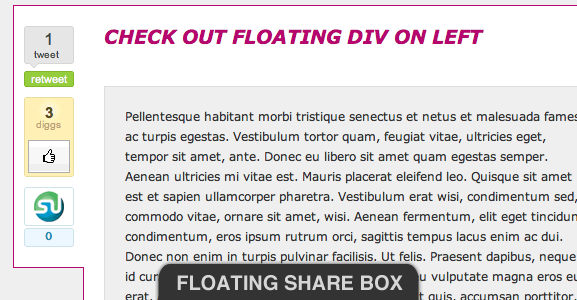
I came across this article back in May and didn’t think much of it. I thought it was pretty cool, but I was moving in a different direction for my bookmarking buttons. What makes this article different is, the author shows us how to create and style your own floating bookmarks. The author designed his floating bookmarks to be like Mashable’s and several other site’s floating bookmarks. For me, this is the route that I will have to go, if I were to add floating bookmarking tools. The plugin I tested on my site, does not work and after playing with settings and code, it still wouldn’t work. This tutorial is easy to follow and the author also offers a download of the files and code to create this on your site. If you can follow the instructions and know a little about CSS and PHP then you can complete this change to your site. If the floating box doesn’t match up the way you want it, you will have change the float settings.

How to Add a Floating Share Box to your site.

5- Create a beautiful minimalist WordPress Theme using Adobe Photoshop

Beautiful Minimalist WordPress Theme

The last article I wanted to share with you today, is one for advanced users who have a knowledge of web design and Photoshop. This article is all about creating a theme using Photoshop. Its a great article and if you know how to use Photoshop, then it makes it easy to create the layout. Then once you got that setup, then you can take your design to Developer and the developer / designer can then slice it up and code it for you. I can create the layout but I do not have the knowledge to code it. Even if you can’t or do not want to create your own themes, you should check it out, so you can see how much work it takes just to create the theme itself.

How to create a beautiful minimalist WordPress Theme using Adobe Photoshop.

This is it!

Your thoughts are much appreciated!

Article by James Johnston

spends most of his free time using social media and loves to teach others about design, web development, CSS, SEO, and social media. He is addicted to Wordpress, and social media. You can reach him website, Evolutionary Designs Blog.

Write for us a guest post

{ 58 comments… read them below or add one }

Wesley Shirer August 23, 2011 at 5:11 pm

My brother suggested I might like this web site. He was entirely right. This post truly made my day. You can not imagine just how much time I had spent for this information! Thanks!

Reply

cory March 1, 2011 at 1:04 pm

Great article im just geting into wordpress and loving it. I will have to try the author box sounds very interesting..

Reply

cory March 1, 2011 at 12:58 pm

Thanks for the useful information and it is so true that sometimes simple is the best way..

Reply

Brett Widmann January 28, 2011 at 7:28 pm

These are great tutorials! I’m going to tell my friend about this page because she is just getting started with wordpress.
Brett Widmann recently posted..The History and Present State of Domain Names InfographicMy Profile

Reply

Usama September 30, 2010 at 2:48 pm

The article covers up everything on designs. Solid information.
Thanks.
Usama recently posted..Who Are You Outsourcing Your Self-Worth ToMy Profile

Reply

Chadrack from Home Business Marketing
Twitter:
September 8, 2010 at 7:55 am

Blogging is truly becoming a creative thing! When I saw the headline, “Design Tutorials” I was wondering what the post was up to. I now know that design tutorials is not just about website designs!

I’ve always used plugins to do major peep up on my blogs and then a little manual change here and there. But as you said, plugins are a headache when it comes to load time. I think pulling out some of the plugins and doing a manual coding is a good idea.

Reply

bryan September 4, 2010 at 7:38 pm

that’s a really fantastic design list. I was actually thinking of where to get ideas for author box on my blog. hmm you mentioned something about some advanced knowledge for coding required, I think i’ll take the challenge
bryan recently posted..Hyper Facebook Traffic Pre-Launch ReviewMy Profile

Reply

Dennis Edell September 3, 2010 at 5:11 pm

Sweet! While I don’t do much coding myself, I will definitely be sharing some of this with my designer if I want any of it. :)
Dennis Edell recently posted..Welcome To The All New DennisEdellcom!My Profile

Reply

Mike Nguyen September 3, 2010 at 3:16 pm

Hi James,

Thanks for these helpful links to spice up our website design :) they’re really great!
Mike Nguyen recently posted..Top 3 advices on how to find a profitable niche to make money onlineMy Profile

Reply

Tia September 2, 2010 at 12:07 pm

Hey James,

These tutorials are awesome. I have been on plugin overload lately so I need to find some better solutions. I love the floating social bookmark one.

Cheers,
Tia
Tia recently posted..Ask the Experts- What If I Can’t Afford CollegeMy Profile

Reply

Cindy
Twitter:
September 2, 2010 at 7:52 am

Great article James! I might try that author box on my header sometime and see if I can add the number of articles written.. nice job!
Cindy recently posted..Enhance WordPress Posts with Post Layout Pro pluginMy Profile

Reply

element321
Twitter:
September 2, 2010 at 9:22 am

Thanks Cindy!

I am looking forward to see what you can do with these tuts on your site.

Reply

ZK September 2, 2010 at 7:31 am

Certainly a good looking website is important but there are many bloggers who are using very simple design and they are still on demand …

But their main important point is great content and consistency.
ZK recently posted..Download The Copywriting Scorecard for BloggersMy Profile

Reply

element321
Twitter:
September 2, 2010 at 9:22 am

Simple design is still design:) Sometimes Simple is better. I have setup several client sites are simple one page buisness card style sites and they look great.

Reply

ZK September 2, 2010 at 7:18 am

I will pass this post to my designer.

I am sure he will get many things from this post.
ZK recently posted..Download The Copywriting Scorecard for BloggersMy Profile

Reply

element321
Twitter:
September 2, 2010 at 9:19 am

thanks ZK!
element321 recently posted..Manually Install Digg This to Your WordPress ThemeMy Profile

Reply

Julius September 2, 2010 at 3:53 am

Great tutorials James. I took a look at every single one. Is this going to be like a weekly design round up?!
Julius recently posted..Glimpses on Understanding LifeMy Profile

Reply

ZK September 2, 2010 at 7:20 am

That will be nice if he start it like weekly …

Starting from header tips to footer and taking questions in comments section.
ZK recently posted..Download The Copywriting Scorecard for BloggersMy Profile

Reply

element321
Twitter:
September 2, 2010 at 9:19 am

Julius,

Hesham and I talked about this and decided we do a weekly round up. So I will be doing a design list for DesignGizer and several other favorite sites when I can not get enough tuts to complete a good list.

So my goal is going to be a weekly article plus other articles I will be writing for my site and famous bloggers…
element321 recently posted..Guest Post- Design Elements That Will Kill Your WebSiteMy Profile

Reply

Andreas from Online Advertising September 2, 2010 at 3:19 am

I agree that after content comes design, or more important, the navigation structure. If the structure is uniform on all pages and all sections are reachable within 1-2 clicks, chances are high that I will be a frequently returning visitor of that site.

Reply

ZK September 2, 2010 at 7:21 am

Yes design should be clean and should add lively and cheerful colour.
ZK recently posted..Download The Copywriting Scorecard for BloggersMy Profile

Reply

element321
Twitter:
September 2, 2010 at 8:49 am

Andreas,

I get tired of sites and software that takes more than two clicks to get anywhere. Such as office 2007, it takes forever and a day to turn on and off some features that should only be on the toolbar by default or at least have no more than two clicks!
element321 recently posted..Guest Post- Design Elements That Will Kill Your WebSiteMy Profile

Reply

Biodun September 2, 2010 at 3:10 am

Awesome tutorials.. Effective design is crucial! A great website design engages the user, but it has less impact on the long-term success of the blog than the quality of content. Readers like to see a nice design, but content is what really keeps visitors coming back!
Biodun recently posted..Find out how you can Make Money ID 18107My Profile

Reply

Tran Tinh
Twitter:
September 2, 2010 at 2:13 am

I am bad at designing but I would like to learn PS sooner and these articles are awesome too. Thanks
Tran Tinh recently posted..My First Ads Sold with BuySellAdsMy Profile

Reply

ZK September 2, 2010 at 7:24 am

There are few things which we should outsource.

You should not be one man army … in this way you will loose your concentration from your goal and also waste significant amount of time.
ZK recently posted..Download The Copywriting Scorecard for BloggersMy Profile

Reply

element321
Twitter:
September 2, 2010 at 8:40 am

ZK,

I agree, if you can’t design outsource! But, its nice to know about design, so you know when your designer is full of crap and you can tell them how you want the design look and they put your design idea to the site.
element321 recently posted..Manually Install Digg This to Your WordPress ThemeMy Profile

Reply

element321
Twitter:
September 2, 2010 at 8:41 am

Thanks Tran Tinh,

I plan to do some PS tutorial lists either here or on my site in the near future. Maybe do a list for both sites… :)
element321 recently posted..CommentLuv has Redesigned and Updated the PluginMy Profile

Reply

Devesh
Twitter:
September 2, 2010 at 1:27 am

Really Great Post.

These are some great tutorials. I really like the floating one.

Thanks for sharing this great Post.

~Dev
Devesh recently posted..7 Secrets to Good Sales CopyMy Profile

Reply

element321
Twitter:
September 2, 2010 at 8:38 am

Thanks Devesh,

The floating box is one of my favorites as well…
element321 recently posted..Manually Install Digg This to Your WordPress ThemeMy Profile

Reply

abhishek September 1, 2010 at 10:27 pm

This article practically covers all the topics u need to know for making a cutting edge wordpress theme. The best thing i liked was the author bio box and the floating bookmark. I was looking around it for a while and wasn’t able to find it anywhere.
So again a big thanks to this site as it has helped me so much again as it has done in the past.
I can now no doubt say that this has become the most visited site by me in the recent days.
abhishek recently posted..krishna janmashtami or krishnashtami 2010My Profile

Reply

element321
Twitter:
September 2, 2010 at 9:08 am

Thanks abhishek,
I think the floating share box is almost everyone favorite tut. The bio box is also a great to market your site or your guest author’s sites.
element321 recently posted..19 Color Palette Generators to Help You Design Like A ProMy Profile

Reply

element321
Twitter:
September 1, 2010 at 10:23 pm

Thanks badajide,

Design is one of the best ways to get your blog to stand out. Even you have to use a free theme or a premium that everyone has, with just a little time and effort you can easily make it your own.
element321 recently posted..Manually Install Digg This to Your WordPress ThemeMy Profile

Reply

Rick LaPoint September 1, 2010 at 9:53 pm

I totally agree that as much should be coded as possible. I seem to have plugins for everything, and I’m interested in anything I can do to reduce that.

There aren’t enough hours each day to write, code, design, research, test… stop me any time :-)

It’s great that those who specialize in various aspects of what we do are kind enough to help others. I’m going to check at least of those ideas. Thanks!

Rick
Rick LaPoint recently posted..10 Reasons Your Local Business Needs a WebsiteMy Profile

Reply

element321
Twitter:
September 2, 2010 at 9:06 am

Rick,
There really isn’t enough time to write code, design and research, and test your own site. For me, I do it for a living, so when I am working on client sites, I really do not want to do it on my own site at the same time. When I am not busy or I don’t have a client, I tend to code out my site during the time off…

In general, good time management skills can help with this. Then again, if you have a good time management skills and still don’t have the time….let just say its hard to find more time…
element321 recently posted..CommentLuv has Redesigned and Updated the PluginMy Profile

Reply

Dr. Lawrence Kindo
Twitter:
September 1, 2010 at 9:28 pm

Was wondering about the new left floated social sharebox on famousbloggers and bang here it is with some other awesome design tips.

I love the one with the feedburner tutorial.
Dr. Lawrence Kindo recently posted..Refeeding Syndrome- Anticipation is KeyMy Profile

Reply

ZK September 2, 2010 at 7:43 am

Their sixth sense is really active … lollzz

They can sense what their visitors want to read.
ZK recently posted..Download The Copywriting Scorecard for BloggersMy Profile

Reply

element321
Twitter:
September 2, 2010 at 8:54 am

Kinda funny,

Hesham reads my article and he does the Floating share box. :)

Yeah the feedburner tut is a great.
element321 recently posted..Hootsuite Has Introduced Freemium PlansMy Profile

Reply

digiknowzone September 1, 2010 at 7:34 pm

James,

What an awesome article! The topics you’ve posted are amongst the top things to pimp a wp site. Good job! Two thumbs up for you!
digiknowzone recently posted..How to – Install Statcounter to BloggerMy Profile

Reply

element321
Twitter:
September 2, 2010 at 8:51 am

Thanks digiknowzone!
element321 recently posted..Manually Install Digg This to Your WordPress ThemeMy Profile

Reply

Libby Fisher September 1, 2010 at 5:52 pm

Hi James,

This is a great article, with lots of good info and useful links. I have been thinking of adding an author bio box to my blog, and now that I have that link, I think I will! :)

I entirely agree with you that design is right behind content in terms of importance. Personally, the two biggest things that drive me away from a site are too many flashing ads or pop ups, and a lack of clear and organized navigation…
Libby Fisher recently posted..Getting to Know Your Blog’s AudienceMy Profile

Reply

element321
Twitter:
September 2, 2010 at 8:36 am

Thanks Libby,

That bio box is a great way to market your site or your guest author sites.
I also HATE popups, flashing ads, and horribly designed navigation on a website. That stuff turns me off a site real fast!
element321 recently posted..New Logo Banners Designs for Evolutionary DesignsMy Profile

Reply

Mani Viswanathan September 1, 2010 at 3:31 pm

Wonderful collection! I love the idea of sharing with a style. Gonna try that one on a test blog. Thanks for sharing them.
Mani Viswanathan recently posted..DailyBlogging Traffic Stats for August 2010My Profile

Reply

element321
Twitter:
September 2, 2010 at 7:52 am

Thanks Mani…
element321 recently posted..Manually Install Digg This to Your WordPress ThemeMy Profile

Reply

Jimi Jones September 1, 2010 at 1:46 pm

Excellent post, James!
There can be no doubt about the importance of having a great design. It really sets the tone for the site and provides the reader with an enjoyable experience.

Nice that you added the coding tutorials. :-)
Jimi Jones recently posted..Working Without a Plan Only Leads to More Hard Work!My Profile

Reply

ZK September 2, 2010 at 7:42 am

Quite agree with you ….

There are few design on our blog world which is now a recognition for their owners.

So design is quite important now a days.
ZK recently posted..Download The Copywriting Scorecard for BloggersMy Profile

Reply

element321
Twitter:
September 2, 2010 at 7:48 am

Jimi,

I agree, a great design, helps set the tone for a site full of great content.!
element321 recently posted..StressMy Profile

Reply

Blazing Minds September 1, 2010 at 1:34 pm

Love the floating widget, I’ve seen those used a lot on blogs lately, they certainly seem to stand out and say “share me” ;)
Blazing Minds recently posted..Top Gear’s The Stig Finally Has His Helmet Removed!My Profile

Reply

element321
Twitter:
September 2, 2010 at 7:34 am

Karen,

I agree, the floating widgets are great. I was thinking about adding one. They are getting pretty popular.
element321 recently posted..21 Killer Examples of Afro Samurai Fan ArtMy Profile

Reply

ZK September 2, 2010 at 7:38 am

These kind of widgets can be very handy and can increase your traffic … if your readers like to share what they are reading …
ZK recently posted..Download The Copywriting Scorecard for BloggersMy Profile

Reply

Abhishek September 1, 2010 at 1:23 pm

This is really awesome having good design is must.I have make my lots of effort to get best wordpress design for my blog.Other essential things are also must with it.

Thanks For Putting All Together :D
Abhishek
Abhishek recently posted..Best SEO Tips And Techniques For BloggerMy Profile

Reply

element321
Twitter:
September 1, 2010 at 10:26 pm

I agree, design is a must, but there are other parts to a blog that are very important.
element321 recently posted..Manually Install Digg This to Your WordPress ThemeMy Profile

Reply

Designer Freelance September 1, 2010 at 1:05 pm

Hi James,

Thanks for sharing this list, I was looking for the floating share box without a Plugin, GREAT!!
Designer Freelance recently posted..Create a high contrast and sharp image-Smart Objects 2My Profile

Reply

element321
Twitter:
September 1, 2010 at 10:25 pm

Thanks Javier,

You got some great work on your site as well. :) Can’t to see what you do with the floating box.
element321 recently posted..19 Color Palette Generators to Help You Design Like A ProMy Profile

Reply

ZK September 2, 2010 at 7:39 am

Everyone is going for the floating share box … seems to me that this one is hot cake item at the moment.
ZK recently posted..Download The Copywriting Scorecard for BloggersMy Profile

Reply

element321
Twitter:
September 2, 2010 at 7:41 am

I know, it looks great and it is right there asking to be clicked on. :)
element321 recently posted..What is SEOMy Profile

Reply

babajide September 1, 2010 at 12:10 pm

this is a good concept on how to make a wordpress blog stand out of the crowd…thanks for the tutorial and loving post
babajide recently posted..HOW I SETUP MY BLOGMy Profile

Reply

element321
Twitter:
September 1, 2010 at 10:24 pm

Thanks badajide,

Design is one of the best ways to get your blog to stand out. Even you have to use a free theme or a premium that everyone has, with just a little time and effort you can easily make it your own.
element321´s last blog ..Manually Install Digg This to Your WordPress Theme
element321 recently posted..Manually Install Digg This to Your WordPress ThemeMy Profile

Reply

ZK September 2, 2010 at 7:40 am

Just add your own taste and your own style and you will have own and signature marked design.

That’s why I like Alex (Blogussion) design.
ZK recently posted..Download The Copywriting Scorecard for BloggersMy Profile

Reply

Leave a Comment

  Twitter (ID only. No links or "@" symbols)

CommentLuv badge

This blog uses premium CommentLuv which allows you to put your keywords with your name if you have had 3 approved comments. Use your real name and then @ your keywords (maximum of 3)

{ 6 trackbacks }