Check out ThesisAwesome.com and get $20 OFF Product Skin Thesis Skins
New Design for CommentLuv Info Panel in this Sexy Version

New Design for CommentLuv Info Panel in this Sexy Version

by on August 18, 2010 · 73 comments

I just got my new version of CommentLuv plugin, Andy pronounced the good news at ComLuv today, the new version is available in the Codex on WordPress.org now for download. You will get bug fix and two design enhancements added to the new version of the plugin, this will make it really exciting upgrade, we can say that their a nice design touch has been added.

I had a great experience with CommentLuv plugin since I started to use it on my blogs,  it was the reason I discovered the real benefit of using WordPress default comment system for SEO.

I am pretty happy with it, and still try to find enough time to do more article marketing during the coming a few weeks.

The New CommentLuv Info Panel

I haven’t talk about this before, probably because the very busy month we was having. We have added some styling to ComentLuv Info Panel, and we were lucky enough to add it to the new version of the plugin Thanks to Andy @CommentLuv for the upgrade, and it’s even much more easier now to create your own style of CommentLuv info panel if you have some CSS knowledge.

Here how it looks!

I was actually able to test the new plugin here on our blog during the last month, maybe some of you notice the design of the panel, and for those who didn’t notice it, simply mouse over the little nice heart, the new panel will show on your blog, give it a try and see by yourself!

Remember.. You must update your profile information at ComLuv.com to allow your info to show on the panel!

This is how the new info panel looks like:
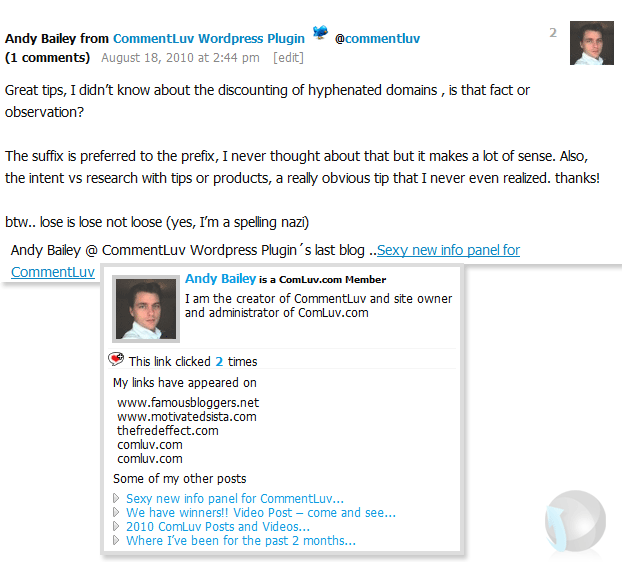
commentluv new version

Upgrade to the new version

I am looking forward to see more development and enhancements added to CommentLuv in the near coming future.

Note: if your panel is not as good looking, go to your commentluv settings page and click the ‘reset to default’ button. That will set it all up to look like the panel here

So, upgrade to the new version now, it will not take a few seconds, try it on your blog, and let me know how you find it!

Article by Hesham Zebida

I create websites, and I develop Thesis Skins. I am a social network lover. I am also the night creature who works hard to keep this project up. Owner and founder of FamousBloggers.net.

Write for us a guest post

{ 71 comments… read them below or add one }

Mohammed Suhaib May 28, 2011 at 4:29 am

Hey Guys,

Am facing a problem with Comluv. Every now and then it keeps saying too many accesses from this IP, please try after a minute. But it doesnt get rectified, the only way to rectify it is by resetting the modem. Dont know if its only me or others are also facing this problem? Any idea how to rectify it.

Reply

John October 12, 2010 at 7:32 am

The info box is cool it gives so much info. Now I have friends that are still on the fence about ComLuv what would you say are the main benefits from it.
John recently posted..Falling out of love with FoursquareMy Profile

Reply

Prasenjit
Twitter:
October 2, 2010 at 10:49 pm

The new CommentLuv panel shows lot of information about your commentator. It gives much exposure.

Thanks.
Prasenjit recently posted..Google Instant Search- Will it Help Internet Marketers-SEO expertsMy Profile

Reply

Karan Labra October 26, 2010 at 12:43 am

That is what comment luv is meant to be.
This plugin is just awesome.
Karan Labra recently posted..How to revive your old blogposts My Profile

Reply

Brian August 30, 2010 at 9:10 pm

Hey Hesham, one quick note I wanted to point out about CommentLuv that affects a very large amount of people. If you use CommentLuv along with FeedBurner, Feeburner will actually steel all the credit/link juice for the backlink. All you have to do to check is simply scroll over the link on your posted comment and see what shows up in the bottom left corner of your browser. If it shows a direct link back to your site then you are in the clear, but if it says …feedproxy.google.com… then Google is taking the benefits. It’s a simple one click solution in the FeedBurner settings, but it is automatically switched on by default and most don’t realize it.
Brian recently posted..How To- Anchor Text & Link StructureMy Profile

Reply

Joy from Coppell Houses August 26, 2010 at 12:34 pm

Hesham or all others,
I just installed comment luv a few days ago so I am assuming I have the newest version? Sorry for the newbie questions.

Reply

Hesham August 26, 2010 at 12:46 pm

Hey Joy, I have checked your blog, but I am not sure if you have the recent version or not!

Plz, hit the reset settings red button on your commentluv settings, and then check your blog to see if you have the new panel or not!

If not :) then simply get the new version from wordpress site, here is a link :
http://wordpress.org/extend/plugins/commentluv/

Just override the plugin, or remove it and install the new one and everything will be alright!

Reply

Bryan August 23, 2010 at 8:47 am

ok i know this is a very newbie question. why is it I can’t update my plugin, it says plugin installation failed. Should I delete the old one and then install the new one? I’m just thinking if all my stored dofollow links will disappear if i delete the old version… hmm..

Reply

Hesham August 23, 2010 at 1:05 pm

Your links is stored in the database, removing the plugin will not delete anything, it will all be back when you install the latest version!

Reply

bryan August 23, 2010 at 7:23 pm

thx for the reply hesham, glad that its stored in their database. will update it asap

Reply

Hesham August 26, 2010 at 12:48 pm

No problem, enjoy!

Reply

Hieu Martin August 21, 2010 at 3:44 am

Just upgrade and now i can see it worked with me very well
Hieu Martin recently posted..10 Tips to Increase Blog TrafficMy Profile

Reply

Hesham August 23, 2010 at 1:03 pm

Great, to enjoy the new look.. go to your commentluv settings page and click the ‘reset to default’ button. That will set it all up to look like the panel here.

Reply

Hieu Martin August 24, 2010 at 9:33 am

i have done it @ Hesham.
Thanks so much
Hieu Martin recently posted..Website Conversion TipsMy Profile

Reply

Hesham August 26, 2010 at 12:49 pm

Note that when you add my name after the “@” it automatically link to twitter account , and @ Hesham is not mine !

I had to edit your comment and add a space there ;)

So…. no worries.. I know you are talking to me lol

Reply

Hieu Martin August 26, 2010 at 8:14 pm

Thank for you note.
I will not add your name after @. now i know twitter id Hesham not you :) .Thanks for understand i’m talking with you without name :D
Hieu Martin recently posted..How to Use a Blog to Promote Your BusinessMy Profile

Reply

Ileane
Twitter:
August 20, 2010 at 5:07 pm

Hesham, everything is working fine now (I’m back at home). Hopefully Andy will chime in and give us his opinion.
Ileane recently posted..BloggerLuvMy Profile

Reply

Hesham August 23, 2010 at 1:02 pm

Great! Andy is a busy guy ;)

Reply

Ileane
Twitter:
August 20, 2010 at 1:09 pm

Hi Hesham,

I looking forward to upgrading to the new version.

FYI – there’s a little problem I’m having now where the CommentLuv feeds says Too many accesses for this IP. Please wait a minute. Here’s a screenshot. http://awesomescreenshot.com/095i78ec

I’ll come back later and let Andy know if this happens again.

Thanks.

Reply

Hesham August 20, 2010 at 4:44 pm

I am wondering if it’s your IP or mine or what :)

Let’s ask professor Andy!

Reply

Isabel Rodrigues
Twitter:
August 20, 2010 at 5:11 am

A welcome change. I have got the latest version for my blog. Thanks Hesham for the update.
Isabel Rodrigues recently posted..Should You Hire Someone To Write Your Blog For YouMy Profile

Reply

Hesham August 20, 2010 at 4:45 pm

You are welcome, enjoy!

Reply

Hieu Martin from Blog Tips August 24, 2010 at 9:38 am

Hi Isabel i can see you blog comment luv enabled.
Your blog is new and seen look nice. try the best for your blog ok

Reply

James August 19, 2010 at 4:01 pm

Hey Great looking updates . Glad to see commentluv is now available in the codex from Wordpress. Time to go update mine now.
James recently posted..Running a Blogs Means More Cash In Your PocketMy Profile

Reply

Hesham August 20, 2010 at 4:46 pm

I see you didn’t update yet! right?!

Reply

james Pruitt August 20, 2010 at 5:02 pm

Yeh, I got distracted when I logged into my blog, LOL.

Reply

Ian August 19, 2010 at 2:44 pm

I think that I’m going to be installing this plugin on my site. Been thinking about it for a little while now. Have you noticed any bugs with it? Reason why I ask is that it seems the plugin isn’t pulling in my latest post. Below you’ll see something about Viral Marketing as my last post but I’ve actually written another post since then.
Ian recently posted..Viral Marketing Strategies – Master Viral Marketer Reveals 3 Things You Need To KnowMy Profile

Reply

Hesham August 20, 2010 at 4:51 pm

The fastest way to solve this is to check your profile whither if it’s complete or not! then submit a support ticket at comLuv.com!

I never had a single problem with CommntLuv, we.. maybe once or something in 2 years! not bad at all :)

Reply

Julius August 19, 2010 at 2:21 pm

Nice. I really have to think about whether I should add comment luv to my blog. Everyone is only saying good things about it :)

Reply

Hesham August 19, 2010 at 2:27 pm

You even don’t have to follow what people says, give it a try by yourself ;)

Reply

DiTesco
Twitter:
August 20, 2010 at 4:34 pm

Great advice Hesham. Sometimes this is all what we should do. listening too much about what other people is good but can sometimes be confusing and misleading. Nothing better than giving it a go by yourself ;-)
DiTesco recently posted..Mobile SEO The Marketers New FrontierMy Profile

Reply

Hesham August 20, 2010 at 4:49 pm

Agree.. “Nothing better than giving it a go by yourself” !!

I think it’s something in Humans nature, the love to discover things by their own :)

Reply

Lennart Heleander from Property Marbella August 19, 2010 at 1:28 pm

Hi hesham,
Ok, it looks cool, I have to book a meeting tomorrow with my partner to do it, I will have to upgrade in a couple of days. Thanks Hesham.

Reply

Hesham August 19, 2010 at 2:28 pm

mmm.. sounds good!

Reply

Laura Davis August 19, 2010 at 12:23 pm

Looks great! Thanks Hesham!
Laura Davis recently posted..What You Didnt Know About Wall Street ReformMy Profile

Reply

Hesham August 19, 2010 at 12:41 pm

You are welcome Laura! thanks for stepping by today :)

Reply

Mike August 19, 2010 at 9:57 am

I just upgraded to the latest version, I think so I did not know what the old version look like :) Anyway, good to see that CommentLuv has made a design change and hope you guys will have some creative features in the future :)
Mike recently posted..May I take a look at what WordPress plug-ins you are usingMy Profile

Reply

Hesham August 19, 2010 at 11:09 am

lol! ok :) I hope you will enjoy commentluv!

Reply

Tia Peterson August 19, 2010 at 9:35 am

Hey Hesham – Very cool! I will have to upgrade now. That info panel is nice.
Tia Peterson recently posted..The Art of Embracing the Oops MomentsMy Profile

Reply

Hesham August 19, 2010 at 12:21 pm

Nice, enjoy Tia :)

Reply

Ching Ya August 19, 2010 at 3:58 am

Great that Element had brought up the question, I was checking through my plugin updates during half way of the article. Deleted/installed the new plugin. :) Great improvements, looking forward to upcoming release.

@wchingya
Social/Blogging Tracker
Ching Ya recently posted..How to Separate Facebook Personal Profile from Business Page pt1My Profile

Reply

Hesham August 19, 2010 at 12:43 pm

It’s wonderful day to day :) thank you for stepping by Ching Ya, glad to see the panel design fitting your blog!

Reply

Kevin August 19, 2010 at 1:45 am

now it looks clean. I have been using CommentLuv for a long time and their support is really good.
Kevin recently posted..Blog Contest by BLOG404 – Chance to Win Cash Prizes and MoreMy Profile

Reply

Hesham August 19, 2010 at 12:45 pm

Hi Kevin,

I just came from your blog!

Note: “if your panel is not as good looking, go to your commentluv settings page and click the ‘reset to default’ button. That will set it all up to look like the panel here on FB”

Reply

Kevin August 19, 2010 at 2:34 pm

hi, i tried but its not showing up new version.

Thanks
Kevin recently posted..15 Awesome Apple Inspired WallpapersMy Profile

Reply

Hesham August 19, 2010 at 2:37 pm

I am not sure why! but maybe clearing your cashe plugin?!

Reply

Kevin August 19, 2010 at 2:45 pm

I tried that too but with no success.. I think i need to contact them or reinstall the fresh one.
Kevin recently posted..15 Awesome Apple Inspired WallpapersMy Profile

Reply

Hung | JVPRIME
Twitter:
August 19, 2010 at 2:50 pm

It worked from my side
Hung | JVPRIME recently posted..Why you SHOULD become a member and use comment luvMy Profile

Reply

Hieu Martin August 20, 2010 at 4:37 am

@Hesham My blog have problem as you Kevin :(
Hieu Martin recently posted..The Copywriting Scorecard for Bloggers eBook ReviewMy Profile

Reply

Mani Viswanathan
Twitter:
August 18, 2010 at 11:04 pm

Even I’m thinking of adding CommentLuv to my blog. Hesham did you find any disadvantages from CommentLuv till now ?

The reason I’m asking this is, that I don’t want to remove once it’s added.
Mani Viswanathan recently posted..Add the Infolinks Related Tags to increase your CTR &amp earningsMy Profile

Reply

Hesham August 19, 2010 at 12:47 pm

I have been using CommentLuv for almost 2 years now! I am in love with it day after day!

You will not have to remove it, your readers will love it!

Reply

Mani Viswanathan
Twitter:
August 21, 2010 at 8:17 am

Thanks for the reply. I will add in the my very pretty soon :)
Mani Viswanathan recently posted..RapidShare makes a fool out of you when it says its offering free Premium AccountsMy Profile

Reply

Tinh
Twitter:
August 18, 2010 at 9:12 pm

Great news, I will have a look at this and see whether I should make an upgrade or not for @azblogtips
Tinh recently posted..5 Things You MUST Know Before Guest BloggingMy Profile

Reply

Hesham August 19, 2010 at 1:18 pm

Upgrade is always useful, and we have tested the plugin for over than a month!

Reply

Steve
Twitter:
August 18, 2010 at 9:04 pm

Thanks for the info. I will have to go update now!

Steve
Steve recently posted..Info Income Coaching Class Week 7My Profile

Reply

Hesham August 19, 2010 at 1:18 pm

You are welcome Steve, I think the new panel will look good on your blog!

Reply

element321
Twitter:
August 18, 2010 at 6:49 pm

I went to the update panel and it doesn’t say comluv has an update. Do I just need to delete the old comluv plugin and install the new one?

The new comluv looks great!
element321 recently posted..21 Killer Examples of Afro Samurai Fan ArtMy Profile

Reply

Hung | JVPRIME
Twitter:
August 18, 2010 at 6:54 pm

You’re right
That is what i have done.
I didn’t see the update button like you and the good choice is delete old one and re install new version
Hung | JVPRIME recently posted..Happy Birthday To Bim- My BoyMy Profile

Reply

Hesham August 18, 2010 at 6:56 pm

You can download it from wordpress.org : http://wordpress.org/extend/plugins/commentluv/

Reply

element321
Twitter:
August 18, 2010 at 6:59 pm

Thanks guys. Thats what I will do!
element321 recently posted..What is SEOMy Profile

Reply

AIDY
Twitter:
August 18, 2010 at 5:57 pm

The new ComLuv plug-in looks fab! Time for me to update my info!

Cheers,

AIDY
AIDY recently posted..the roadMy Profile

Reply

Hesham August 19, 2010 at 11:10 am

Enjoy Aidy! thanks for stepping by!

Reply

Hung | JVPRIME
Twitter:
August 18, 2010 at 5:44 pm

Just to know about this with setting in panel
Thanks
Hung | JVPRIME recently posted..Place Your Advertising On Thesis ThemeMy Profile

Reply

Hesham August 18, 2010 at 6:03 pm

The new panel design is included in the plugin, and you can pick a new badge from the settings!

Reply

Roger Williams August 18, 2010 at 5:40 pm

Cool stuff, I am looking forward to upgrading and diving further into Comment Luv. Sites that adopt this protocol are sites that I like.

Reply

Hesham August 18, 2010 at 6:02 pm

Enjoy Roger!

Reply

Ana | Traffic Generation Cafe
Twitter:
August 18, 2010 at 5:33 pm

Sounds like some great additions; I am off to get my updrade!

Thanks for the heads-up, Hesham

Best,
Ana Hoffman
Ana | Traffic Generation Cafe recently posted..New Tweet Button- The Good- The Bad- The UglyMy Profile

Reply

Hesham August 18, 2010 at 5:35 pm

Let us know how you find the new panel Ana! thanks a lot!

Reply

Hung | JVPRIME
Twitter:
August 18, 2010 at 6:43 pm

Just upgrade but i found that the panel is not beautiful as yours.
Hung | JVPRIME recently posted..Happy Birthday To Bim- My BoyMy Profile

Reply

Andy Bailey
Twitter:
August 19, 2010 at 3:02 am

if your panel is not as good looking, go to your commentluv settings page and click the ‘reset to default’ button. That will set it all up to look like the panel here.
Andy Bailey recently posted..What to do if commentluv is not showing the latest postMy Profile

Reply

Hung | JVPRIME
Twitter:
August 19, 2010 at 7:49 am

Awesome!
I have done this.It worked.
Hung | JVPRIME recently posted..Why you SHOULD become a member and use comment luvMy Profile

Reply

Leave a Comment

  Twitter (ID only. No links or "@" symbols)

CommentLuv badge

This blog uses premium CommentLuv which allows you to put your keywords with your name if you have had 3 approved comments. Use your real name and then @ your keywords (maximum of 3)

{ 2 trackbacks }