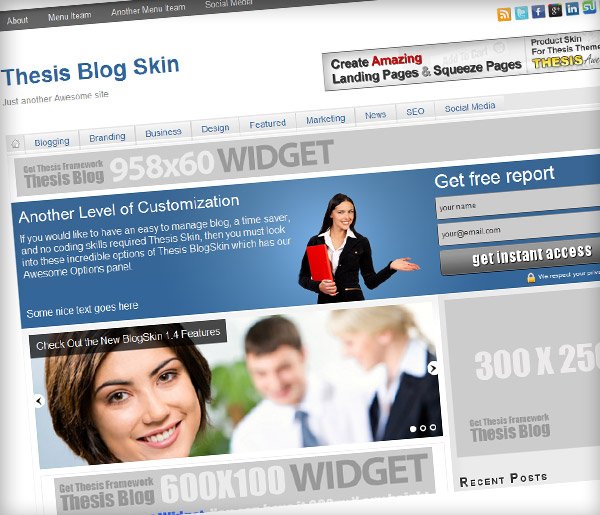
I’ve introduced the BlogSkin for Thesis Theme back in 31st of Dec 2010 with a simple to use option page with a promise to put more development into it, and this is exactly what happened in the last 8 months of the life of this skin, it went through many development phases, and the whole options page has been changed to match the Thesis Theme options page, but it ads a cool features to it.
[box type="yellow"]Today I am pronouncing the new BlogSkin 1.4 as the best release I’ve ever made so far.[/box]
I consider the BlogSkin my best selling product so far, therefore I don’t save any time working on it to enhance its features and make it a better product by responding to member’s feedback, yes I listen to all what they have to say, and realize their needs, then I try to find a simple way to solve the problem.
Of course, I don’t have a solution for everything and I can not add all features that I’ve been asked for, but I do that only for reasonable feature requests that will add value to everyone who use the skin on their blogs.
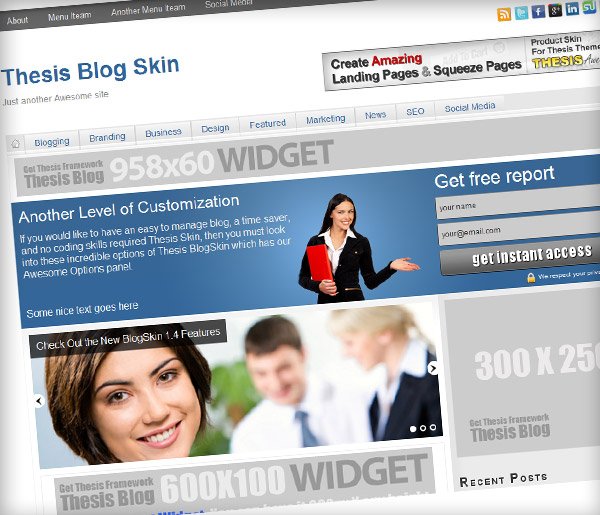
A highlight of the most important changes and features I’ve added to the BlogSkin 1.4
You can see it live on the Thesis BlogSkin Demo site.
1- Integrating Aweber using their API
The BlogSkin was actually having an integration for Aweber, but I didn’t like the way it works because it was not using Aweber API the right way, so I’ve changed the whole code and did a better integration. Plus adding the ability to customize the optin form to display name/email fields or only email field for your blog visitors with only one click, which was not possible in the last version.
2- Integrating MailChimp
I’ve got 10s of request to integrate MailChimp into the BlogSkin, so I finally decided to add it to skin, I’ve used the MailcChimp API to do the integration and it works great. You can also decide whither to grab name/emails of only emails of your subscribers.
Note: I had this integration into the beta 1.5 version, but in a different way, it’s still beta though, and won’t be released as final version yet, read below to know why!
3- New Slideshow with New sliding features
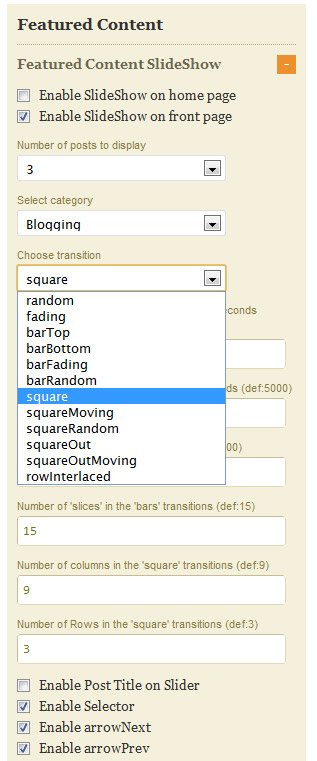
I am so exciting to tell you about the new Slideshow I’ve used in the skin, it’s called DDSlider and it has 12 Transitions and of course has inline content support. The idea here is to make use of all transactions and other cool features of the slider, check out this featured content panel (this is how it looks inside the skin options page):
I’ve got the extended licence of the DDSlider for $50, which allows me to code it and distribute it as part of the BlogSkin.
By the way, the DDSlider cost $10 if you wanna get its code and integrate it into your blog. If you are not into coding, then the I recommend using the DDSlider Plugin for WordPress which is easy to use, and it works with any theme.
4- A Second Custom Menu has been added
Many times I’ve been asked how to add links to pages on the top of the blog, not in the navigation menu, and we was doing it manually by editing the custom_functions.php file and then we have to add some CSS classes in the custom.css file to make it look good.
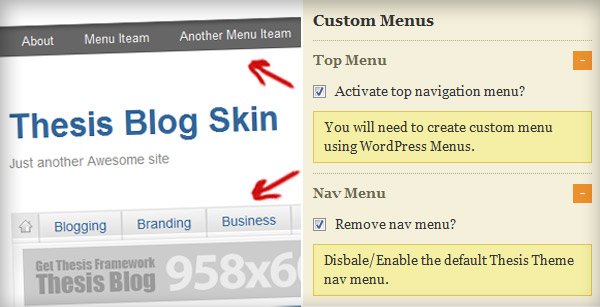
Now, and to end this coding stuff that most of us don’t want to do, I’ve added a new custom menu to the BlogSkin (Top Nav Menu) that you can customize easily using the WordPress menus system.
The cool thing about it is that you can use both menus on the blog, or remove any of them it’s up to you.
5- Simple integration for CommentLuv Premium
The TwitterLink plugin is now part of the new CommentLuv Premium, and because I work closely with Andy (the creator of the plugin) as a beta testee of the new CommentLuv, I’ve had the chance to integrate this featuer into the BlogSkin and make it automatically indicate that you are using CommentLuv Premium and adds the TwitterLink field in the Thesis comments box for you without you having to do anything. Thanks to Andy for the great help.
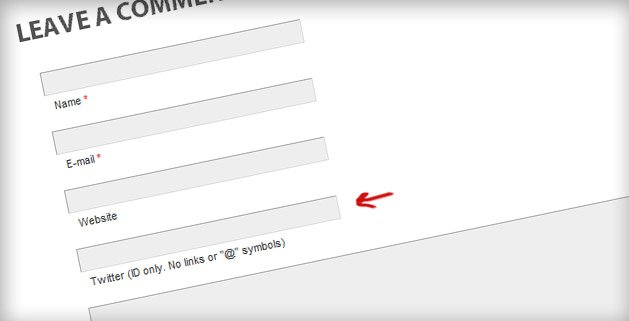
So, If you are using the BlogSkin, you can simply tick the Do not add a field. I will do it manually” checkbox in the TwitterLink options page, and get red of the blue box below your comments box.
6- Enhanced author info box, author archive page and added rel=”author”
First, I’ve started with adding new fields to the profile account, for example: Google+ URL. Then I recorded the author info box and the customized archive page of the BlogSkin to display Google+link and added the authorship markup rel=”author” to that link as recommend by Google.

This will provide more information about your guest bloggers and authors, so they are required to fill their profile account with Google+ URL to let Google know that they are the authors, so then Google can display their images next to the posts in the search results pages. Thanks to Ileane or BasicBlogTips.com to point me out to this and being quite supportive.
[box type="info"]Note: I’ve done this already to FamousBloggers.net author box and profile account, so please if you guest post on FB, it’s great to update your profile and add your Google+ URL.[/box]
There are many other changes. Read the full list of changes here.
[box type="spacer"] [/box]
What about the BlogSkin Beta 1.5
This release was and still a beta, it integrates 5 Auto Responder services into the optin form:
But, I can not pronounce it as a working version because I am still not getting enough feedback. I know that there is a few internet marketers using it, and they are actually using services like IContant and GetREspond successfully.
However, I don’t recommend using the BlogSkin 1.5 Beta on a live blog until it becomes a final release, or you hear me say so
But.. In case you want to test it out, please do let me know how things works for you, I really need your feedback to get things done better.
Alright, that’s all for today
I hope all ThesisAwesome.com members will be happy with the new release of the BlogSkin, and till we meet again in another update.
If you are using Thesis Themes on your blogs, and you would like to promote my skins so we can earn money together, then here is a link to join my affiliate program.
Enjoy!




jin January 25, 2012 at 1:50 am
Hi Hesham,
I have some trouble with my thesis blogskin.i know it is so stupid question but i don’t know about.
1.How i can change title stop box. My tittle stopbox is: “We recomended”. I want to change it.
2.How i find Facebook Page url and custom feed url and email feed url
3.I don’t understand success page in opt-in form. I think my getresponder has had “confirm page” and “thank you page”
4.I don’t know how to use Twitter@Anywhere. I have enabled Twitter@anywhere in Edit Blogskin but nothing happend.
5.You can give me code html to add stopbox look like this:
Thesis Theme(get my affiliate link) is the best theme…(text).
I know nothing html.
Finally, I hope you will answer me.
I looking forward to hearing from you
Thank you so much.
Hesham Zebida January 25, 2012 at 3:01 am
Wow.. I don’t give support in comments, only at the forum.
See you there!
Ileane September 17, 2011 at 5:27 am
Hesham, I’m so very pleased with the Thesis Awesome BlogSkin and how it has improved my blog.
I would have been totally lost trying to customize Thesis Theme without this wonderful BlogSkin. Now that you have added these new features I’m just blown away.
My favorites updates are the ones you did for the author bio box. This is a great benefit to me and all of the guest posters on my blog. To tell you the truth, I was pulling my hair out trying to figure out how to add rel=author and testing different plugins to do the job. Just when I was at my wits end, I found out that you added this to the bio box and I wanted to send you a big virtual hug and kiss!
You gave these skins the right name – AWESOME! And so are you
Thank you for everything.
Ileane recently posted..Quick Lessons in Live Blogging
Hesham September 17, 2011 at 3:34 pm
Wow.. Thank Ileane, it’s really great to read your comment this morning
There are some other stuff I am working on, something related to thumbs and post images, I feel the problem, and I am on the way to find the solution!
Ileane September 19, 2011 at 3:21 pm
Hesham, That sounds like it will solve a big problem for me, so I really appreciate you for taking a look at those thumbnails.
Ileane recently posted..Why I’m Not Installing Livefyre on Basic Blog Tips
Hesham September 19, 2011 at 5:13 pm
The part of teaser images is ready, but I need add that to the related posts images as well.
Let’s see if I can make it ready this week.
Carsten September 16, 2011 at 4:44 am
Hi Hesham,
did you plan, to publish your active Famous Bloggers Thesis Skin to Thesis Awesome?
I ask, because i like it and i need a similar theme for a new blog.
Hesham September 17, 2011 at 5:14 am
Not any time soon, it’s made for FamousBloggers.net only… Sorry!
Music Diva September 15, 2011 at 5:13 pm
Hello Hesham!
I use Thesis and for my new site I’m going to buy your new skin ‘Thesis Blogskin”.. I tell you this because I have a logistics question.
I want to do something similar to what you have in your Nav bar on this site. For example, you have a category ‘SEO.’ Then the drop-down menu has seo/ Traffic, seo/Linkbuilding and the Google has dif cat.
Actually I don’t need to get quite that complex. Here’s what I want:
Category
-drop down child categories (I think they’re child categories)
When pp click on one of the child categories, they’ll see a page like famousbloggers.net/category/seo/link-building-seo where I’ll have multiple posts.
So, my question: Is this easily attainable or does my programmer have to do something?
thx, dee

Music Diva recently posted..Ballet Austin The Nutcracker ~ Long Center Dec 3-23
Hesham September 15, 2011 at 11:55 pm
Hi Dee,
Yes, this is pretty how WordPress custom menus works!
mmm.. maybe watch this video, it will give you some idea!
Music Diva September 16, 2011 at 1:57 pm
I’ll give video to my guy.. I don’t know how to set up.. I was just wondering what the components where? Like in your (lower) top bar do you have Categories, sub-cats, and posts for the drop down menu? Or a dif combination?
Maybe I made the question more complicated than necessary..
dee
Hesham September 16, 2011 at 4:09 pm
Not so sure what you mean, but I don’t have any “auto generated” combination, you can customize the menus exactly the way you want it to be.
I prefer pages on the ‘top’ nav, then categories on the one below it.
I hope this makes sense
Dean Brooks September 15, 2011 at 4:02 pm
great skin!
Michael from AndroidApps September 15, 2011 at 11:35 am
This theme looks amazing. I like the cool colors and the way it suits my eye while reading the content. I need to get it for my next blog launch. Thank you for sharing this awesome post and the benefits to enjoy.
Michael recently posted..Android Security And Top Antivirus Apps
Hesham September 17, 2011 at 5:15 am
Glad you like it!
mitz September 14, 2011 at 9:06 pm
Hi Hesham
I have a few questions???
1. Does the above theme allow for a 728×90 anywhere? Can it fit where the 468 banner is?
2. Is your affiliate program giving recurring commissions? So if a person you refer signs up for another year?
mitz recently posted..9 SEO Tips to Dominate Google Search Reslults
Hesham September 14, 2011 at 10:11 pm
Hi Mitz,
Sure…
1- The BlogSkin has a footer widget especially for the 728×90 banner, so it work for the footer, but with a little customization you can make that size fit in the 468×60 in the header, but then you must use a smaller logo to fit! (I can help with this)
2- When you buy individual skin, there is no requiring payment, this goes only for the membership which cost $120 for personal and $260 for developer options (yearly), then aff commission is not recurring though, only for the first payment.
However, this is not what I wanted to be, I am studding the whole case (pricing, commissions) expect things to change soon!
mitz September 15, 2011 at 6:35 am
Thanks for your reply
Your themes are awesome! That is so cheap! I will go and buy it in a few days..
I would also love to know if you get recurring commissions. I sell a lot of theme related stuff and yours is a no brainer!
mitz recently posted..9 SEO Tips to Dominate Google Search Results
Hesham September 15, 2011 at 7:05 am
I am planning to move to the affiliate to shareasale soon, I will put the recurring commissions in mind.
Thanks Mitz
James September 14, 2011 at 9:06 am
Yeh, I have a membership plugin already set up, I just need the design to make the site more professional looking, and a lot easier to navigate. Plus, my attempts at creating a custom sales page template didn’t do so well. Not being a coding type of person, its really mind numbing to try and figure something out when it doesn’t work right the first time.
Your themes are amazing, and I cant wait. Should be getting it whithin the next week.
Thanks Hesham you are doing awesome work.
James recently posted..The Top 3 Traffic Tactics You NEED
Hesham September 14, 2011 at 4:27 pm
James, email me
Faissal Alhaithami from fans bridge September 14, 2011 at 4:41 am
WOW new awesome updates!! well done hesham
I feel like so lucky to use this Great thesis skin!!
so now! how can i update my skin?? thanks!
Faissal Alhaithami recently posted..best 6 free facebook iFrame tab apps with fan gate feature
Hesham September 14, 2011 at 4:25 pm
Hey Faissal ,
Download the skin files from your account, then read the PDF included in the download package, I’ve explained the process of upgrading in it,
You will mostly need to backup there two files then replace them again after upgrade:
- custom_function.php
- custom.css
Boston Diva September 13, 2011 at 10:04 pm
Well, since my questions got ‘lost in the mail’..
let me try and reconstruct the questions here in case others might have same ones.
1) Can one or both of the top navigation bars have pages/child pages or Categories?
2) Can the 958×60 widget be deleted and if so, I assume the optin will shift up?
3) Can side 300×250 widget be moved down?
4) Can Slider and Top of Content widget be removed? and if so, is it as simple as clicking or not clicking a box?
Thanks, Dee
Boston Diva recently posted..Steely Dan ~ Boston Citi Performing Arts Center October 1
Hesham September 13, 2011 at 10:17 pm
Alright, no problem…. let me answer those:
1) Yes, because it uses the WordPress Menu system, so both menus can have items/sub-items to any link on your blog or even an external link. (you will create a new menu in WP menus and customize it the way you want).
2) You can enable/disable any of the custom widgets, so answer is yes, and you are right the optin will shift up right below the main nav menu.
3) Actually this is not a custom widget, I used a simple text widget to add a banner image to it, so yes.. it can be moved down. (basically it doesn’t exist in the setup, I use this in the demo to show you the size of banner that can be used).
4) Yes with a simple of a click (actually there is a check box to enable/disable the slideshow), and same for all custom widgets.
I hope this helps.
Boston Diva September 14, 2011 at 7:42 am
Thanks for detailed reply and I will order this week. Very excited about this Thesis theme because it has everything I’m looking for.
Hey, any chance you can put up a ‘Showcase’ like Thesis does where we can submit our sites and potential buyers can see live sites with your fab skins??
dee

Boston Diva recently posted..Steely Dan ~ Boston Citi Performing Arts Center October 1
Hesham September 14, 2011 at 4:22 pm
Showcases is made for unique customized skins, I mean someone who customize and change the way the skin looks like, so basically it should be different than the default look
However, I have a slider for testimonials on the front page of the site, it would be nice to get one from you and credit your site.
Boston Diva September 13, 2011 at 9:46 pm
I sent several questions through your contact form this morning in reference to this Theme.
Did you receive them?
thanks, Dee

Boston Diva recently posted..Steely Dan ~ Boston Citi Performing Arts Center October 1
Hesham September 13, 2011 at 9:51 pm
Hi Dee, no I haven’t got your emails for some reason, please email me directly to hesham.zebida at gmail.
Boston Diva September 13, 2011 at 10:08 pm
Hesham.. I posted the questions in the comments here but forgot to say that I’m asking about the ‘Thesis Blog Skin’
thx, dee
Boston Diva recently posted..Steely Dan ~ Boston Citi Performing Arts Center October 1
Hesham September 13, 2011 at 10:18 pm
No worries, I go it -:)
James September 13, 2011 at 9:11 pm
Question on your themes Hesham.. Do they come with unlimited usage? I have 5 blogs, and am looking at getting the product/silver theme combo for my membership sites. does that allow me to use it on multiple sites, or is it only for one site?
James recently posted..The Top 3 Traffic Tactics You NEED
Hesham September 13, 2011 at 9:34 pm
Hi James,
I don’t restrict the use of all of my skins, I don’t charge extra to remove copyright footer message!
So, the answer is your question is there is no limitation of use, and yes it’s unlimited usage license.
FYI: The Product skin can be used to create sales pages and now it support PayPal, it doesn’t provide any membership features, so you will need another system to play the membership part, I just want to make sure you got this point.