Check out ThesisAwesome.com and get $20 OFF Product Skin Thesis Skins
Best Blogroll WordPress Plugin to Control the Dofollow and Nofollow

Best Blogroll WordPress Plugin to Control the Dofollow and Nofollow

by on June 16, 2010 · 37 comments

Have you ever dreamed to control Dofollow and NoFollow attribute on your Blogroll without having to touch the core of your WordPress blog?

Chris Guthrie actually came up with the right solution for Bloggers who wants to award their friends, sponsors or even advertisers by giving them a powerful DoFollow link from their blog homepages!

Dofollow and nofollow are actually backlinks, both ways are fine, but the difference here is that Google will not pass link juice if you are using rel=”nofollow” which you can not control without a plugins or some hard coding, and not all people like to do that.

Provide more valuable link value to your partners

So, what if you want to provide more valuable link value to your partners or advertisers?!

Away from anything, and generally specking I love to control everything, or at least have the option to control it, now with the best blogroll plugin I simply can set blogroll to dofollow when it’s shown only on the home page of my blog, and at the same time set the plugin to not pass the juice from other articles or pages that has no value or power as the main page has.

Best Blogroll Plugin for WordPress
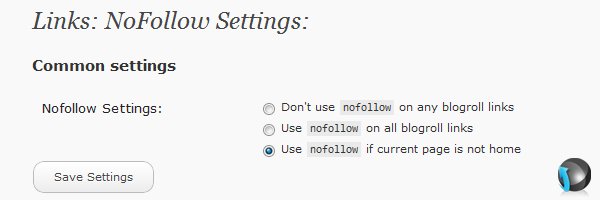
best blogroll plugin options

I have received a copy of the plugin yesterday and made some test for it on one of my new blogs as I don’t like to write about something without giving a personal ride. I like the idea and I am going to use it on that particular blog to pass link juice to some of my other blogs and sites by adding links to it’s blogroll!

As Chris said on his post about the best blogroll plugin, he is not SEO expert, I am not one of those SEOs as well, but we are trying our best to optimize our sites for search engines, and because most SEO experts recommend linking from powerful pages, that was the idea of creating the best blogroll plugin!

Using DoFollow links on your home page will give more control over the value of your blogroll links and more power to blogs or site you are linking to.

Dowload the best blogroll plugin

If you have a blogroll or planning to have one, Dowload the best blogroll plugin, give it a try and tell us what you think about it, it’s actually making a lot of sense to me, but I hope that someone who knows more about SEO could give an opinion about the new plugin! Any thoughts?!


Article by Hesham Zebida

I create websites, and I develop Thesis Skins. I am a social network lover. I am also the night creature who works hard to keep this project up. Owner and founder of FamousBloggers.net.

Write for us a guest post

{ 35 comments… read them below or add one }

friv June 25, 2011 at 7:22 pm

ctually not required to answer ….
This is the plugin is actually really helpful and very useful for webmasters of all, sharing your blog and share our link is worth thousands of gratitude! Keep up the good work! WoW will always be part of the 10 best online game of me!

Reply

Rae March 29, 2011 at 7:59 am

The plug ins really look effective. looking forward to use this one. thanks for sharing this post.

Reply

Udegbunam Chukwudi
Twitter:
June 27, 2010 at 2:56 pm

Great plug-in. Installed it on my site last week and though I was skeptical @ first, I’m now loving the concept of dofollow on home page, nofollow on other pages ;-)
Udegbunam Chukwudi recently posted..How To Sell A Blogger Blogspot Blog Without HasslesMy Profile

Reply

Hesham June 27, 2010 at 3:49 pm

I actually like the idea and the concept of the plugin and how it works, so this is why I am using it on one of my new blogs!

Thanks Udegbunam for your feedback!

Reply

Colleen June 18, 2010 at 11:28 pm

I’m all ears, but what plugin are you using for comments? I’ll look at the blogroll plugin you have recommended Hesham.
Colleen recently posted..June Network Tri Cities Luncheon: The State of Higher EducationMy Profile

Reply

Hesham June 27, 2010 at 3:47 pm

mmmm… I hope I can help with that! I am using the “No Follow” plugin, I set it to remove the “nofollow” after 10 comments!

Reply

Colleen June 27, 2010 at 6:57 pm

Thank Hesham. I use Lucia’sLinkLove and when upgrading to WP 3.0 I thought I would make sure my plugins were compatible. Lucia’sLinkLove hasn’t had an update in a very long time, so I thought it best to switch to another comment plugin that has the same toggle for number of comments before the nofollow is removed. Thanks for the recommendation.
Colleen recently posted..Hue Estates Kennewick Homes For SaleMy Profile

Reply

Nasrul Hanis
Twitter:
June 18, 2010 at 8:44 am

This is easier than activating/deactivating the dofollow plugin. Great! Hope to see more useful plugins later on.

Reply

Hesham June 27, 2010 at 3:44 pm

That’s right Nasrul!

Oh! by the way, I got your email, I just didn’t have a chance to reply to you yet, I will do! also feel free buddy, it’s absolutely fine with me! and there is some awesome news on the way I want to share with you!

Email you soon!

Reply

Ileane
Twitter:
June 17, 2010 at 7:54 pm

Hi Hesham, Do you know if this plugin will still be necessary with if the blogger upgrades to the new WordPress 3.0? I know they have a lot of options coming out that will eliminate the need for some plugins, but I’m not sure about this one.

Thank you!
Ileane recently posted..Introducing WordPress 3.0 (via WordPress.tv)My Profile

Reply

Nile June 17, 2010 at 10:12 pm

I know this was a question for Hesham, but I really did not feel a need for this plugin because you can already do a lot of this in your WordPress admin panel. Go play around with it. :D

I will talk to Matt and send a request through trac to see if we can add the field to be able to change the widget name when dragging over the widget to whatever sidebar. :D

I left some directions in another comment on this post on how to use the dofollow using the options WordPress already gives and how you can make multiple instances with by creating categories and selecting the link to show in that list.
Nile recently posted..Determining What Your Site Visitors Are Looking ForMy Profile

Reply

Hesham June 17, 2010 at 10:57 pm

I have emailed Chris because I am not sure if it will work with WP 3.0 or not! I asked him to visit the post hopefully he will have time to do it soon!

Reply

Chris Guthrie June 17, 2010 at 11:30 pm

I upgraded to Wordpress 3.0 earlier today and all of my plugins work just fine (including this one I had developed) so feel free to use it.

Thanks again for sharing with your readers Hesham :)
Chris Guthrie recently posted..How I got my first 1,000 subscribersMy Profile

Reply

Hesham June 17, 2010 at 11:46 pm

You are welcome Chris , and thank you for stepping by and the fast respond

Reply

Ileane
Twitter:
June 18, 2010 at 7:47 am

Thanks for your answers everyone.
Hesham, where does the blogroll appear on this blog? I think I’m missing it.
Ileane recently posted..Readability for ChromeMy Profile

Reply

Hesham June 18, 2010 at 1:09 pm

I don’t have a blogroll here on FamousBloggers because if I have one then it will be a huge list :) and I don’t want to have a a problem with anyone who is not on the list :)

I prefer to have the sidebar links to articles not to other blogs! because I promote articles written by bloggers not the blog of the author!

Reply

Gautam Hans June 17, 2010 at 1:57 pm

Looks like a great pick and I will take a look at it.

Actually I prefer linking to people who have a little online presence because google can penalize you for linking to bad sites
Gautam Hans recently posted..Innovative Things I Learned With Guest Blogging ContestsMy Profile

Reply

Dennis Edell June 17, 2010 at 1:37 pm

I don’t use a blog roll, but it is a handy plugin.

I’m a little confused. The blogroll was inherently do follow from the jump, when did someone change it to no follow?
Dennis Edell recently posted..6 Blogs – 6 Blog Themes. All the Same or All Different? It’s a Branding Issue…My Profile

Reply

Chris Guthrie June 17, 2010 at 11:31 pm

It never changed to no follow. What the plugin does is allow your Blogroll links to be do follow on the home page and no follow on every other page.

Every SEO agrees site wide links are less powerful than a single link. So this provides the benefit to the people you’re linking to and is worth asking them to install as well.
Chris Guthrie recently posted..How I got my first 1,000 subscribersMy Profile

Reply

Dennis Edell June 18, 2010 at 4:02 pm

Ah OK, it just manipulates the do follow that’s already there; makes sense.
Dennis Edell recently posted..Comment Replies – Do You Even Notice?My Profile

Reply

Eric June 17, 2010 at 12:11 pm

I have deleted blogroll from my blog too, maybe it’s time get back ? :-)
I feel this plugin really MUST HAVE. will test it at weekend.
Thank you Hesham

Reply

Kimi June 17, 2010 at 9:22 am

That sounds indeed very useful Plugin to control dofollow and nofollow since i learnt alot about “bad links” and the good useful links. I have just deleted my blog roll that i got from forum link exchange stuff because i realise those links werent relevant to my site :(
Kimi recently posted..Wordpress- Set up all in one seo pack configuration tutorialMy Profile

Reply

Asad June 17, 2010 at 6:46 am

Hesham,i am confused about one thing.Don’t you think that comluv plugin also pass link juice to other blogs from internal pages which are not so powerful.If you are not using this plugin and passing link juice to 3 to 4 advertisers from internal pages,then how it can be destructive.
Asad recently posted..Top 10 Amazing Girly Blogger TemplatesMy Profile

Reply

Chris Guthrie June 17, 2010 at 11:33 pm

I don’t understand the question. This isn’t to be confused as a replacement for ComLuv. Use this in addition to it as it only applies to your blogroll links.
Chris Guthrie recently posted..How I got my first 1,000 subscribersMy Profile

Reply

Hesham June 17, 2010 at 11:45 pm

CommentLuv links is links in the comment section, as Chris said is has nothing to do with the blogroll plugin!

Reply

SEO Company June 17, 2010 at 3:55 am

Nice tips for blogroll links, spaially want to say thanks Chris for sharing best blogroll plugin…great post.
SEO Company recently posted..Enjoy the Advantages of Application HostingMy Profile

Reply

Nile June 17, 2010 at 3:44 am

I received an email about this and had a discussion about it with Chris. WordPress by default allows you to specify with the XFN the rel… where you can put nofollow in with each individual link.

You can also categorize your blogroll links. If you want a different blogroll to appear on another page, you can do so. The links widget in WordPress allows for multiple instances. So you can use either the same set of links on another page template, or a different.
Nile recently posted..Finding The Right Site For Guest BloggingMy Profile

Reply

Dennis Edell June 17, 2010 at 1:35 pm

I wish there was a way to rename that widget, instead of always being “blogroll”.
Dennis Edell recently posted..6 Blogs – 6 Blog Themes. All the Same or All Different? It’s a Branding Issue…My Profile

Reply

Hesham June 17, 2010 at 10:55 pm

I am sure that there is more than one way to do it, but the thing is not all people knows how! so.. some bloggers will find this plugin ideal especially if they don’t have enough time or knowledge!

Thanks you for the awesome addition!

Reply

Nabeel from Create Your First Website June 17, 2010 at 2:44 am

Looks cool. I am not an SEO expert either, so waiting to read some more experienced thoughts..

Nabeel

P.S.Typo in article:

Away from anything, and generally specking (speaking) I love to control everything,

Reply

Murlu
Twitter:
June 16, 2010 at 10:16 pm

I don’t use a blogroll currently but it does look like a great plugin.

That’s a concern I hear from a lot of people, if you’re placing a blogroll in the sidebar that shows up on each page, you could be leaking quite a bit of PR.
Murlu recently posted..How To Edit Videos With Youtube Video EditorMy Profile

Reply

Hesham June 16, 2010 at 10:38 pm

That’s right Murlu, and this plugin will give you control over the leak ;)

Reply

element321
Twitter:
June 16, 2010 at 11:22 pm

Murlu,

Thats was also my concern, having a large blog roll can also be ugly as well. I thought about setting it up a blog roll as page so the blog roll is only seen when the visitor clicks on the link.
element321 recently posted..Does Your Site have an Error 404 File Not Found Page?My Profile

Reply

element321
Twitter:
June 16, 2010 at 8:17 pm

The plugin looks good. I do not have a blog roll yet. But I am about to start one. Over the install and the setup was easy. I will have to test out once I get a blog roll setup.
element321 recently posted..Famous Bloggers Largest Guest Blogging Contest! Cash Rewards Totalling Over $3000My Profile

Reply

Hesham June 16, 2010 at 8:33 pm

The plugin is actually working good, it does exactly what it’s created for! enjoy ;)

Reply

Leave a Comment

  Twitter (ID only. No links or "@" symbols)

CommentLuv badge

This blog uses premium CommentLuv which allows you to put your keywords with your name if you have had 3 approved comments. Use your real name and then @ your keywords (maximum of 3)

{ 2 trackbacks }